POWERED BY
58
SERIESSERIES
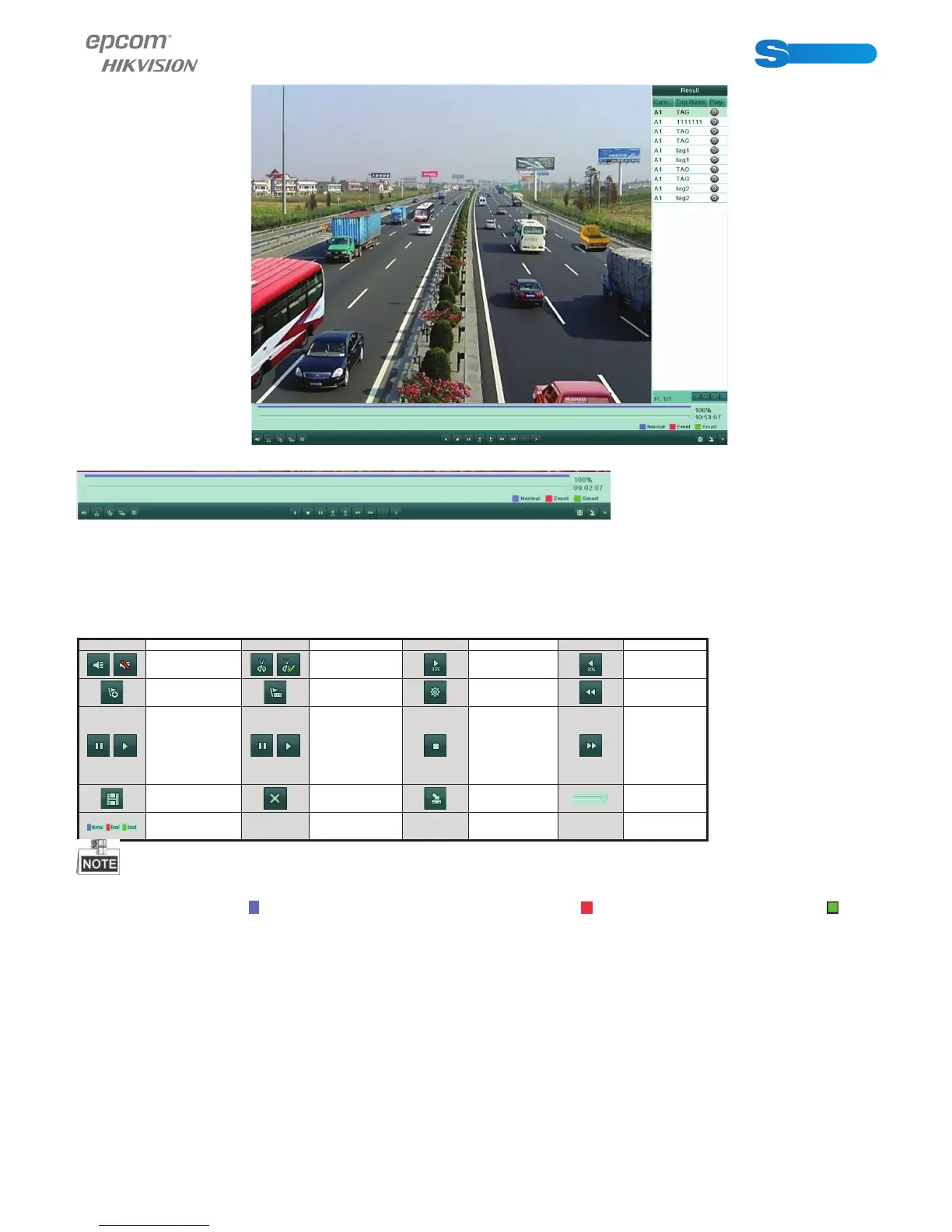
Figure 6.25 Interface of Playback by Tag with Video List
Figure 6.25 Interface of Playback by Tag with Video List
Figure 6.26 Toolbar of Playback by Tag
Table 6.5 Detailed Explanation of Playback-by-tag Toolbar
Button Operation Button Operation Button Operation Button Operation
/
Audio on/
Mute
/
Start/Stop
clipping
30s forward 30s reverse
Add default
tag
Add custo-
mized tag
Tag manage-
ment
Slow
forward
/
Pause reverse
play/Re-
verse play/
Single-frame
reverse play
/
Pause play/
Play/Sin-
gle-frame
play
Stop
Fast
forward
Video search Exit Hide
Progress
bar
Video type
bar
Playback progress bar: use the mouse to click any point of the progress bar or drag the progress bar to locate special frames.
About video type bar: represents normal recording (manual or schedule); represents event recording (motion); repre-
sents smart search recording.
6.1.6 Playing Back by System Log
Purpose:
Play back record fi le(s) associated with channels after searching system logs.
Steps:
1. Enter Log Search interface.
Menu>Maintenance>Log Information



 To Next Page