EB-E01 series Disassembly and Assembly INTERNAL USE ONLY
SEIKO EPSON 87 Revision A
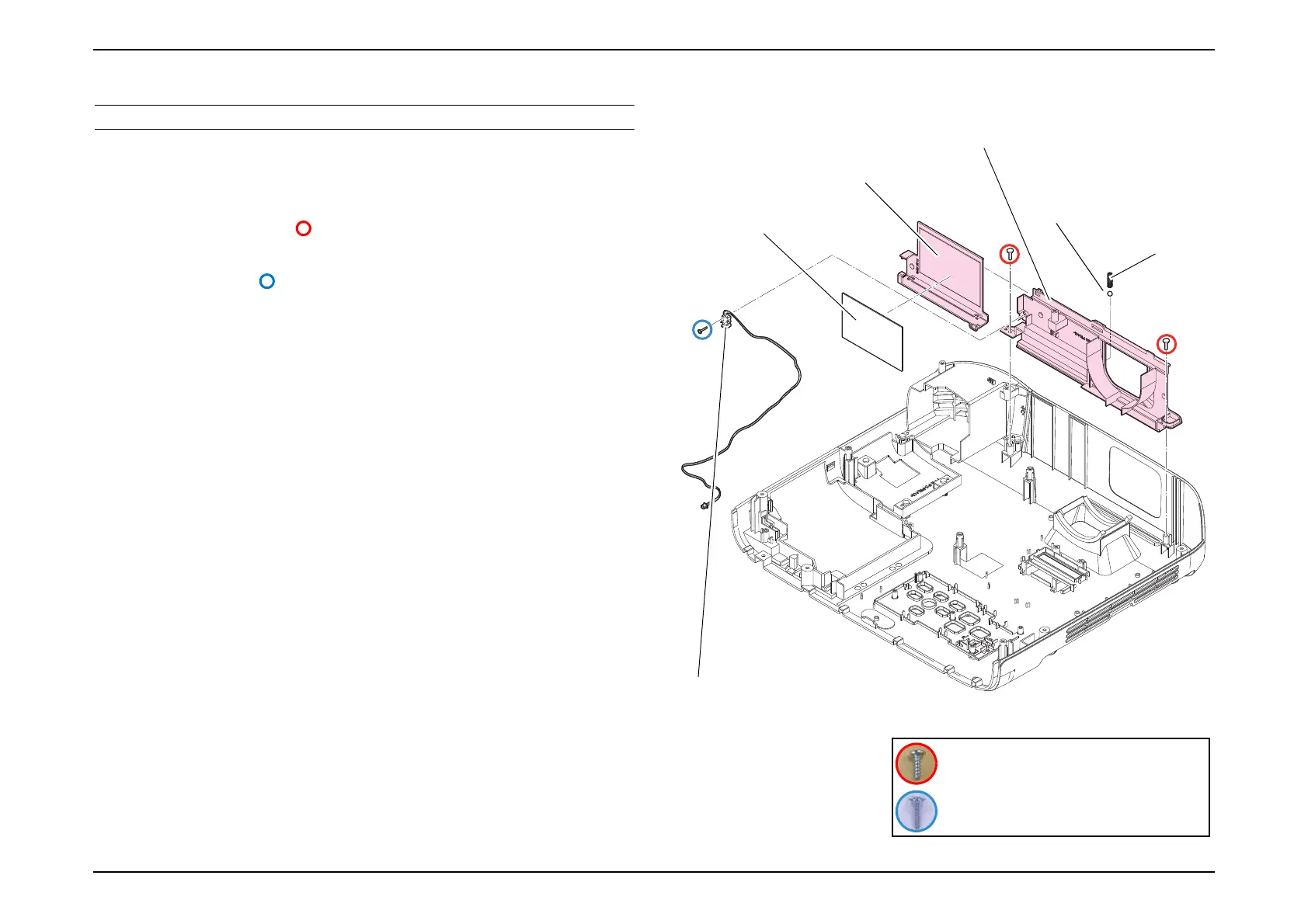
3.3.6.3 Shutter
DISASSEMBLY PROCEDURE
1. See Flowchart (p70) and remove all parts up to the component below from
the projector.
Upper Case (Assy) (p80)
2. Remove the two screws ( ) and remove the "Shutter (Assy)".
(The following procedure does not apply to EB-E01/E10.)
3. Remove the screw ( ) and remove the "Switch Cable H721-A".
4. Remove the following parts:
Shutter frame
Shutter ball
Shutter Spring
Lens Shutter
Shutter Lens Sheet
Shutter frame
Lens Shutter
Switch Cable H721-A
Shutter Spring
Shutter ball
Shutter Lens Sheet
C.P.F.TYPE1 P-TITE SCREW,1.6X8,F/ZN-3C
C.B.P-TITE SCREW,2.5X8,F/ZN-3C



 To Next Page