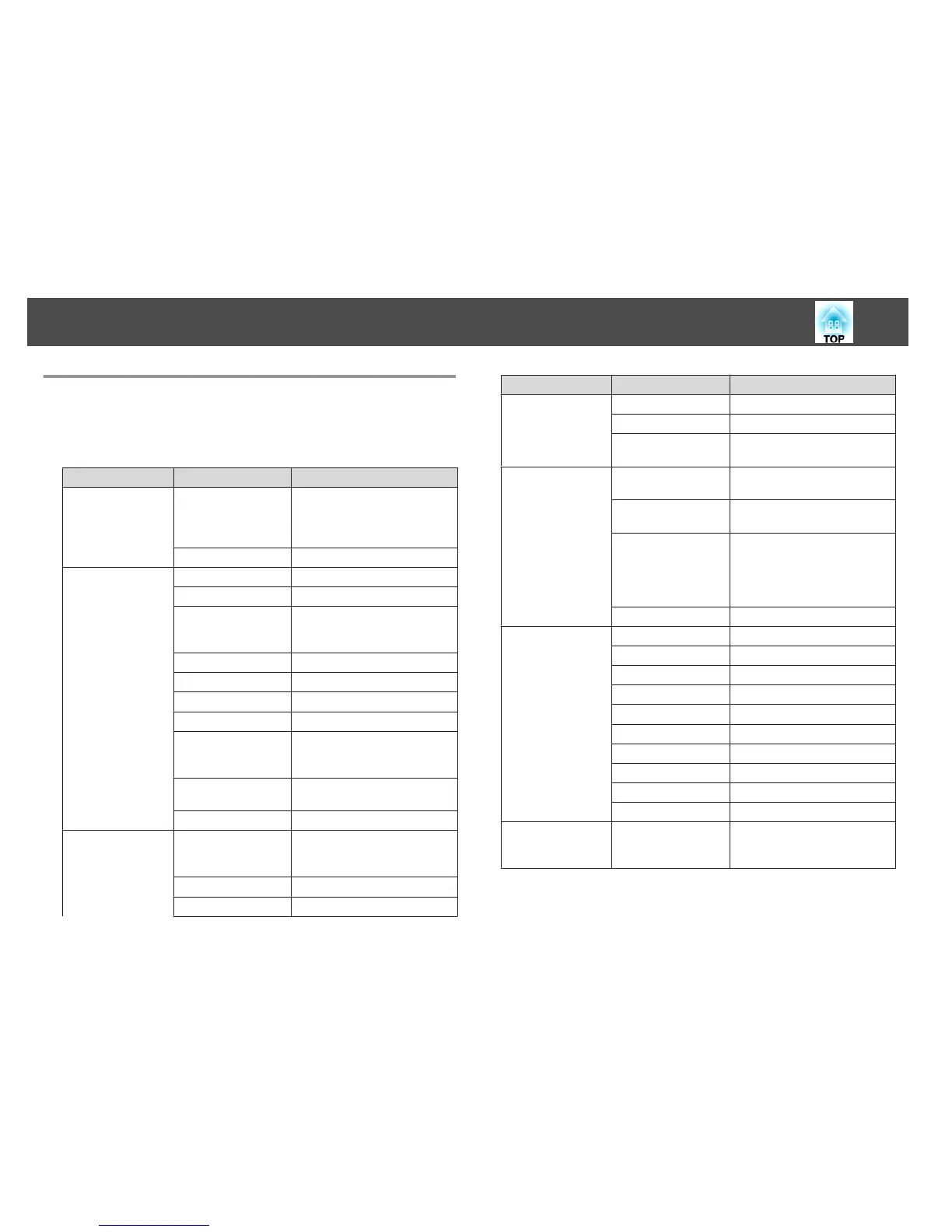
Configuration Menu Table
Apply the set items or values to the commander and the receiver.
Settable items vary depending on the model being used and the image
signal and source being projected.
Top Menu Name Submenu Name Items or Setting Values
Image menu
s p.58
Color Mode Dynamic, Presentation, Theatre,
Photo, Sports, sRGB, Blackboard,
Whiteboard, 3D Presentation,
and 3D Theatre
Auto Iris On and Off
Signal menu
s p.58
Auto Setup On and Off
Resolution Auto, Wide, and Normal
3D Setup 3D Display, 3D Format, Inverse
3D Image, and 3D Viewing
Notice
Progressive Off, Video, and Film/Auto
Noise Reduction Off, NR1, and NR2
HDMI Video Range Auto, Normal, and Expanded
Input Signal Auto, RGB, and Component
Video Signal Auto, NTSC, NTSC4.43, PAL,
M-PAL, N-PAL, PAL60, and
SECAM
Aspect Normal, Auto, 16:9, Full, Zoom,
and Native
Overscan Auto, Off, 4%, and 8%
Settings menu
s p.60
Adjust Commander
Pos.
Pattern Color (Commander),
Pattern Color (Receiver), and
Start Adjustments
Control Panel Lock Full Lock, Partial Lock, and Off
Power Consumption Normal and ECO
Top Menu Name Submenu Name Items or Setting Values
Volume 0 to 10
Remote Receiver Front/Rear, Front, Rear, and Off
User Button Power Consumption, Info,
Progressive, and Resolution
Extended menu
s p.61
Display Messages, Display Background,
Startup Screen, and A/V Mute
Projection Front, Front/Ceiling, Rear, and
Rear/Ceiling
Operation Direct Power On, Sleep Mode,
Sleep Mode Timer, Lens Cover
Timer, High Altitude Mode,
Monitor Out Port, and Stack
Mode
Language 15 or 35 languages
*1
Info menu
s p.62
Lamp Hours -
Source -
Input Signal -
Resolution -
Video Signal -
Refresh Rate -
3D Format -
Sync Info -
Status -
Serial Number -
Reset menu
s p.63
Reset Lamp Hours Reset Lamp Hours
(Commander) and Reset Lamp
Hours (Receiver)
*
The number of supported languages differs depending on the region where the
projectors are used.
List of Functions
57


 To Next Page