Home
Epson
Printer
EPL-6200
Page 177
Epson EPL-6200 - Page 177
513 pages
Manual
Save Page as PDF
To Next Page
To Next Page
To Previous Page
To Previous Page
Loading...
160
Using the Printer Dr
iver For Macintosh
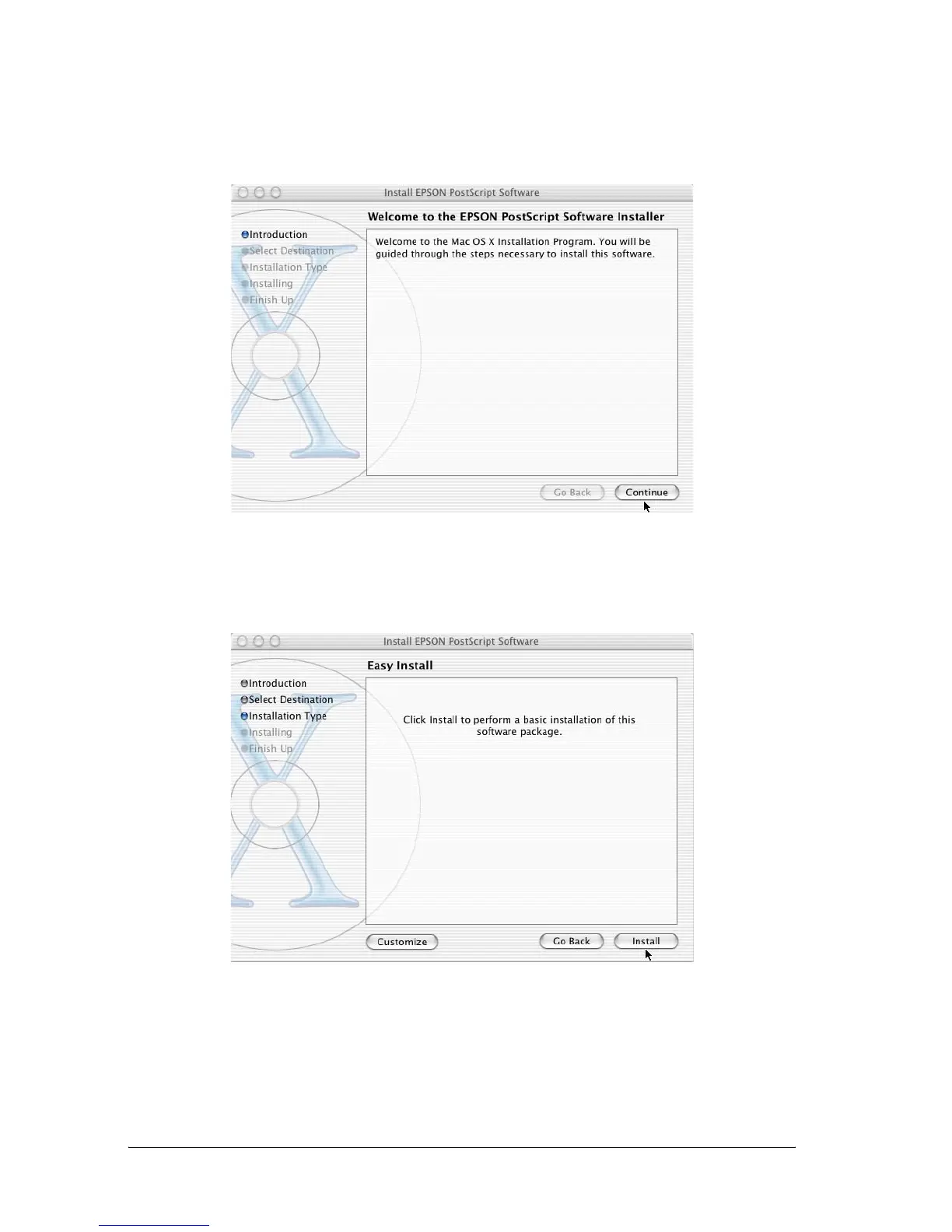
5.
In the welcome screen that appears, click
Continue
, and
follow the on-screen instructions.
6.
When the following screen appears, click
Install
.
7.
When installation is done, click
Close
.
176
178
Table of Contents
Main Page
Default Chapter
1
Where to Find Information
1
Laser Printer
2
Table of Contents
4
Monitoring Your Printer with Epson Status Monitor
5
Using Appletalk under Windows 2000 or Windows Nt
7
Installing the 500-Sheet Lower Paper Cassette Unit a
8
Safety Information
12
Warnings, Cautions, and Notes
12
Safety Precautions
12
Important Safety Instructions
16
Power On/Off Cautions
17
Product Information
18
Chapter 1 Product Information
19
Printer Parts
19
Control Panel
21
Indicator Lights
21
(Epl-6200)
22
Buttons (EPL-6200 Only)
23
Options and Consumable Products
23
(Epl-6200L)
23
(EPL-6200 Only)
24
Options (EPL-6200 Only)
24
Consumable Products
25
Features at a Glance
26
Adobe Postscript 3 (EPL-6200 Only)
26
Resolution Improvement Technology and Enhanced Microgray Technology (EPL-6200 Only)
26
Technology (EPL-6200 Only)
26
Toner Save Mode
26
Duplex Printing (EPL-6200 Only)
27
Fit-To-Page Printing
27
Printing Multiple Pages on a Sheet
27
Watermark Printing
27
Overlay Printing (EPL-6200 Only)
28
High-Quality Printing
28
Chapter 2 Paper Handling
30
Paper Sources
31
MP Tray
31
Paper Handling
31
500-Sheet Lower Paper Cassette Unit A4 (EPL-6200 Only)
32
Manual Feed Slot (EPL-6200 Only)
32
Loading Paper
32
MP Tray
33
500-Sheet Lower Paper Cassette Unit A4 (EPL-6200 Only)
38
Manual Feed Slot (EPL-6200 Only)
43
Loading a Custom Paper Size
45
Printing on Special Media
46
Labels
46
Envelopes
46
Thick Paper
48
Transparencies
48
Chapter 3 Using the Printer Driver for Windows
50
About the Printer Software
51
System Requirements
51
Installing the Printer Software
51
Installing the Printer Driver
51
Installing the EPSON Status Monitor 3 (EPL-6200 Only)
52
Installing the Postscript Printer Driver (EPL-6200 Only)
54
Using the Printer Driver
64
Accessing the Printer Driver
65
Printer Driver Settings
66
During Printing
67
Accessing the Postscript Printer Driver (EPL-6200 Only)
81
Postscript Printer Driver Settings (EPL-6200 Only)
81
Using Online Help
110
Monitoring Your Printer with EPSON Status Monitor 3
110
About EPSON Status Monitor 3
110
Accessing the EPSON Status Monitor 3
111
Getting Printer Status Details
113
Using the Job Management Function
115
Setting Monitoring Preferences
117
Status Alert Window
121
Stopping Monitoring
122
Selecting Printers to be Monitored (EPL-6200 Only)
123
Setting for the USB Connection
123
Canceling Printing
125
From the Control Panel (EPL-6200 Only)
125
From the Computer
125
Uninstalling Printer Software
127
Uninstalling the Printer Driver and EPSON Status Monitor
127
Chapter 4 Using the Printer Driver for Macintosh
135
About the Printer Software
135
System Requirements
135
Using the Printer Driver for Macintosh
135
Mac os 8.6 to 9.X Users
136
Installing the Printer Driver
136
Selecting the Printer Driver
136
Printer Driver Settings
137
Installing the Postscript Printer Driver (EPL-6200 Only)
147
Selecting the Postscript Printer Driver
150
Postscript Printer Driver Settings
153
Using Online Help
165
Mac os X Users
166
Installing the Printer Driver
166
Selecting the Printer Driver
166
Printer Driver Settings
175
Installing the Postscript Printer Driver (EPL-6200 Only)
176
Selecting the Postscript Printer
178
Changing the Printer Setup Settings
189
Postscript Printer Driver Settings
189
Monitoring Your Printer with EPSON Status Monitor 3
196
About the EPSON Status Monitor 3
196
Accessing the EPSON Status Monitor 3
196
Getting Printer Status Details
197
Setting Monitoring Preferences
200
Status Alert Window
201
Setting for a USB Connection
201
Canceling Printing
204
From the Control Panel (EPL-6200 Only)
204
From the Computer
205
Uninstalling Printer Software
205
Mac os 8.6 to 9.X Users
205
Mac os X Users
206
Chapter 5 Setting up Your Printer on a Network (EPL-6200)
209
For Windows
209
Sharing the Printer
209
Setting up Your Printer as a Shared Printer
210
Using an Additional Driver
212
Setting up a Clients
219
Installing the Printer Driver from the CD-ROM
227
Using Appletalk under Windows 2000 or Windows NT 4.0211
228
For Macintosh
229
Sharing the Printer
229
Setting up Your Printer as a Shared Printer
229
Accessing the Shared Printer
231
For Mac os X
233
Chapter 6 Setting up Your Printer on a Network (EPL-6200L
234
For Windows
235
Sharing the Printer
235
Setting up Your Printer as a Shared Printer
236
Using an Additional Driver
238
Setting up a Clients
245
Installing the Printer Driver from the CD-ROM
252
Using Appletalk under Windows 2000 or Windows NT 4.0237
254
For Macintosh
254
Sharing the Printer
254
Setting up Your Printer as a Shared Printer
255
Accessing the Shared Printer
256
For Mac os X
258
Chapter 7 Using the Remote Control Panel Utility (EPL-6200 Only
260
For DOS
261
Remote Control Panel Utility Overview
261
Making Printer Settings
266
Choosing Printer Emulation
279
Other Special Settings
280
Printing Font Samples
289
For Macintosh Users
289
Remote Control Panel Utility Overview
289
Making Printer Settings
293
Resetting the Photoconductor Counter
298
Chapter 8 Installing and Removing Options (EPL-6200 Only
300
500-Sheet Lower Paper Cassette Unit A4
301
Installing the 500-Sheet Lower Paper Cassette Unit A4
301
Installing and Removing Options
301
Duplex Unit
305
Installing the Duplex Unit
305
Removing the Duplex Unit
312
Removing the 500-Sheet Lower Paper Cassette Unit A4
305
Memory Module
312
Installing a Memory Module
313
Removing a Memory Module
317
Interface Cards
317
Installing an Interface Card
317
Removing an Interface Card
320
Chapter 9 Replacing Consumable Products
322
Precautions During Replacement
323
Developer Cartridge
323
Replacing the Developer Cartridge
325
Photoconductor Unit
331
Chapter 10 Cleaning and Transporting the Printer
338
Cleaning the Printer
339
Cleaning the Printer Case
339
Cleaning the Inside of the Printer
339
Cleaning and Transporting the Printer
339
Cleaning the Paper Path Rollers
343
Removing Spilled Toner
346
Transporting the Printer
346
Chapter 11 Troubleshooting
350
Status and Error Lights (EPL-6200 Only)
351
Troubleshooting
351
Ready and Error Lights (EPL-6200L Only)
368
Printing a Status Sheet
379
Epl-6200
379
Epl-6200L
379
Clearing Jammed Paper
380
Precautions for Clearing Jammed Paper
381
Preventing Paper Feed and Paper Jam Problems
381
Paper Jam - Inside the Printer
382
Paper Jam - Output Cover
385
Paper Jam - MP Tray (EPL-6200 Only)
387
Paper Jam - MP Tray (EPL-6200L Only)
390
Paper Jam - Duplex Unit (EPL-6200 Only)
392
Paper Jam - Manual Feed Slot (EPL-6200 Only)
396
Paper Jam - 500-Sheet Lower Paper Cassette Unit A4
399
Only)
399
Operational Problems
403
Printout Problems
404
Print Quality Problems
406
Memory Problems
410
Paper Handling Problems
411
Problems Printing in the Postscript 3 Mode (EPL-6200 Only)
412
Windows Users
412
Macintosh Users
422
Font and Image Problems
425
Problems Using Options (EPL-6200 Only)
427
Appendix A Technical Specifications
430
Paper
431
Available Paper Types
431
General Paper
432
Specifications
434
Printable Area
435
Printer
436
General
436
Environmental
437
Standards and Approvals
437
Mechanical
438
Electrical
439
Postscript
440
Interfaces
441
Parallel Interface
441
USB Interface
442
Options and Consumables
442
500-Sheet Lower Paper Cassette Unit A4 (C12C802042)
442
(EPL-6200 Only)
442
Duplex Unit (C12C802051) (EPL-6200 Only)
443
Memory Module (EPL-6200 Only)
443
Developer Cartridge (S050166)
444
Developer Cartridge (S050167)
444
Photoconductor Unit (S051099)
445
Appendix B Symbol Sets (EPL-6200 Only)
446
Introduction to Symbol Sets
447
In the LJ4 Emulation Mode
447
International Character Sets for ISO
451
In the ESC/P 2 or FX Modes
452
International Character Sets
454
Characters Available with the ESC
455
In the I239X Emulation Mode
455
In the EPSON GL/ 2 Mode
456
Appendix C Working with Fonts
458
Available Fonts
459
LJ4/GL2 Mode
459
ESC/P 2 and FX Modes
461
I239X Mode
462
PS 3 Mode (EPL-6200 Only)
463
Printing Font Samples
463
Adding more Fonts
463
For Windows Users
464
For Macintosh Users
464
Selecting Fonts
466
Downloading Fonts
466
EPSON Font Manager (Windows Only)
466
System Requirements
467
Installing the EPSON Font Manager
467
EPSON Barcode Fonts (Windows Only)
469
System Requirements
471
Installing EPSON Barcode Fonts
471
Printing with EPSON Barcode Fonts
473
Barcode Font Specifications
477
Appendix D Contacting Customer Support
490
For Users in Latin America
491
For Users in Australia
492
For Users in Singapore
493
For Users in Thailand
494
For Users in Indonesia
495
For Users in Hong Kong
495
For Users in Malaysia
496
For Users in India
497
For Users in the Philippines
498
Appendix E Samples
500
Postscript Font Samples
501
Glossary
504
Other manuals for Epson EPL-6200
Service Manual
204 pages
Network Guide
180 pages
Setup Guide
12 pages
Setup
2 pages
Specifications
2 pages
Related product manuals
Epson EPL-6200L
204 pages
Epson EPL-5500
145 pages
Epson EPL-7500
244 pages
Epson EPL-7000
330 pages
Epson EPL-N3000
477 pages
Epson EPL-N4000
306 pages
Epson EP-4004
73 pages
Epson ET-2400
221 pages
Epson ET-3850
283 pages
Epson ET-4550
288 pages
Epson ET-4800
318 pages
Epson ET-5880
4 pages



 To Next Page