117
Troubleshooting
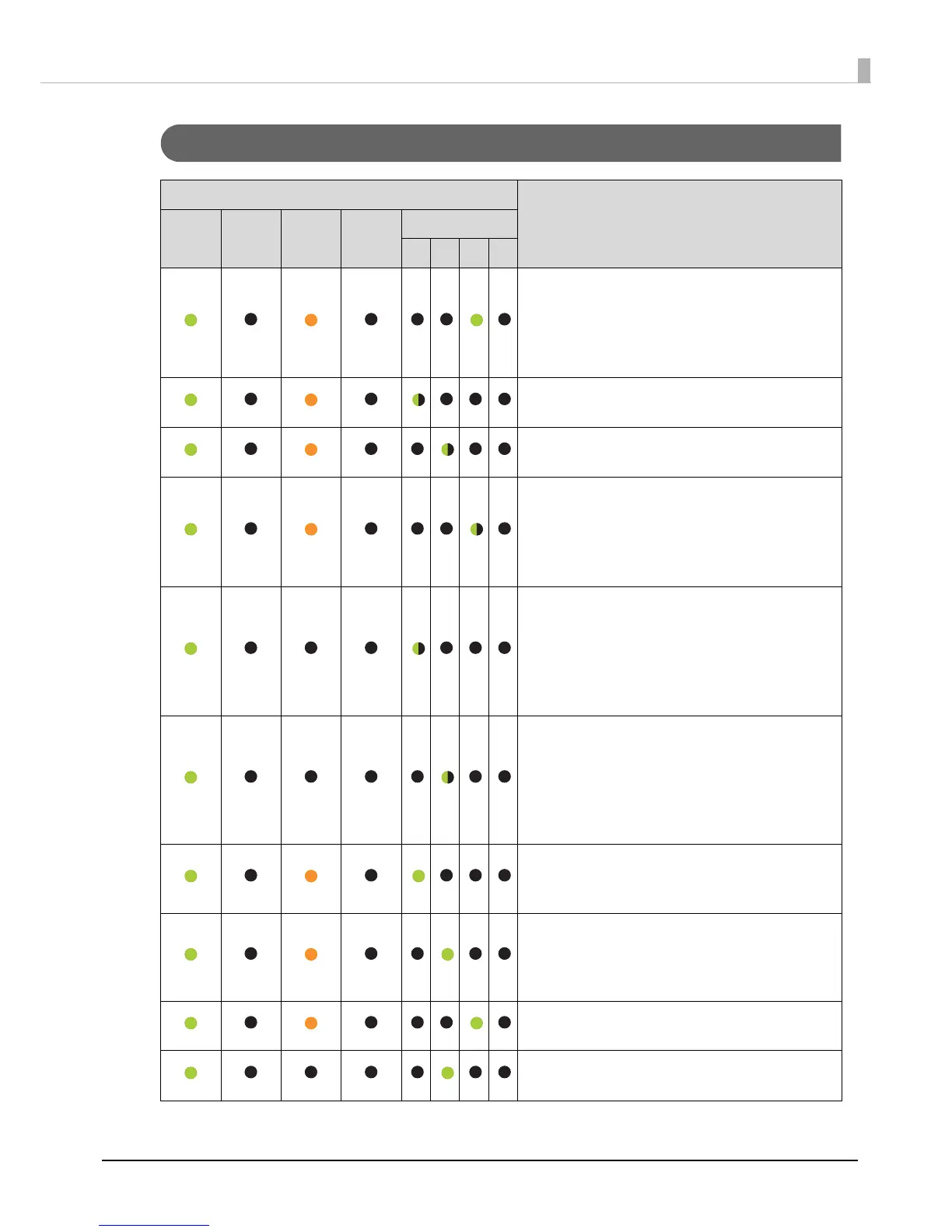
Error Associated with Stacker
Lights
Conditions/Remedies
Power BUSY ERROR INK
STACKER
1 2 3 4
Only for PP-100II/PP-100/PP-100AP
Stacker 3 is inserted for Standard mode or
External Output mode (when Stacker 4 is set as
the output stacker).
Remove Stacker 3.
Stacker 1 is not correctly inserted.
Insert Stacker 1 correctly.
Stacker 2 is not correctly inserted.
Insert Stacker 2 correctly.
Only for PP-100II/PP-100/PP-100AP
Stacker 3 is not correctly inserted for External
Output mode (when Stacker 3 is set as the
output stacker) or Batch mode.
Insert Stacker 3 correctly.
Stacker 1 is empty.
Load discs into Stacker 1.
Note: The Stacker 1 light flashes when it is empty;
however. the beginning of the light flashing may
not match the exact time that the stacker
becomes empty.
Stacker 2 (set as the input stacker) is empty.
Load discs into Stacker 2.
Note: The Stacker 2 light flashes when it is empty;
however. the beginning of the light flashing may
not match the exact time that the stacker
becomes empty.
Stacker 1 is overloaded.
Remove discs so that discs are below the red
line on the stacker.
Stacker 2 (set as the input stacker) is
overloaded.
Remove discs so that discs are below the red
line on the stacker.
Stacker 3 is overloaded.
Remove all the discs from Stacker 3.
Stacker 2 (set as the output stacker) is full.
Remove published discs from Stacker 2.



 To Next Page