PAGE 39
FIREBALL INSTALLATION & USER’S GUIDE - M22001-01A1
CHAPTER 2 - SETTING UP FIREBALL
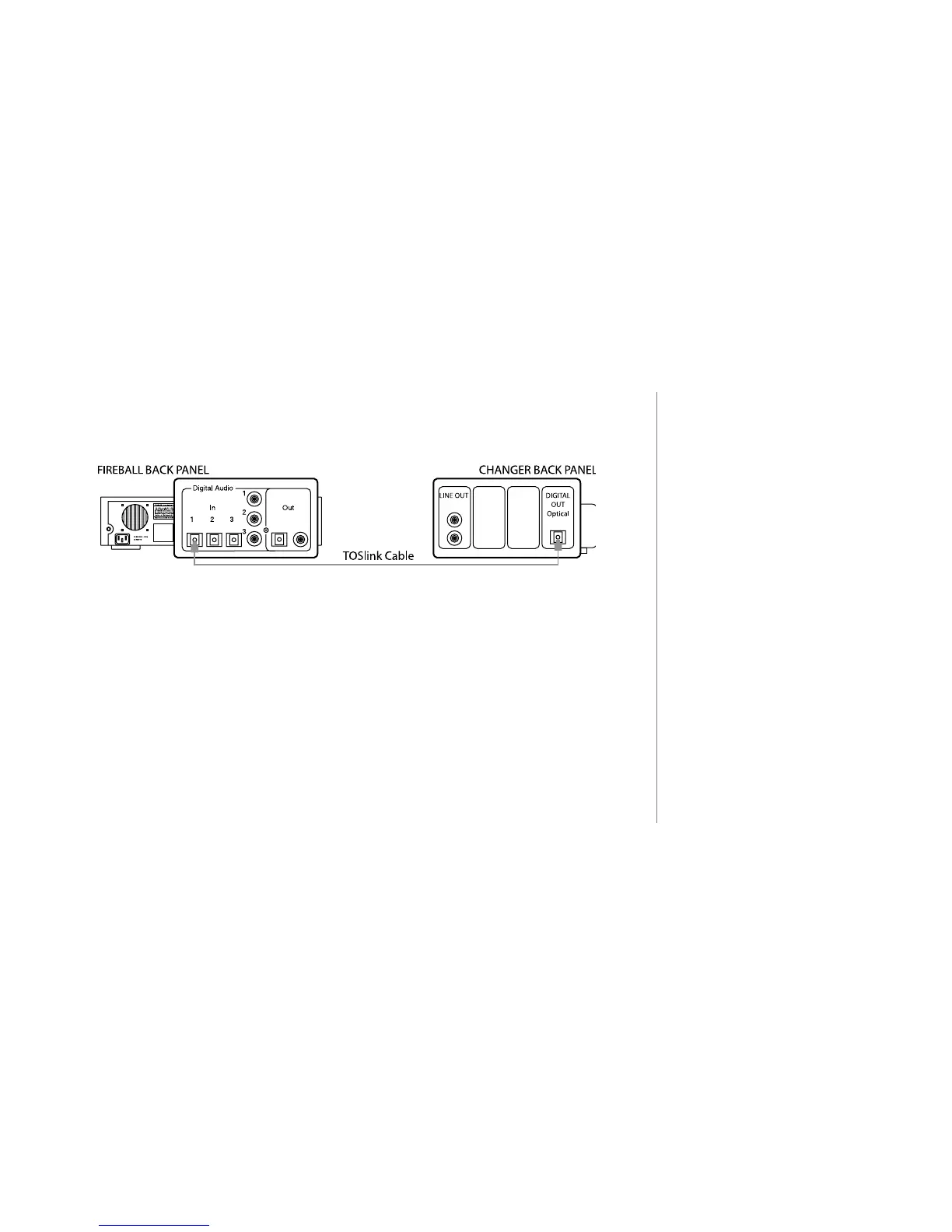
Connecting Digital Audio
u Use a Fiber Optic Cable or a Digital Coax Cable (not supplied).
v Insert one end of the cable into the FireBall Digital Coax or Optical Input Port.
w Insert the other end of the cable into the Digital Output port on your changer.
x To connect additional CD changers, repeat steps 1 through 3 using the additional
FireBall digital audio ports provided.
y Connect audio from each CD Changer to FireBall. Just be sure to connect a
similar type audio input port on FireBall to an audio output port on the changer.
Connecting Devices Using the IR Input
u Insert an appropriate IR cable that will connect to the 1/8” mini connector on the
back of the FireBall Unit.
v Insert the other end of the IR cable into the IR out port on your device.
2
The Kenwood and Pioneer DVD
changers have both Digital Coax
Out and TOSLink ports and could
be connected through either type
of cabling.
2
Sony changers must have matching
S-Link and Optical Digital Audio
ports. For example: the rst Sony
changer must use S-Link port 1
and Optical Digital port 1. The
second Sony changer must use
S-Link port 2 and Optical Digital
port 2, etc...



 To Next Page