The Harmonizer
®
Programmer’s Manual
© 1999-2008 Eventide, Inc. Page 37 of 97 Release 1.3
Parameter Adjusters
“Parameter adjuster” modules have a single
control output and a userobject output. If
connected to a menupage module, a
“parameter adjuster” will show up on the menu
page in the PARAMETER area as a parameter.
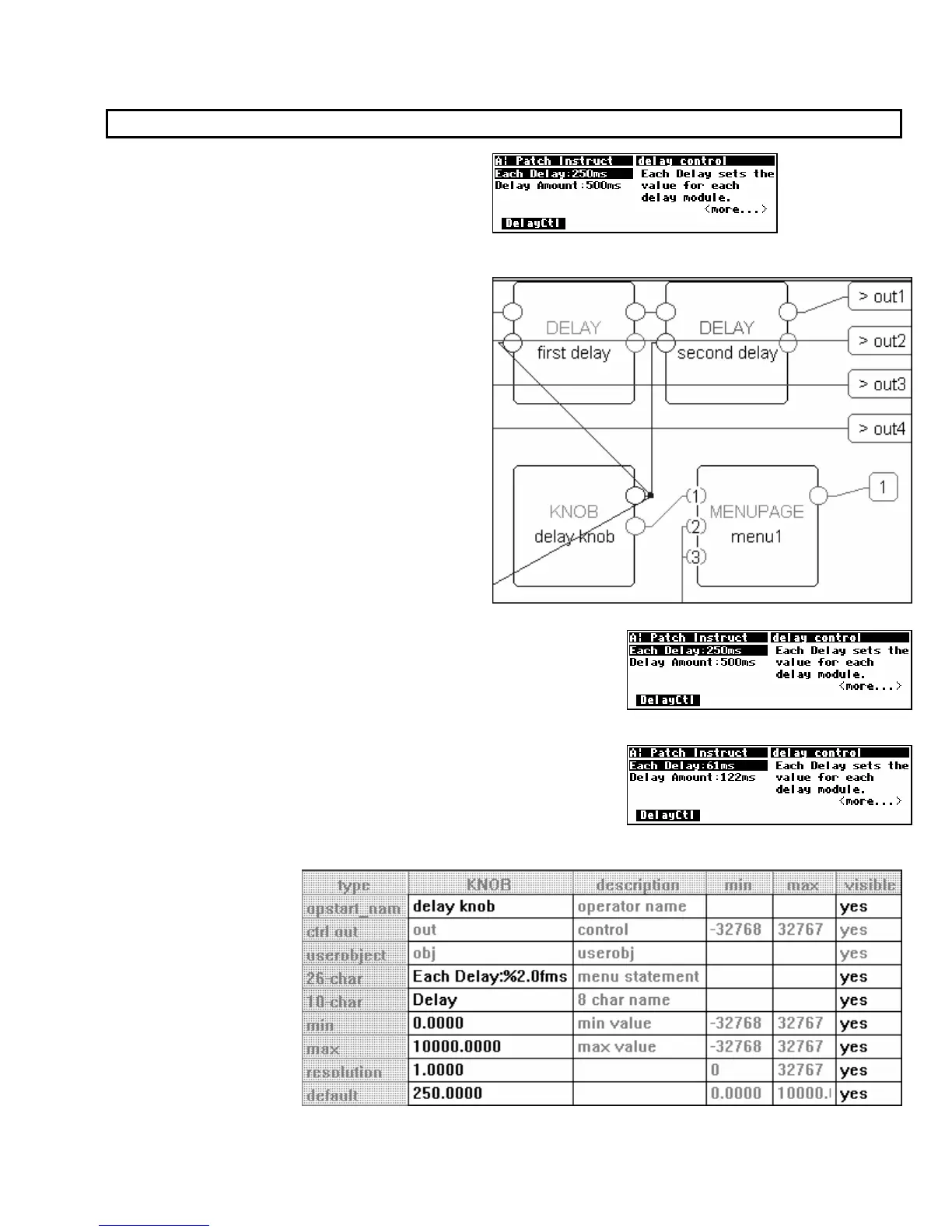
For example, in the program Patch Instruct (a
section of which is shown to the right)
, the module
named “delay knob” is a “parameter adjuster." It’s
userobject output is connected to a menupage
module which is in turn connected to the head
module.
Thus, the module named “delay knob” shows up in the PARAMETER
area as a parameter (Each Delay).
Selecting a parameter in the PARAMETER area and rotating the
KNOB will change the value of the “parameter adjuster’s” control
output. The change will also be reflected in a textual or graphical
display change. In this case, rotating the KNOB changes the Each
Delay
parameter in the PARAMETER area, and it changes the value
sent from the “delay knob’s” control output into both delay
modules and the c_multiply module
(see the diagram above).
The actual text used
for a parameter and the
way changes made to a
parameter’s value in
the
PARAMETER area
translate to control
output changes are set
up in the Vsigfile
Specifier
Display.



 To Next Page