The Harmonizer
®
Programmer’s Manual
© 1999-2008 Eventide, Inc. Page 44 of 97 Release 1.3
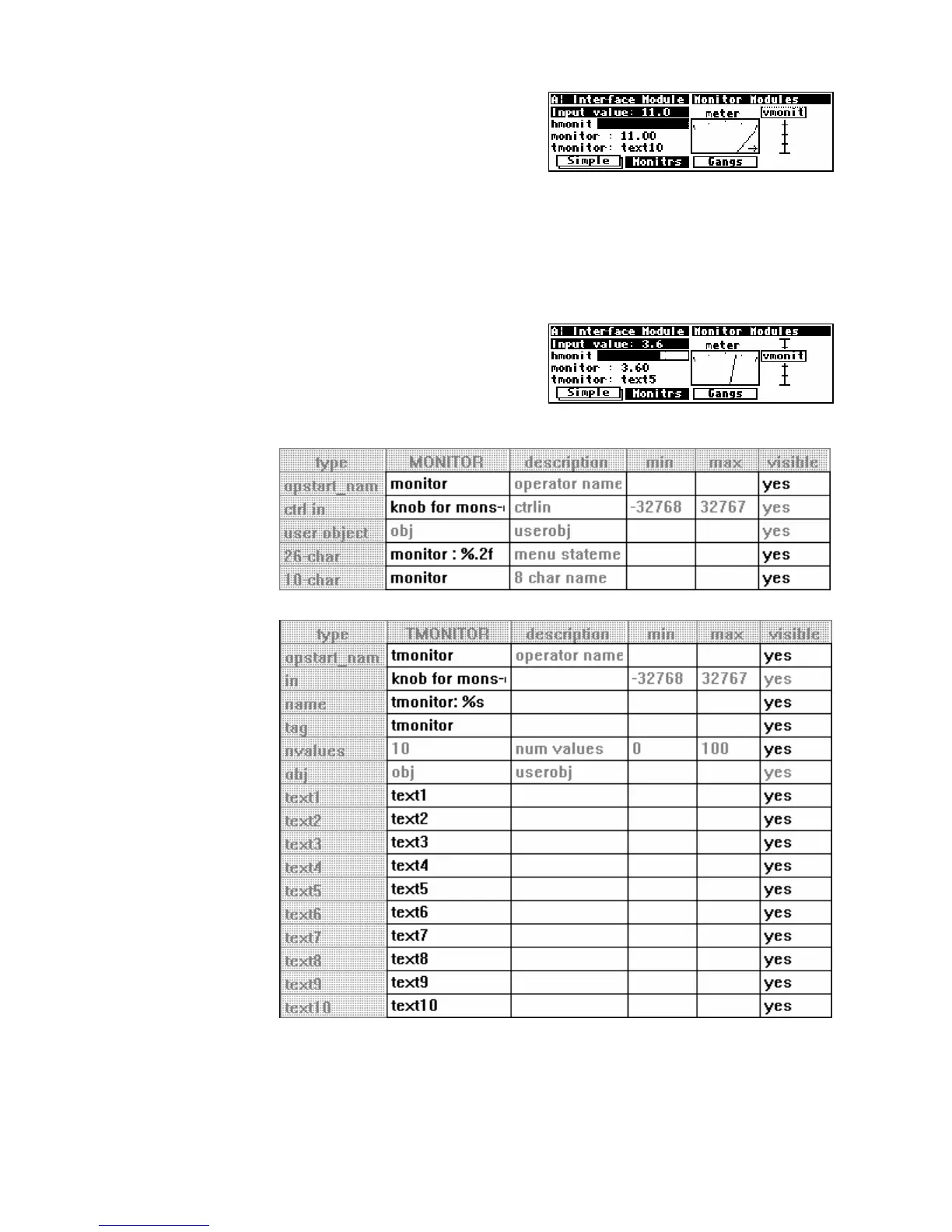
All three graphical monitors will indicate when the control
input’s value falls above or below the range set by the minimum
and maximum specifiers. (The screen to the right was made by changing
the max value to 11 on the “knob for mons” module in the
Interface
Modules
program.)
The vmonitor module creates a graphic that is one sixth of a screen width and four lines high. The
hmonitor module creates a graphic that is one half of a screen width and one line high. The meter
module creates a graphic that is one quarter of a screen width and four lines high. Form over function. . .
Textual Control Signal Monitors
The monitor and tmonitor modules use text to display
their control input values.
The monitor module is a
mirror image of the knob
module; it displays the
decimal value of its control
input. The format for the
display is set using the text
and %f format described
earlier (page ).
The tmonitor module is
a mirror image of the
textknob module. It
uses the control input to
determine which of several
text strings will be shown.
A control input value of 0
chooses
text1, a value of 3
chooses
text4 and so on.
Both the textual monitor
modules create displays
that are half of a screen
width and one line long.



 To Next Page