The Harmonizer
®
Programmer’s Manual
© 1999-2008 Eventide, Inc. Page 46 of 97 Release 1.3
• A userobject output may be connected to multiple userobject inputs. This means a single module’s
userobject output can show up in several menu pages in the PARAMETER area. Note: If a module’s
PARAMETER area graphic is shown more than once on a single menu page, the second instance might not be updated when
the first instance’s value changes and vice versa.
Parameter Placement on a Menu Page
Menu page design may be highly individualized. The “look and feel” of a menu page is important if a
program is complex or if there are displayed reactions to adjustments that must be viewed and
understood quickly. For instance, if a program uses a meter monitor to display the signal level in a
given frequency range while a knob parameter gives adjustment of the compression level in that
frequency range, it is important to have the knob parameter and the meter monitor on the same menu
page. It may also be possible to show the relationship between a fader parameter and a meter
monitor by placing them on the same menu page. This kind of “look and feel” control is performed
through the connection of userobject outputs to menupage modules.
This section goes through a tutorial to show:
• Parameters are presented on a menu page in the PARAMETER area in the order their userobjects are
connected to a menupage module, with placement beginning in the upper left corner of the screen
and proceeding to lower right corner of the screen.
• Modules that produce parameters with simple text
take up one eighth of the screen (exception is the
textblock module)
. Modules that produce parameters
with graphics take up some other portion of the
screen. The order that modules are connected to
the menupage module may cause the parameters
to be placed poorly, allowing only a few
parameters to appear on a screen where better
placement might have allowed more.
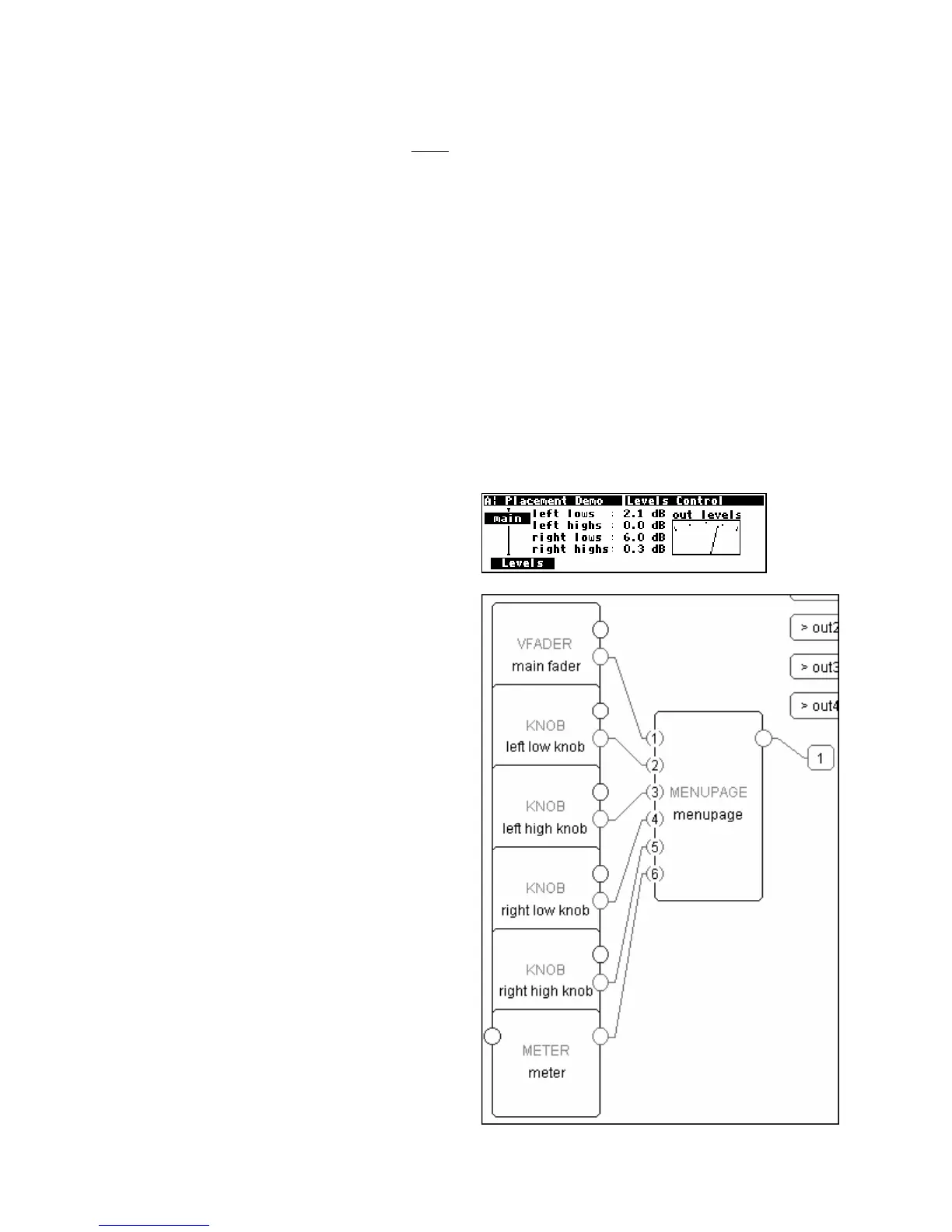
Placing a Vfader, a Meter, and Four Knob Modules
It is possible to build a good looking menu page using
six modules connected to a menupage module. The
order of their connection to the menupage module is
important. The display to the right shows a typical
arrangement of the six modules, taken from the
program Placement Demo found in the
“
Programming” bank.
To achieve this arrangement, the modules’ userobject
outputs must be connected to the menupage module
in exactly the order shown to the right:
1. main fader-obj
2. left low knob-obj
3. left high knob-obj
4. right low knob-obj
5. right high knob-obj
6. meter-obj



 To Next Page