The Harmonizer
®
Programmer’s Manual
© 1999-2008 Eventide, Inc. Page 58 of 97 Release 1.3
Cool. Now we need to be able to control our
compressor. We need some interface modules. If we
open the Vsigfile
Specifier
Display window of our ducker
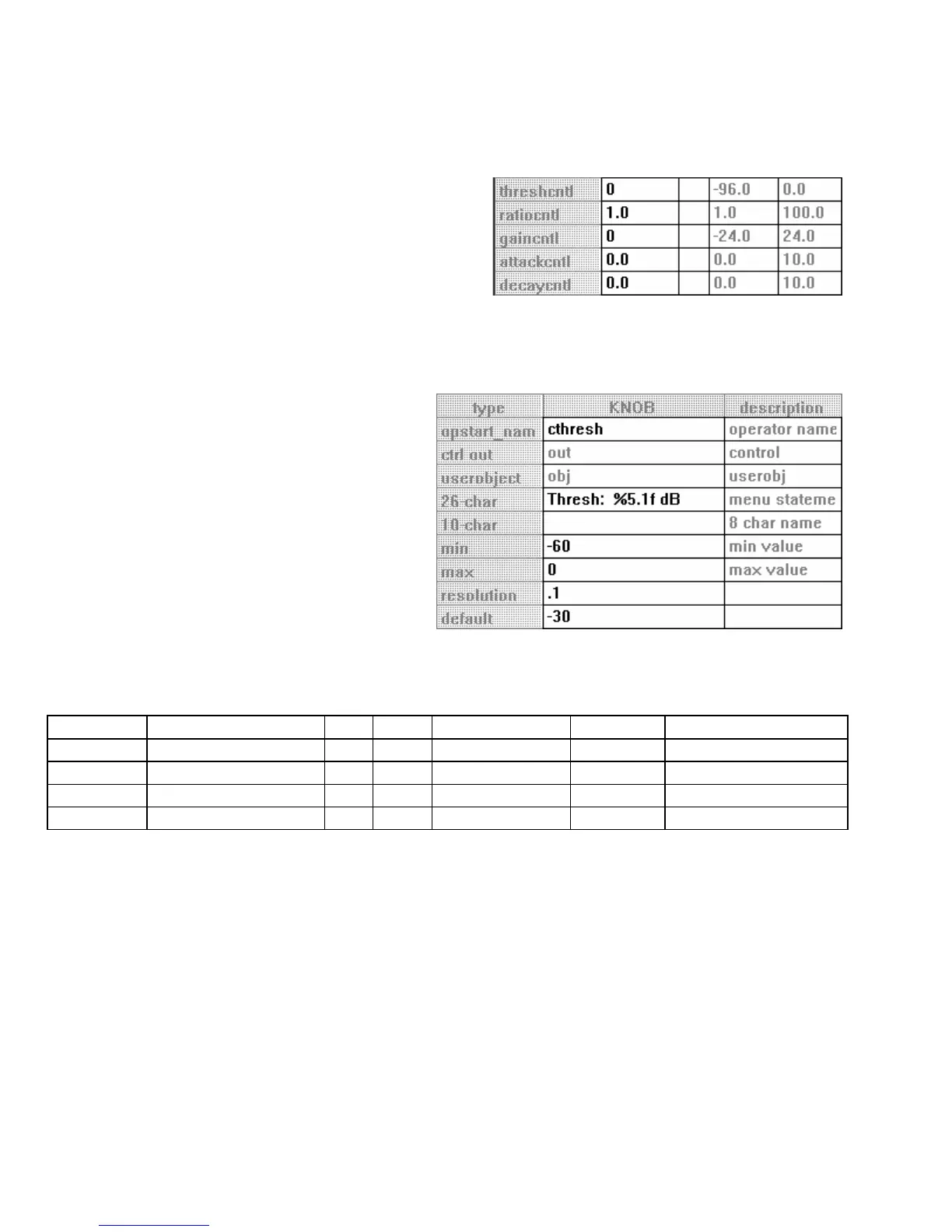
module we see that we have the option of up to five
controls. In this case we will connect “parameter
adjusters” to all five. Also found here are the limits of
these control inputs. We’ll need this information along with the “units” involved (e.g. is the attack
control in seconds or milliseconds?) when we set the min and max specifiers in our “parameter adjusters."
Refer to the Modules Section for the units that each control input is cast in.
Add a knob module and connect its control
output to the ducker module’s threshcntl
control input. Double click on it and change the
specifiers to match those shown to the right.
Notice that we’re not using the full range of the
parameter as settings beyond the ones we’ve
limited it to are quite “unphysical."
Now add four more knob modules. Connect and alter their specifiers
(in the Vsigfile Specifier Display) as
the table below indicates:
name menu statement min max resolution default
connected to. . .
cratio Ratio : %3.0f:1 1 100 1 10
ratiocntl
cgain Gain : %4.1f dB 0 24 0.1 12
gaincntl
cattack Attack: %6.3f Sec 0 10 0.001 0.003
attackcntl
cdecay Decay: %6.3f Sec 0 10 0.001 0.4000
decaycntl



 To Next Page