The Harmonizer
®
Programmer’s Manual
© 1999-2008 Eventide, Inc. Page 74 of 97 Release 1.3
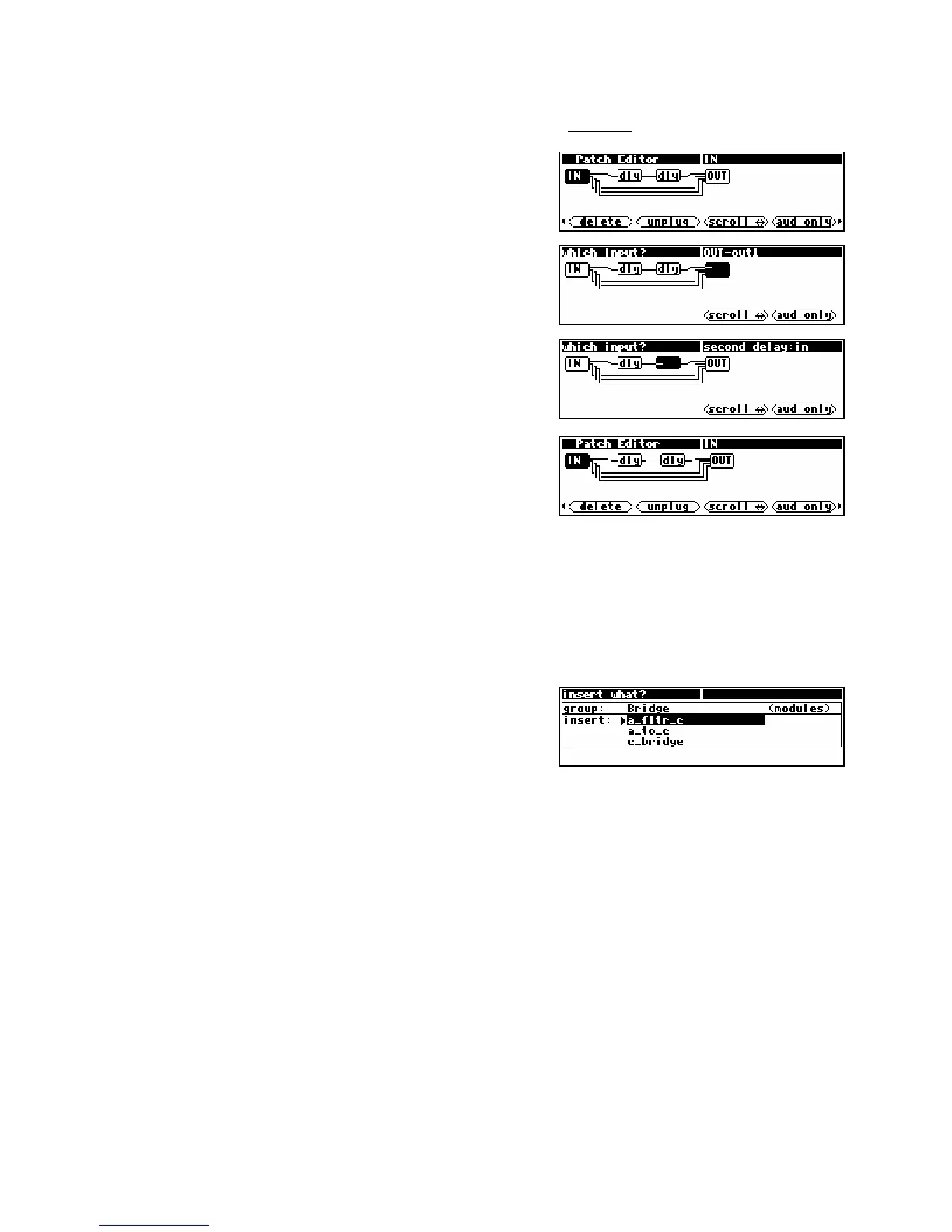
Example: To break the connection between the two delay modules in the program Patch Instruct
from the “Programming” bank, first load the program. Then press and hold the PARAMETER key to
enter the Patch Editor area.
After the display updates, briefly press the
PARAMETER key
again to reveal the alternative set of SOFT KEYS.
Press the
<unplug> SOFT KEY
Use the LEFT CURSOR key to select the input for the second
delay module.
Press the SELECT key.
That’s it. You’ve “unplugged” the input to the delay module.
Note that the aud only/aud+ctrl/ctrlonly/misc SOFT KEY is active to aid in selecting a module and
input to be unplugged. Changing the display mode does not deselect the currently selected input. The
upper right corner of the screen will indicate the currently selected input, regardless of the display mode.
Inserting Modules
<insert>
The <insert> SOFT KEY adds a new module to the “patch." The
new module will be inserted to the right of the currently selected
module. Use the RIGHT and LEFT CURSOR keys to select the
insertion point.
Note that modules do not, strictly speaking, have to be in any particular order because connections can
run in either direction. However, the programmer should be aware that every instance of reverse signal
flow will add a four sample delay to the process. In some cases, such as where a preset has multiple
signal paths, such delays can cause objectionable "phasing," or other artifacts.
After you've chosen where to place a new module, press the <insert> SOFT KEY. This display is a lot
like the one given in the
PROGRAM area. Just as in the PROGRAM area, the top area shows the name of
a “group” (bank), and the field below lists the contents of that group. The difference is that here a group
“contains” modules instead of programs
. If you don’t know how to load a program, you probably shouldn’t be
reading this manual.
Please read the separate User’s Manual before proceeding!



 To Next Page