The Harmonizer
®
Programmer’s Manual
© 1999-2008 Eventide, Inc. Page 95 of 97 Release 1.3
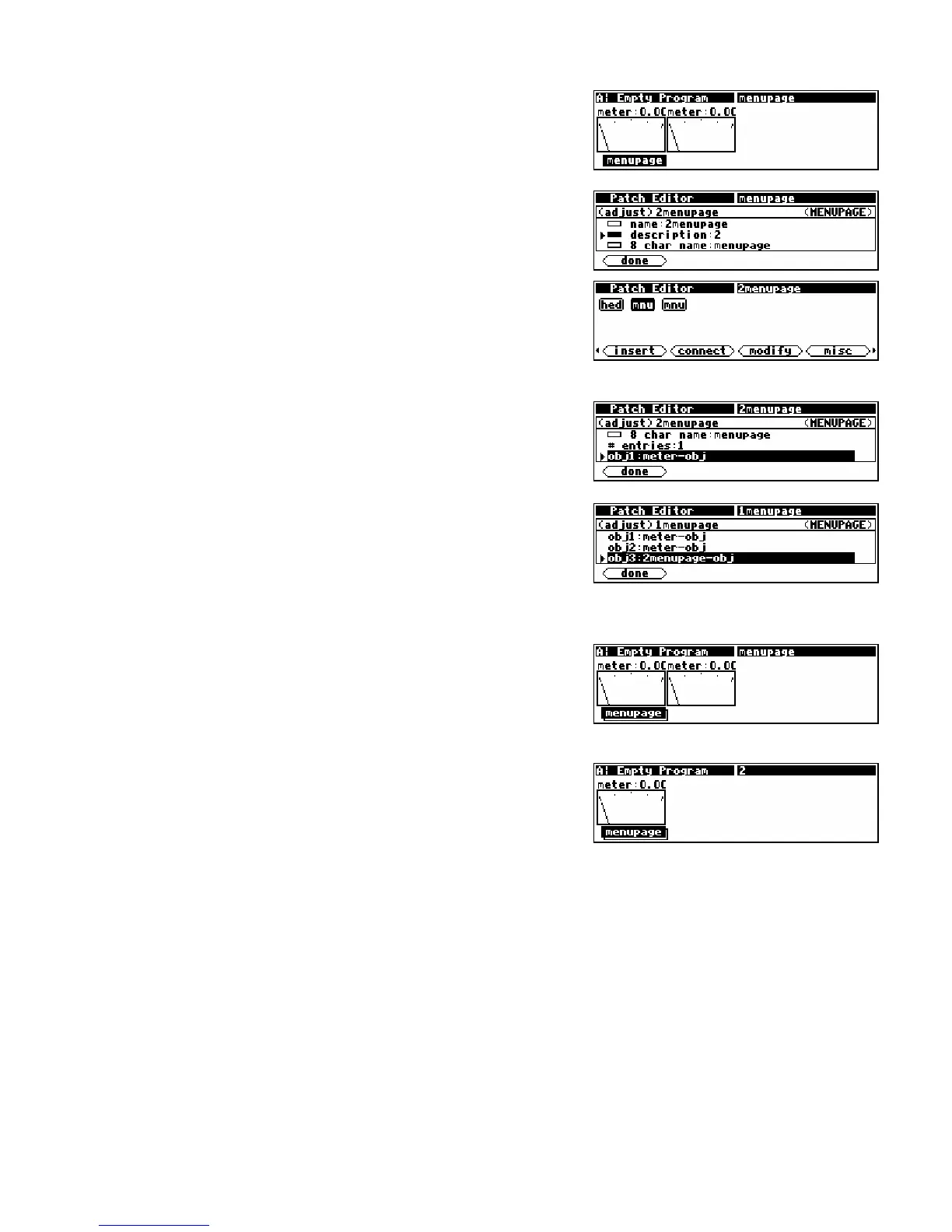
• Return to the PARAMETER area and observe the menu
page. Note that it shows two meter module monitors
(these are in fact two pictures of the same meter module). Notice
that the SOFT KEY is not stacked.
• Go back to the Patch Editor area,
misc display mode and
<insert> another menupage module. Edit its module
name using the <modify> SOFT KEY such that it reads
“2menupage." Then change the description specifier
to read “2” (you will need to use the CXL key to delete characters).
Press <done> to exit the <modify> menu.
Note the module name in the upper right corner of the
display.
• Go back into the <modify> SOFT KEY menu for the
2menupage module and set the # entries specifier to 1
and then change the obj1 specifier to meter-obj. Exit
from the <modify> menu by pressing <done>.
• Now, using the LEFT or RIGHT CURSOR key, select the
1menupage module. Use the <modify> SOFT KEY and
change its # entries specifier to 3 and its obj3 to
2menupage. Press <done>.
• Return to the PARAMETER area. Notice that there is now
a stack of SOFT KEY menu pages. The title of the top
menu page is still “menupage."
• Press the
SOFT KEY. The second menu, whose title is “2."
has only one meter module monitor on it.



 To Next Page