MACHINE OPERATIONS
Retail Operations
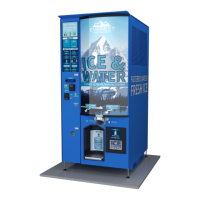
The instructions clearly explain the operation of the machine. In order to make a purchase,
customers make a payment using cash or credit card. For ice purchases, customers, either take
a bag from the bag dispenser and hold it underneath the chute, or they position a clean,
sanitary personal container/cooler under the chute for bulk vending. Once the customer
chooses an ice delivery option, the ice vend button is pressed.
If a water vend is desired, customers place a clean, sanitary container under the water nozzle.
The machines are factory set to dispense five gallons. Thus if you want one gallon, an operator
must use maintenance mode or Akoona.net to change the machine’s operational settings. In
either the one gallon or the five gallon option, the customer presses the “End of Transaction”
button when enough water has been vended. Doing so will give change due or will end the
credit card or vend card transaction.
LCD Screen
The LCD screen provides essential information to the customer. It shows the amount of credit
that the customer has from his or her deposit of cash or insertion of a credit card. It also shows
important messages such as listing the maximum denomination of bill or coin that the machine
has enough coins to provide proper change. The LCD screen is also used by service
technicians to resolve operational problems.
Message Screens - During normal machine operation, a special full screen message will often
replace the main vending screen. The messages either confirm important events or alert for
problems. Read the messages carefully.
Main Vending Screen - The main vending screen is what typically shows to the user during
normal operation. It includes important information about the balance of funds available (“LCD
balance”), the prices and quantities of products currently available from the machine, and the
machine ID (used by “Akoona.net” vending and customer service).
Note: Any type of user activity (coin drop, bill insert, coin return button, end transaction
button, card swipe, card beep, etc.) will immediately cycle the LCD back to the main vending
screen and restart the screen cycle timers.


 To Next Page