ECOR960 4F2 / 8F2 / 16F2
6.8 Schedule Setting
You can set up the recording schedule with the desired time, event types or FPS.
6.8.1 Express Setup
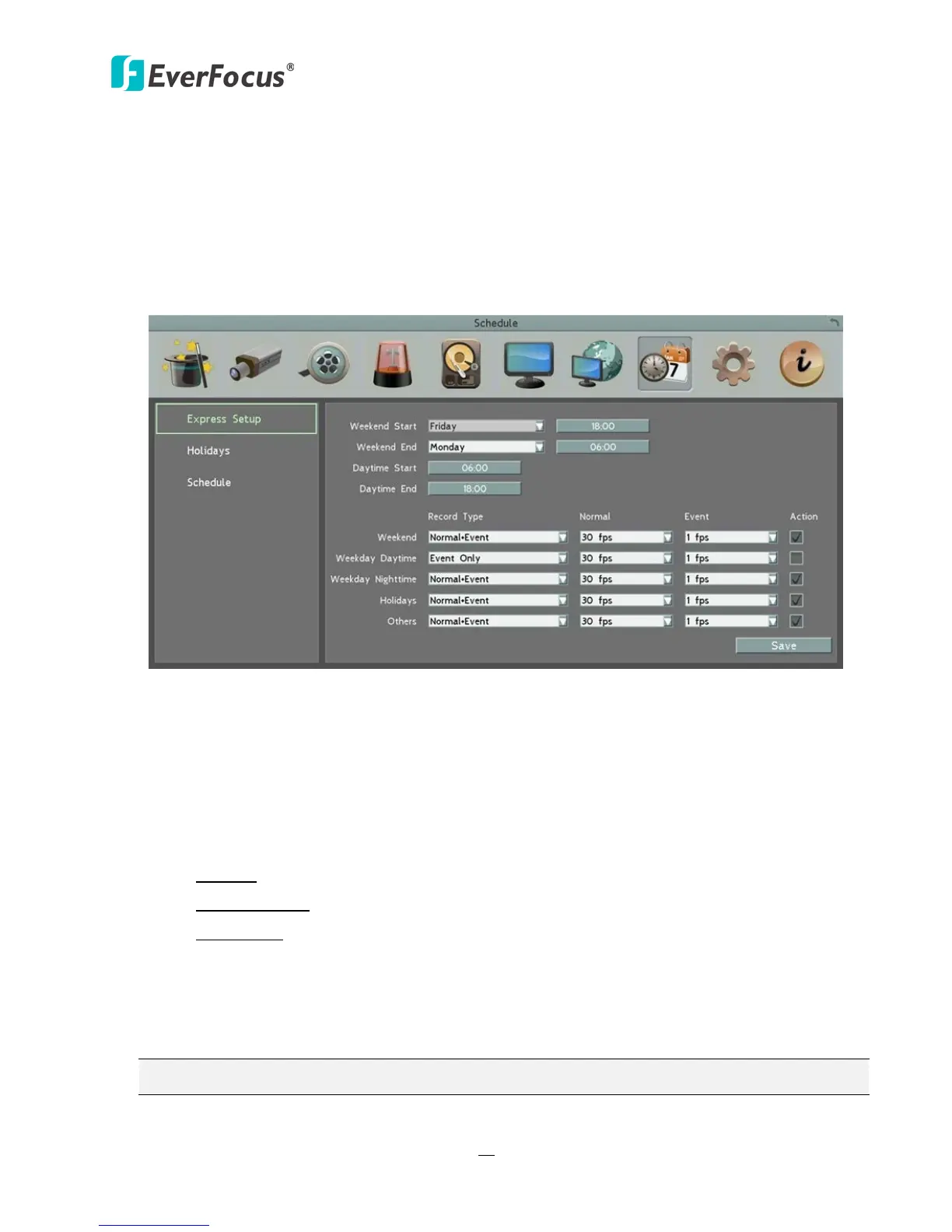
You can set up a weekly recording schedule for the DVR to automatically record videos.
Figure 6-30
Weekend Start: Select a start date and time for the weekend.
Weekend End: Select an end date and time for the weekend.
Daytime Start: Select a weekday start time (Nighttime schedule ends when Daytime begins).
Daytime End: Select a weekday end time (Nighttime schedule ends when Daytime ends).
Record Type: Select a recording type for each time period.
Disable: No recording during the scheduled time period.
Normal+Event: Continuous and Event recordings.
Event Only: Event recordings only.
Normal: Select a frame rate per second (FPS) for the Continuous Recording.
Event: Select a frame rate per second (FPS) for the Event Recording.
Action: Check the box to enable the Buzzer, Alarm Out, E-mail and Network actions selected
in 6.4 Event when an event occurs during the selected time period.
Note: For Holiday and Others, you can set up the recording schedule in 6.8.2 Holidays.














 To Next Page