ECOR960 4F2 / 8F2 / 16F2
1. Change the Screen Mode, TV Format and Recording Format, will REBOOT the DVR.
2. If you select the WD1 mode, the camera resolution options in the Basic Setting will
change to 960x480 / 960x240 / 480x240 (NTSC) or 960x576 / 960x288 / 480x288 (PAL). If
selecting D1, they will change to 704x480 / 704x240 / 352x240 (NTSC) or 704x576 /
704x288 / 352x288 (PAL). Please go to Basic Setting page (see 6.2.1 Basic Setting) to
select the desired resolution for live view / recording.
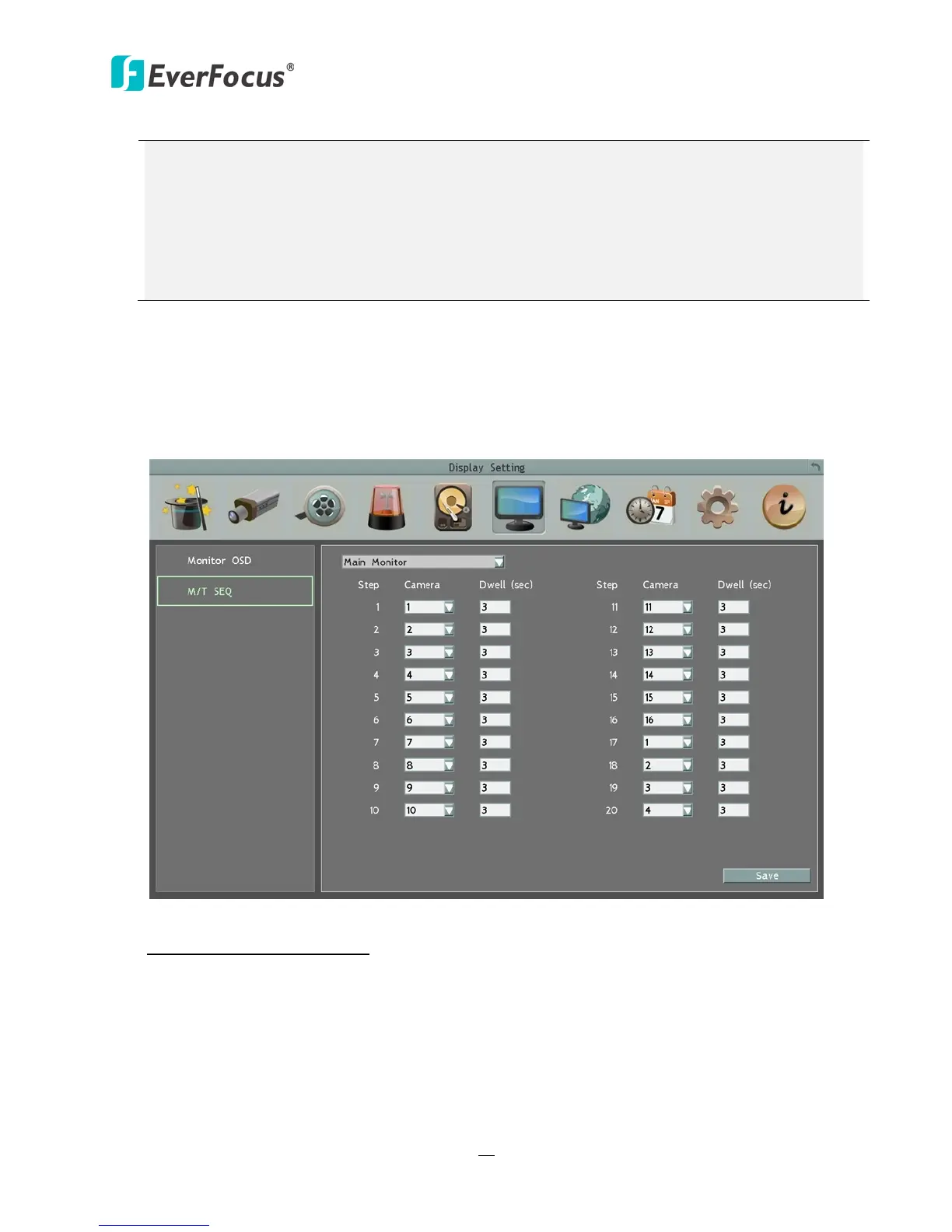
6.6.2 M/T SEQ
You can configure up to 20 steps of the sequencing order for the Main monitor. The
Sequence will repeat continuously from step 1 to step 20 until interrupted.
Figure 6-21
Main Monitor/ Call Monitor: Select Main or Call Monitor for the following settings.
Step: The sequencing order.
Camera: Select a camera for the specific step.
Dwell (sec): Sets up the dwell time between 0 and 60 seconds for each step.














 To Next Page