ECOR960 4F2 / 8F2 / 16F2
6.7 Network Settings
The DVR allows you to use a Web browser to remotely view and manage the system. You can
also receive live video streaming from the DVR using your smartphone.
Note: Since every Network Configuration is different, please check with your Network
Administrator or ISP to see if your DVR should use specific IP addresses and/or port numbers.
6.7.1 LAN
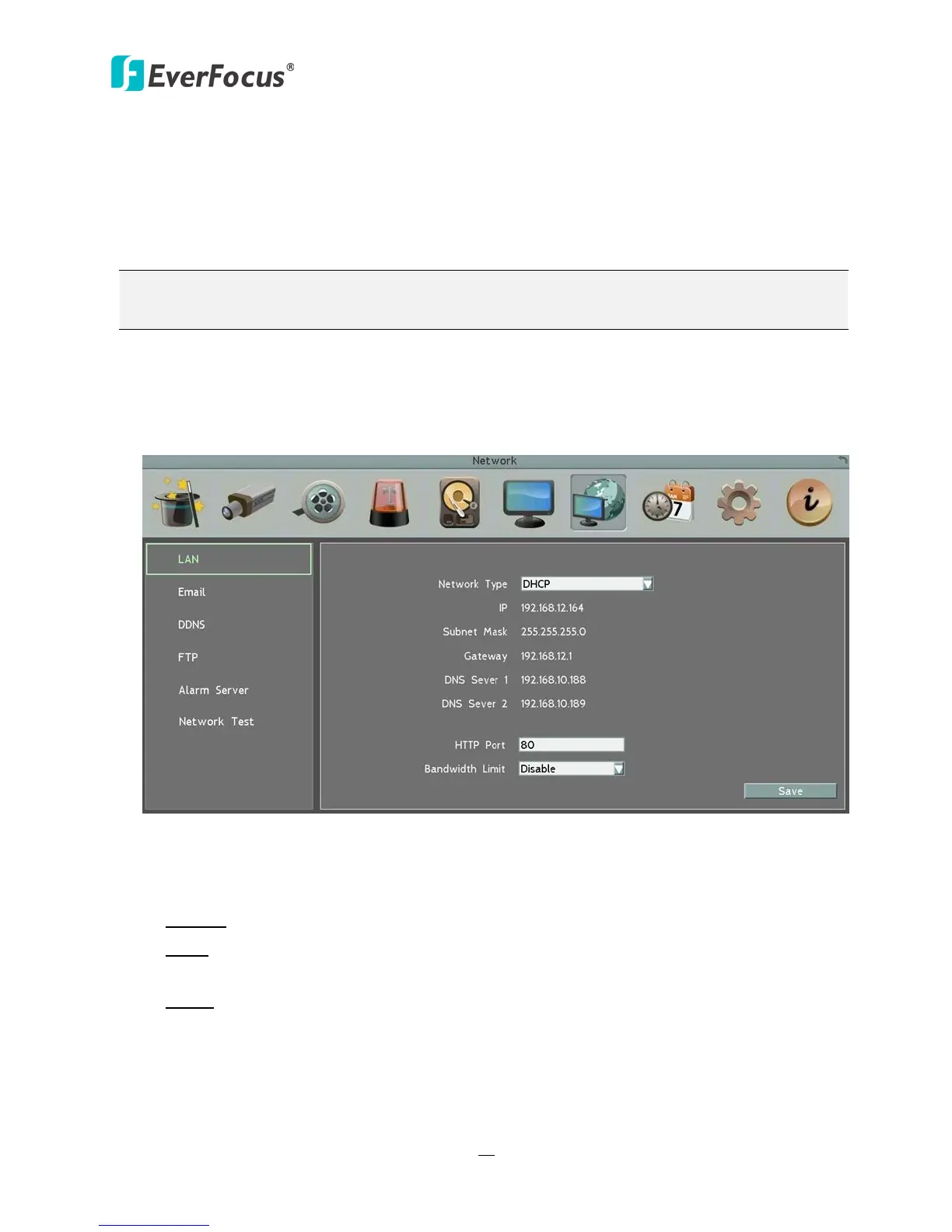
According to your network environment, select Static IP, DHCP or PPPoE to configure an IP
address to the DVR.
Figure 6-22
Network Type: Three options are selectable: Static IP, DHCP and PPPoE.
Static IP: User can set a fixed IP for network connection.
DHCP: DHCP server in LAN will automatically assign an IP configuration for the network
connection.
PPPoE: For direct connection to the DSL only. Verify with your ISP if they use PPPoE.
IP address: Displays the DVR’s current IP Address. A static IP address must be set manually. If
DHCP is selected, this value will be assigned automatically.
Subnet Mask: Displays the subnet mask for your network so the DVR will be recognized
within the network. If DHCP is selected, this value will be assigned automatically.














 To Next Page