21
2121
21
3
3
.
.
2
2
C
C
a
a
m
m
e
e
r
r
a
a
S
S
e
e
t
t
u
u
p
p
M
M
e
e
n
n
u
u
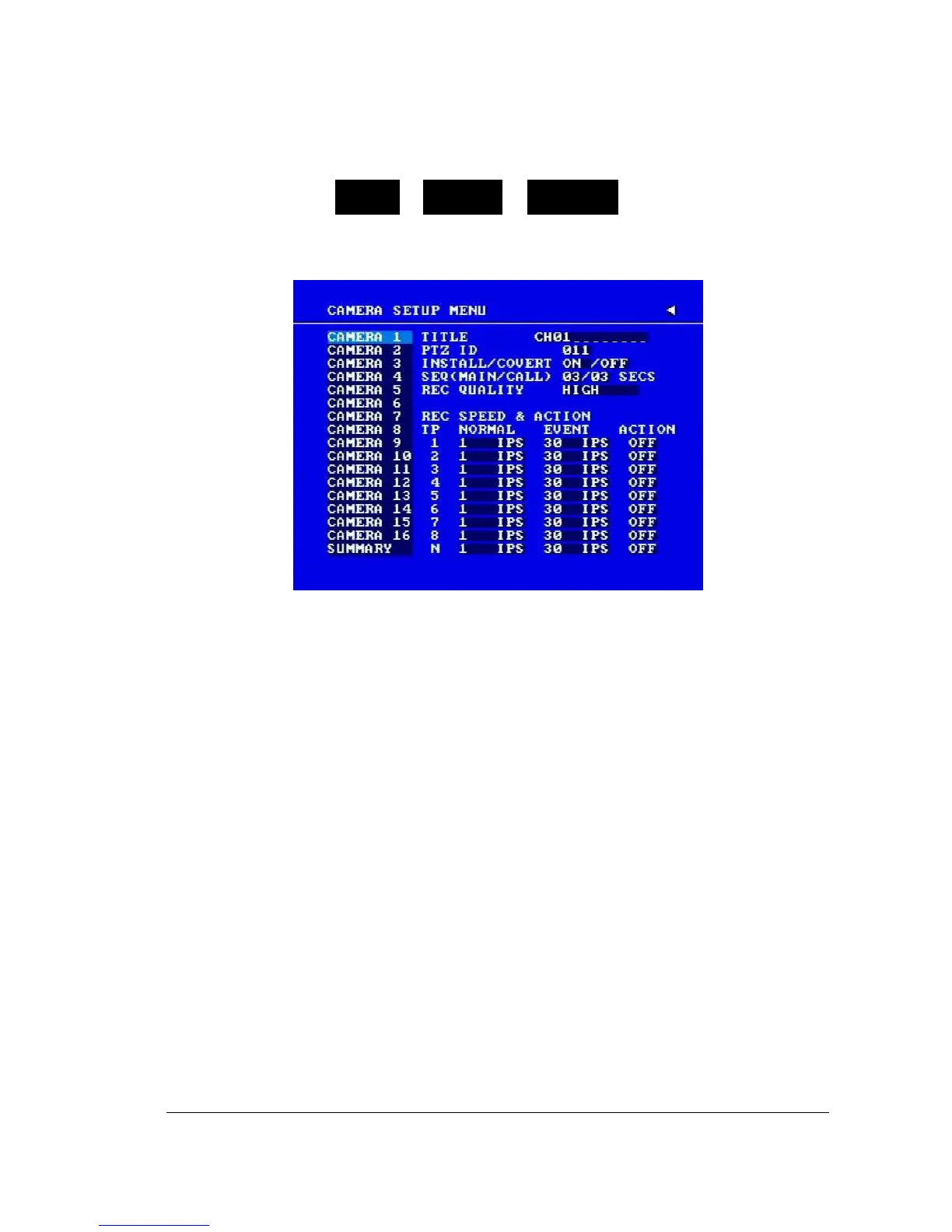
Diagram 3.4
Diagram 3.4 is a screen shot of the CAMERA SETUP MENU. This menu will walk you
through setting up the Camera Recording Speeds, Camera titles, PTZ ID, covert modes,
and recording quality.
In the CAMERA SETUP MENU the following fields are defined as:
1. TITLE
The title setting allows you to assign a title to each camera input. Each channel supports
a title with up to 12 characters. Press Enter to move to each character and use the Jog
Dial to change the value. The available alphanumeric characters are:
0,1,2,3,4,5,6,7,8,9,
A,B,C,D,E,F,G,H,I,J,K,L,M,N,O,P,Q,R,S,T,U,V,W,X,Y,Z,
( ) . , + - / and an empty space.
2. PTZ ID
Select PTZ ID/Address from 001~255 or OFF. OFF is the same as 000. The default
value is 10+N where N is camera’s number. This ID must be the same as the ID used
in PTZ Dip Switch. To change this, simply use the Jog Dial on the DVR.
DAY MONTH WEEK














 To Next Page