60
6060
60
Note:
If STOP key is pressed while machine is recording and playing video, the Play function will
be disabled first. If STOP key is pressed twice, the DVR will stop recording completely.
4
4
.
.
2
2
S
S
c
c
h
h
e
e
d
d
u
u
l
l
e
e
R
R
e
e
c
c
o
o
r
r
d
d
i
i
n
n
g
g
S
S
e
e
t
t
u
u
p
p
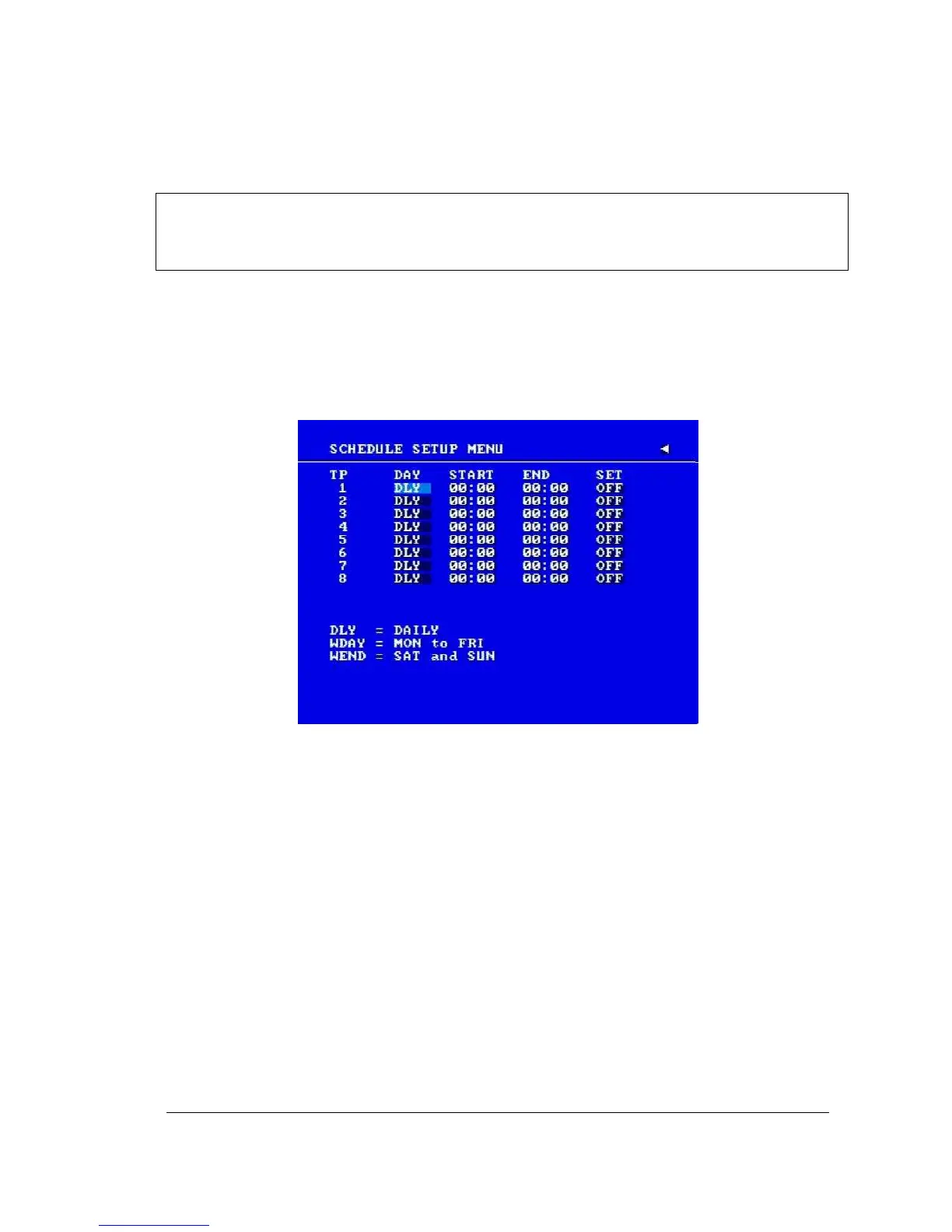
Set up the DAY, START time, END time and then turn SET to “ON” in the SCHEDULE
SETUP MENU.
Diagram 4.1
Please refer to SCHEDULE SETUP MENU for setting procedure and more details.
4
4
.
.
3
3
E
E
v
v
e
e
n
n
t
t
R
R
e
e
c
c
o
o
r
r
d
d
i
i
n
n
g
g
S
S
e
e
t
t
u
u
p
p
We will now define two event recording types ALARM and MOTION. After the event
recording is enabled, the DVR will start an event recording when an event occurs. For
instance, when motion activity or alarm action is detected by the DVR it will begin recording
at the specific IPS set in the Event column.
In order to start an event recording, you MUST perform the following:














 To Next Page