31
3131
31
3
3
.
.
5
5
M
M
o
o
t
t
i
i
o
o
n
n
S
S
e
e
t
t
u
u
p
p
M
M
e
e
n
n
u
u
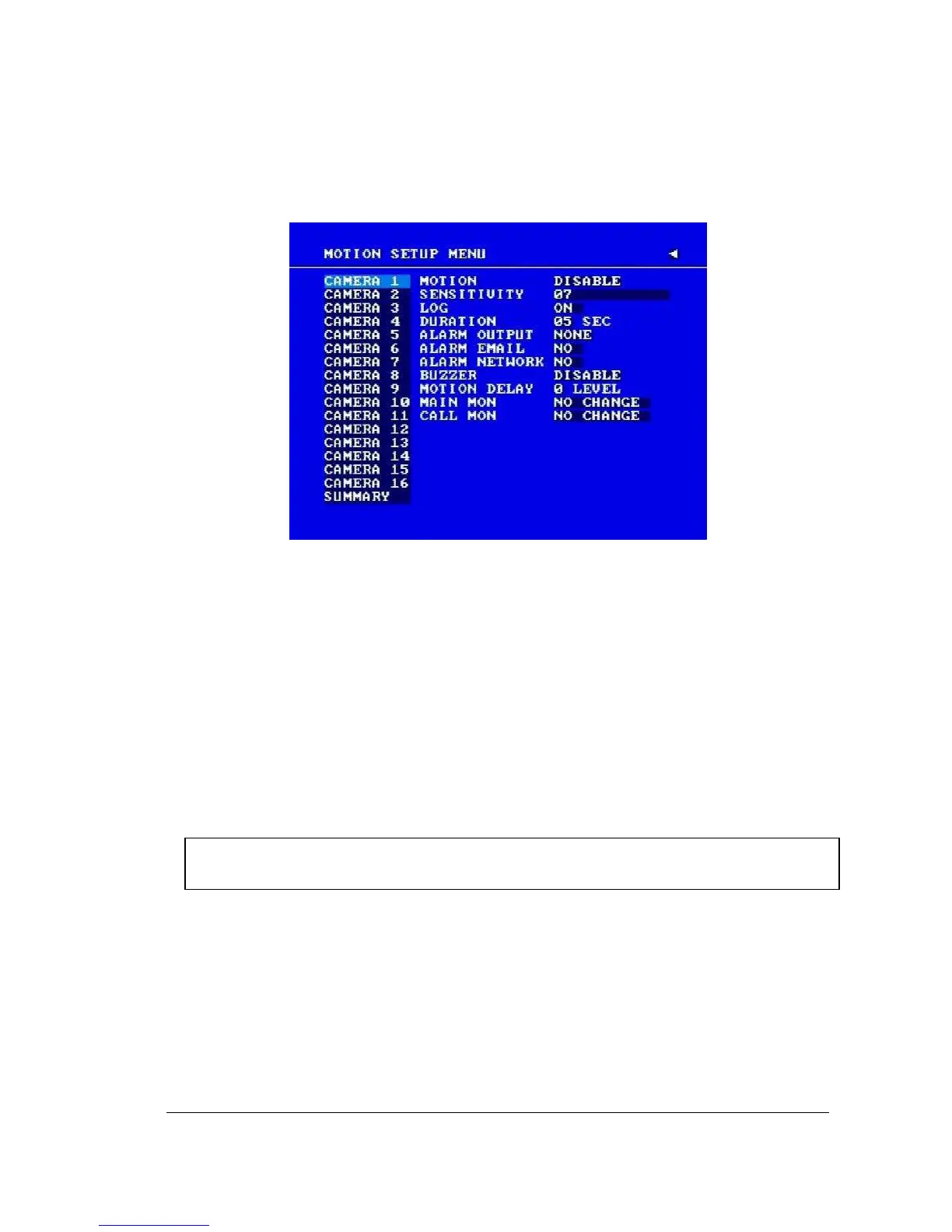
Diagram 3.8
Diagram 3.8 is a screen shot of the MOTION SETUP MENU. We define motion as a change
of pixilation in the field of view, which is detected by the digital video recorder and triggers the
recorder to start recording. This menu is for setting up the digital recorder for motion
recording on a per camera basis.
In the MOTION SETUP MENU the following fields are defined as follows:
1. MOTION
This field is to turn motion detection on or off. The default value is DISABLE. To
change this, simply use the Jog Dial on the DVR.
ENABLE: Enable motion detection.
DISABLE: Disable motion detection.
Note: Motion only works in live and playback modes. It is invalid while in menus.
2. SENSITIVITY
The sensitivity allows users to adjust to a suitable motion detection sensitivity. There are
10 sensitivities available; level 1 is the lowest, and level 10 is the highest sensitivity. To
change this, simply use the Jog Dial on the DVR.














 To Next Page