HDSD9545DLY - PRO Profanity Bypass Delay Manual
INSTALLATION Revision 1.3.7 Page 2-1
2. INSTALLATION
2.1. REAR PANEL OVERVIEW
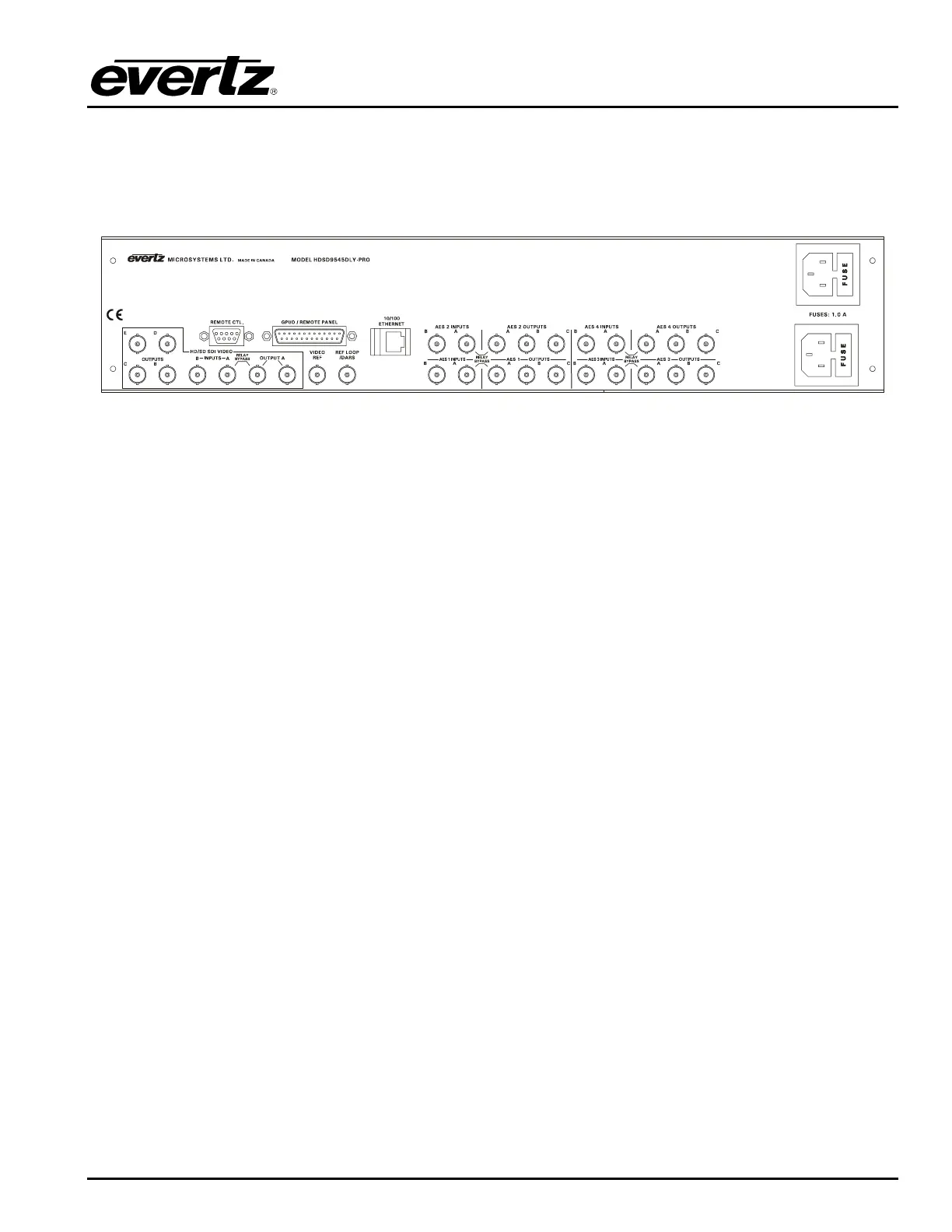
Figure 2-1: Rear Panel Layout
Figure 2-1 shows the rear panel of the HDSD9545DLY-PRO unit. Sections 2.1.1 to 2.1.6 describe the
specific video, audio, and control signals that should be connected to the HDSD9545DLY-PRO unit.
Sections 2.2 to 2.7 describe how to connect them into your system.
2.1.1. Digital Video Connections
INPUT A This BNC connector is for connecting the live program signal. The input can accommodate HD
or SD serial digital component video signal compatible with the SMPTE 259M-C and SMPTE
292M standards. The Video Standard menu item in the VIDEO CONFIG menu is used to
select the input video standard. This input is protected by a bypass relay to the adjacent
OUTPUT A BNC. The bypass relay will activate in the event of power loss to the unit and can
also be activated from the front panel or a GPI. When the bypass relay is activated, OUTPUT
A output will be a direct relay connection to the INPUT A BNC.
INPUT B This BNC connector is for connecting the safe program signal. The input can accommodate
HD or SD serial digital component video signal compatible with the SMPTE 259M-C and
SMPTE 292M standards. The Video Standard menu item in the VIDEO CONFIG menu is used
to select the input video standard.
OUTPUT A These output BNC connectors are normally used for the ‘on-air’ program video output and
are normally connected to the main broadcast chain of your plant. This output may be
configured using the Video Output A menu item in the OUTPUT CONFIG menu. The output on
the left is protected by a bypass relay to the adjacent INPUT A BNC. When the bypass relay is
activated on power loss the output will be a direct relay connection to the INPUT A BNC and
the right output will not have any signal present.
OUTPUT B, C, D, E These output BNC connectors are used for other serial digital component video
outputs and are configured using the Video Out B, Video Out C, Video Out D and Video Out E
menu items on the OUTPUT CONFIG menu. When the bypass relay is activated on power loss
these outputs will normally not have any signal present.


 To Next Page