XRF1/XRF1A 16x16 RF Router Manual
XRF1 - 5-4 Revision 1.2 CONTROL PANEL OPERATION
5.4.2. [MENU] Function from Source and Destination Selection Modes –
Passcode Protection Not Enabled
Press [MENU]
Initiates Configuration Menu Mode and prompts for input channel selection.
5.4.3. [MENU] Function from Configuration Menu Mode or Configuration Set Mode
Press [MENU]
Returns the user to Menu Level 1 and prompts for Input channel selection.
"
When the user exits Configuration Set Mode, or after 30 seconds of inactivity, the
XRF1 Control Panel returns to Destination Selection Mode without making changes
to configuration parameters.
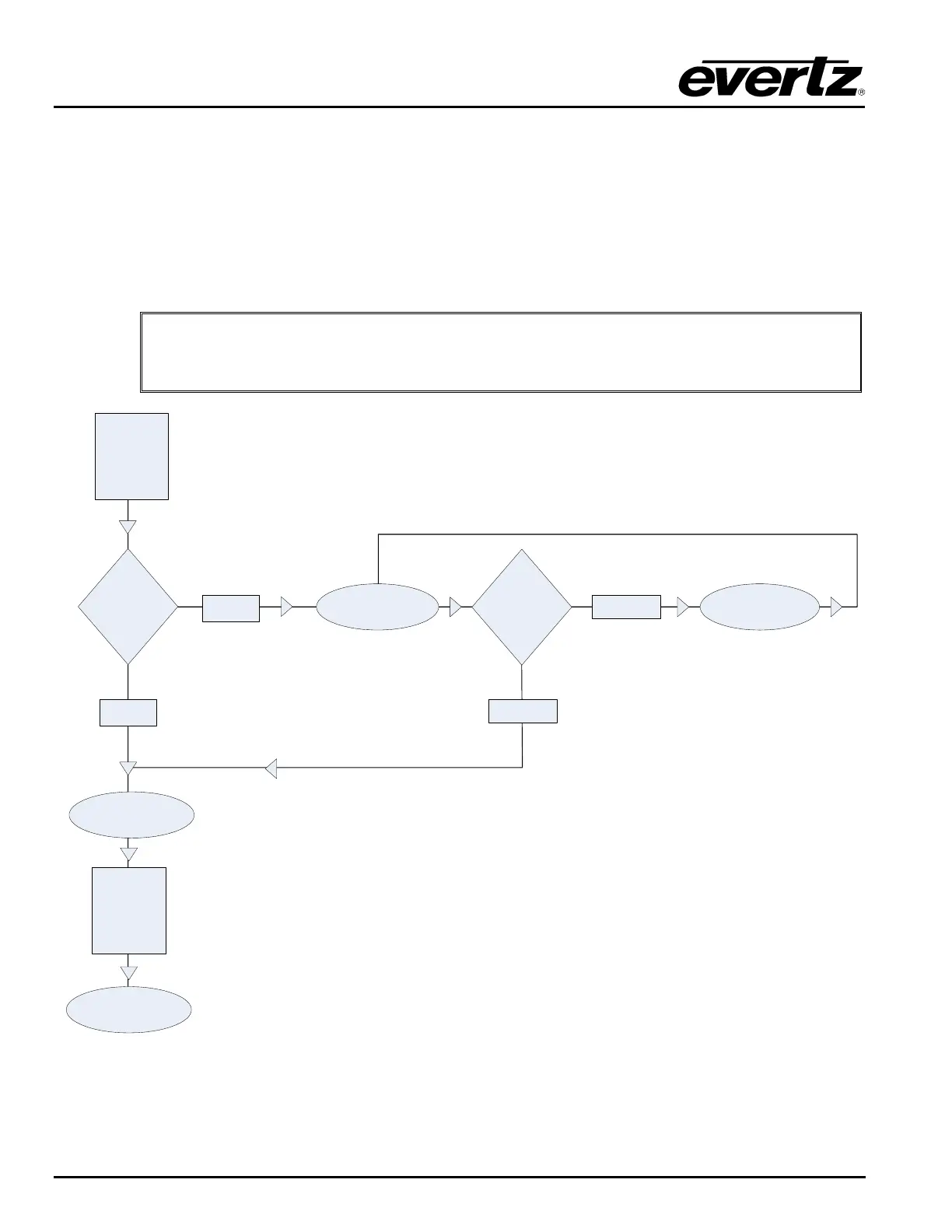
PRESS
[MENU]
Has Passcode
Been Set?
(PROMPT)
“ENTER CODE _ _ _ _”
(DISPLAY)
“INVALID CODE”
YES
INCORRECT
NO
Is Passcode
Correct
or
Incorrect?
(PROMPT)
“CONFIGURE INPUT”
PRESS
[ENTER]
(DISPLAY)
ALL INPUTS
CORRECT
Figure 5-3: Configuration Menu Access Operation



 To Next Page