12530/12540 OWNER'S MANUAL
P/N 447203 Issue I IV-5
D. Semi-Flush Mounting Instructions - 12540
To mount the enclosure:
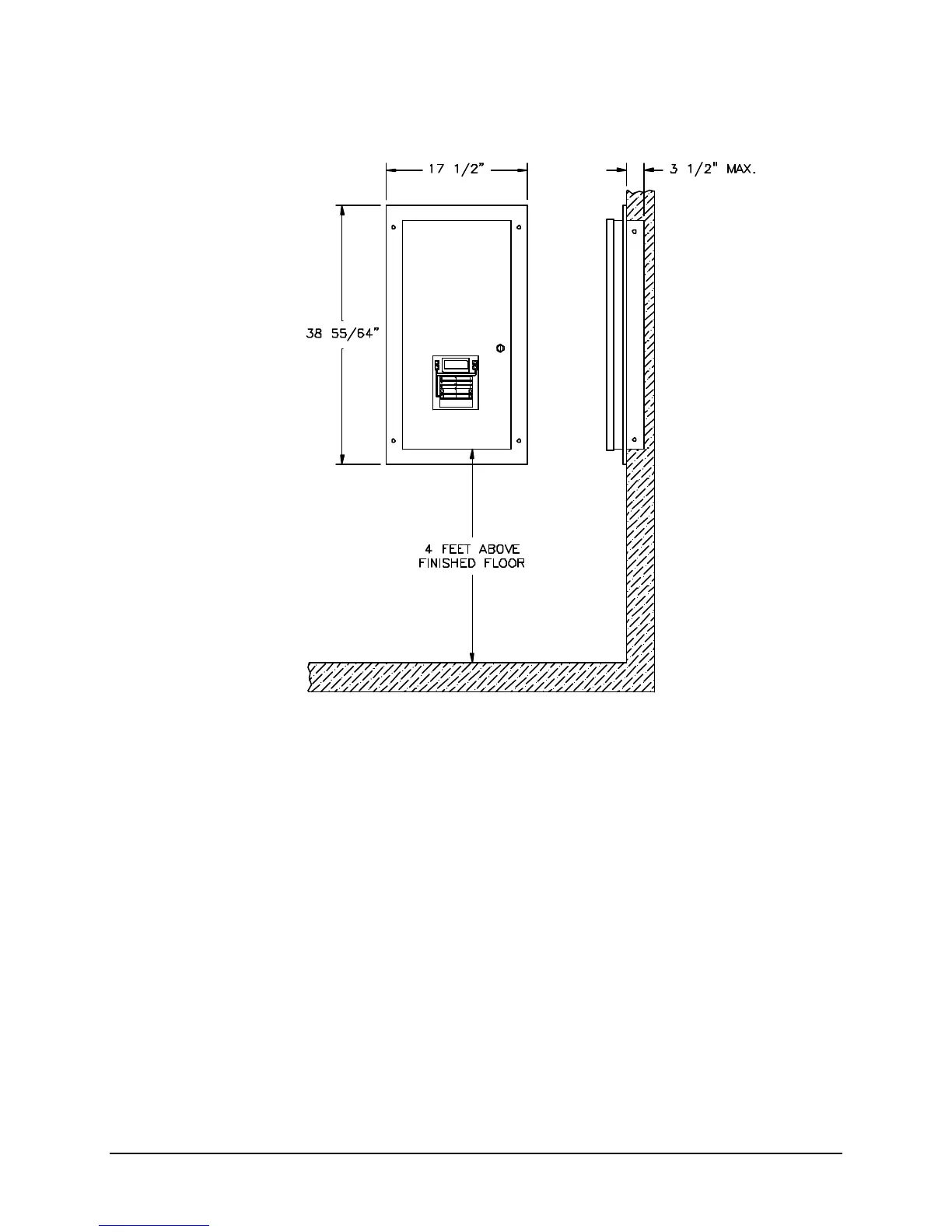
1. Mount the enclosure at a convenient height for viewing indicators, and operating switches.
2. Use four #10 lag screws (not supplied) to secure the control unit to the wall. The screw type and
length must support the control unit, options and battery set.
Note: You may need a different screw type, depending on the wall material.
3. The back-box can be mounted up to 3 1/2 inches into the wall. Place the semi-flush trim around the
back-box and affix to the wall with four #10 x 3/4 inch wood screws (provided with trim).
Note: You may need a different screw type, depending on the wall material.
4. The 12408 Auxiliary Power Supply or battery enclosure may be mounted immediately above or below
the main enclosure, close nipple, allowing a minimum of 3 inches in between the enclosures for
clearance between the semi-flush trims. Keeping the wire run to the control unit short will keep the
voltage drop to a minimum.


 To Next Page