FS10 Series
40 Fluid Components International LLC
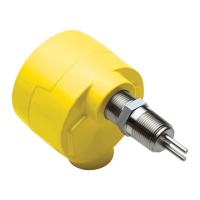
3. This dialog will appear. Click the
selection arrow on the “Connect
using” list box, and select the COM
port your modem is connected to –
not the modem name.
When you select the COM port,
the phone number to dial boxes are
grayed.
Click OK.
1. Start the HyperTerminal .exe program
(hypertrm.exe). Click on START, then
ACCESSORIES, then COMMUNICA-
TIONS, then HYPERTERMINAL, then
choose the HyperTerminal entry that
does not have an .ht extension.
Note:
Some Windows versions
store HyperTerminal as an
Accessory.
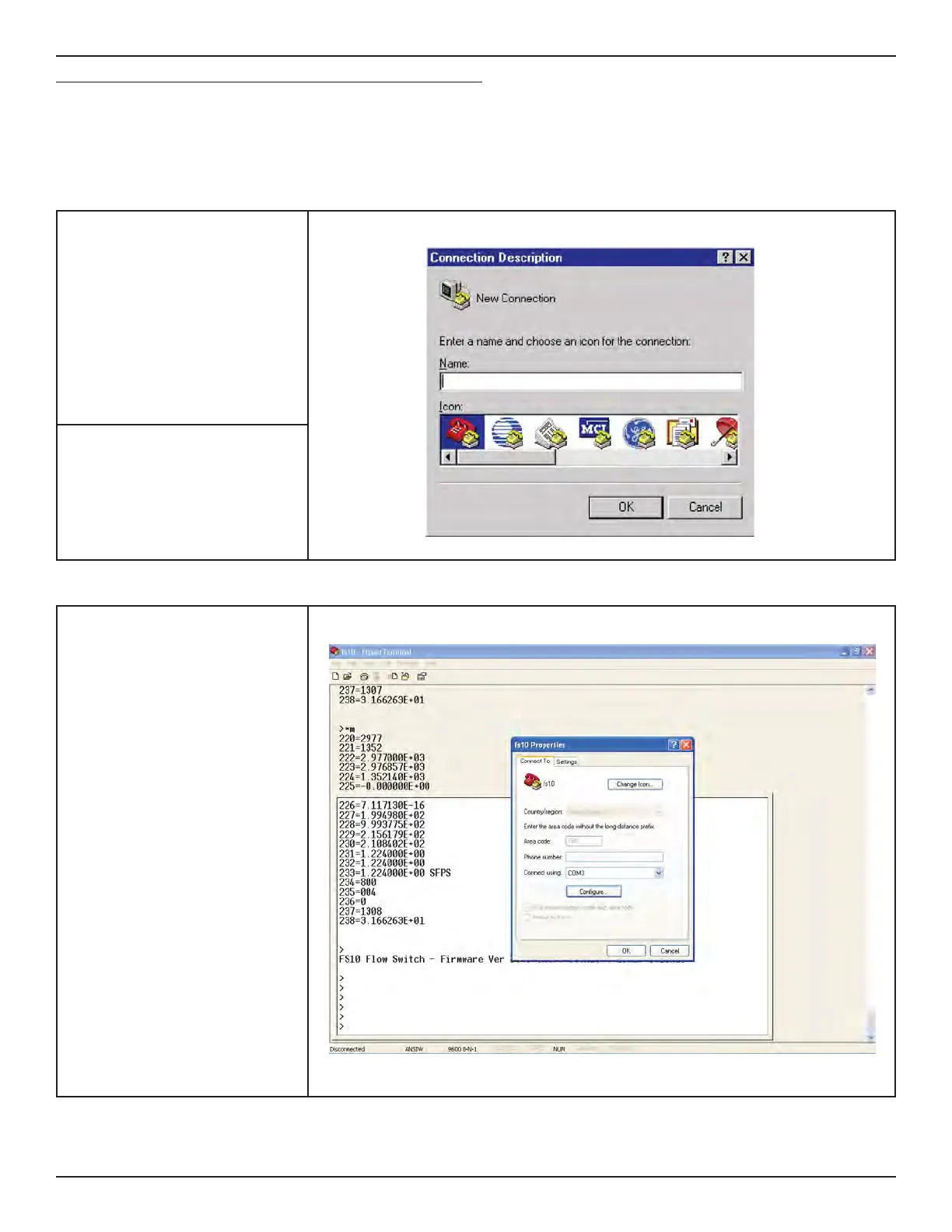
2. This brings up this dialog.
Enter a name (such as “FS10”)
Select any ICON.
Click OK.
FS10 Serial Interface (Command Line, Alternate Communication Interface)
Interface example using HyperTerminal set-up:
HyperTerminal, which comes with Windows95, 98, Me, NT, 2K and XP, can be used to communicate directly with the FS10. For later Win-
dows versions use your favorite search engine to search for “hyperterminal alternative” for free, alternative serial terminal programs.
Follow the below steps to set up HyperTerminal to interface with a computer serial port (adapt these instructions for other serial terminal programs).


 To Next Page