Revised 09.15.11 Proteus A3/125 Technical Service Manual
14
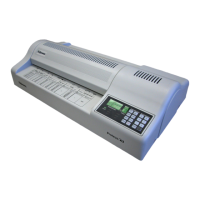
6 Replace lower gray Roller.
Note: Make sure the PVC gear is on the left end (away
from the motor) and that the at side of the Roller bushings
is facing up.
7 Replace the upper gray Roller.
Note: Make sure the PVC gear is on the left end (away
from the motor) and that the at side of the Roller bushings
is facing up.
8 Replace the upper red Roller.
9 Replace the Side Panel Covers and secure with
2 screws each.
Note: Make sure the Rollers are level. The Panel Covers
are spring loaded and can push the Rollers out of
alignment.
Remove Side Panels and Roller Press Side
Panels Covers
1 Remove the 2 screws each from the right and left Roller
Press Side Panel Covers.
2 Carefully remove Side Panel Covers.
Note: The Covers are spring loaded.
3 Remove the Hot and Cold Rollers.
4 Lift the upper gray Cold Roller up and out, and then lift
the lower gray Roller
DO THIS FIRST
Remove Housing Cover
TOOLS
Flathead screwdriver
Phillips screwdriver











 To Next Page