4.1.3 Operation and display
4.1.3.1 User interface
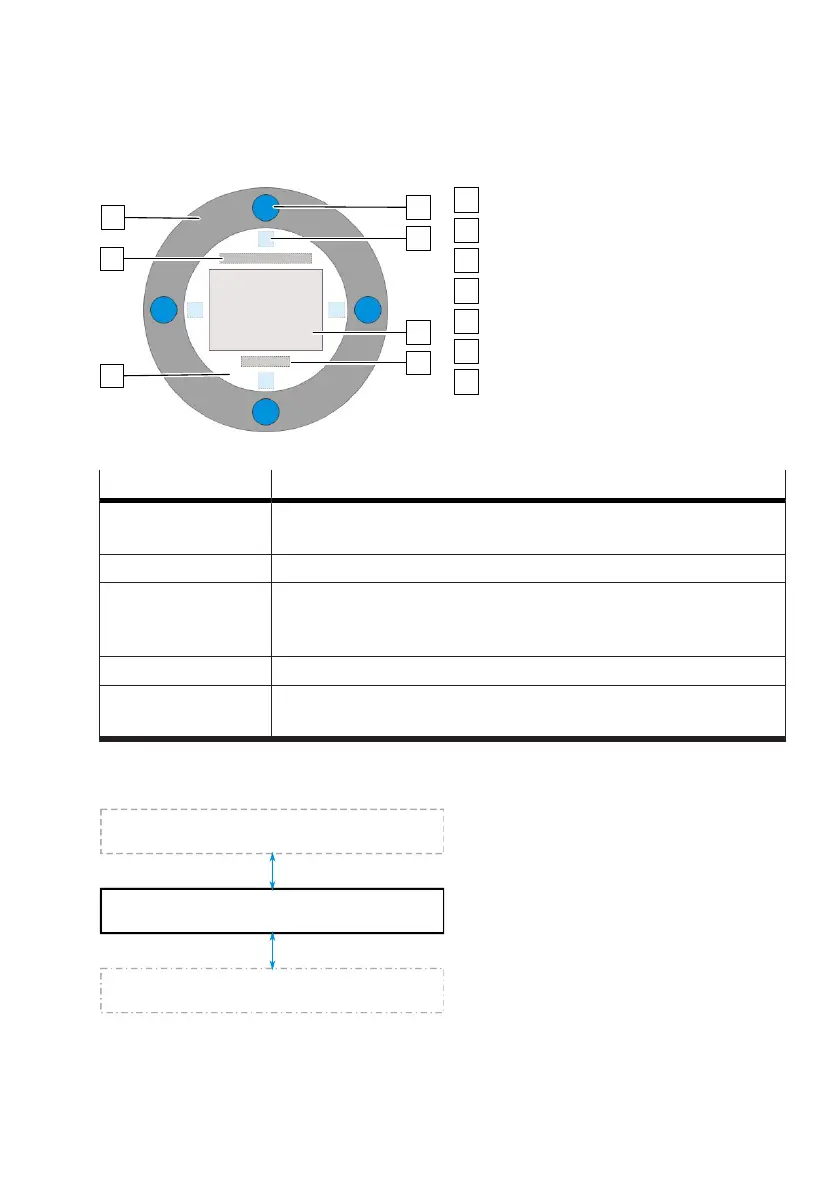
Fig. 3: Structure of the user interface
Display
Information area (optional)
Control ring
4 operating buttons
4 softkeys
Content area
Page indicator (optional)
Area Description
Information area Information about the status of the device is displayed in the process
views
è
Status and information in the information area.
Operating buttons The device is operated with 4 operating buttons.
Softkeys A context-dependent function is displayed. This function can be triggered
by the associated operating button. In the process views, the upper
softkey displays the device status.
Content area Process values, menus and parameters are displayed.
Page indicator The total number of process views and the relative position of the current
process view are displayed in the process views.
Tab. 3: Elements in the user interface
4.1.3.2 Process views
Fig. 4:
Basic layout of the views
The process views show current process values as well as information on the operating status. The
process views are automatically shown on the display when the device is switched on again or if there
is no interaction on the user interface for a long time.


 To Next Page