The progress of the initialisation is shown on the display during the initialisation process. A running
initialisation can be cancelled with the upper key.
After successful initialisation, the display briefly shows the ‘Initialisization successful’ message. The
symbol for a missing initialisation in the process views then disappears
è
Tab. 6 Status and informa-
tion in the information area.
The control parameters can be adapted and, if necessary, optimised in the ‘Control’ > ‘User parame-
ters’ menu
è
7.2.4.2 Control.
7.2.3 ‘Operation mode’ menu
The operating mode is displayed and changed in the Operation mode menu. There is a view for the
two ‘Manual TPOS’ and ‘Manual venting’ operating modes.
Menu option Description
Automatic Automatic mode
Manual TPOS Manual setpoint position mode. The closed-loop controller remains
active. The setpoint value applied externally to the analogue input is
ignored in this operating mode.
Manual venting Manual manipulated variable mode for manual pressurisation and
exhausting. The closed-loop controller is deactivated. The setpoint
value applied externally to the analogue input is ignored in this oper-
ating mode.
Tab. 25: ‘Operation mode’ menu
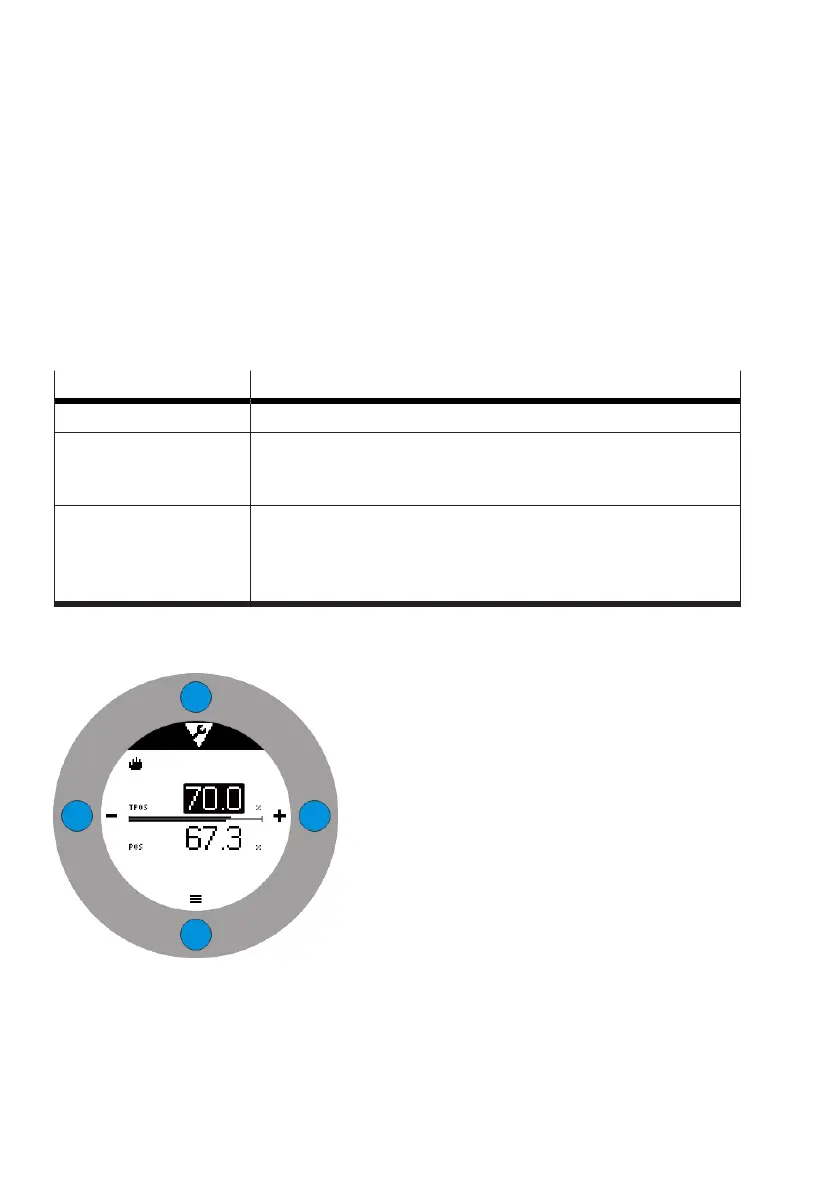
7.2.3.1 ‘Manual TPOS’ manual setpoint position mode
Fig. 23:
Manual setpoint position mode
In this operating mode, the setpoint position is entered manually. The selected position is approached
at the analogue input independently of the setpoint specification.
If the left key is actuated, the setpoint position specification is reduced. If the right key is actuated, the
setpoint position specification is increased.


 To Next Page