1. Installation
1-16
Festo P.BE-CPX-FB32-EN en 1111a
2. Set the network settings with the Handheld (CPX-MMI) or
the program “BOOTP-DHCP Server” from Rockwell
Automation. This activates saving of the network setti ngs.
Fixed addressing via DIL switch
Tip The fixed setti ng of the IP address is to be recommended for
test purposes during commissioning or for small networks.
Settings If a (binary coded) number not equal to 0 or 255 is set with
the switch elements of DIL switch 3, the IP address is
assigned fi xed. The set number specifies the host ID of the
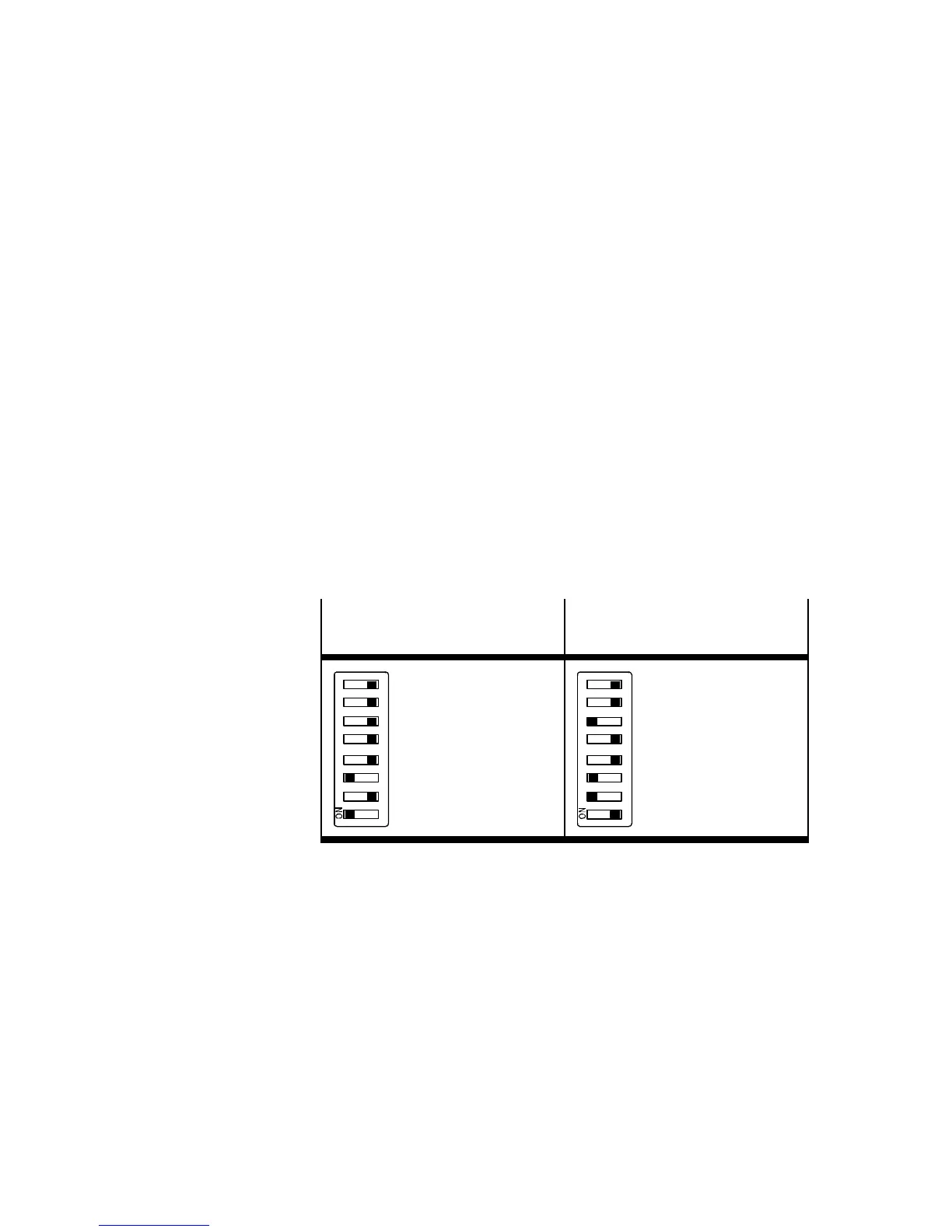
address “192.168.1.xxx” (see Fig. 1/4).
Example: Set IP address:
192.168.1.005
Example: Set IP address:
192.168.1.038
12 34 56 78
2
0
+2
2
=
1+4=
5
12 34 56 78
2
1
+2
2
+2
5
=
2+4+32=
38
Fig. 1/4: Examples of set IP addresses (binary coded) with
fixed addressing
In case of fixed addressing, the setting of the network mask
and the gateway are set unchangeably to:
Network mask: 255.255.255.0
Gateway: 0.0.0.0



 To Next Page