COMPONENTS 24
Checking connections
The most common cause of a hardware problem is a faulty or loose connection. Before you
replace a component, check all external connections, and then check all internal connections.
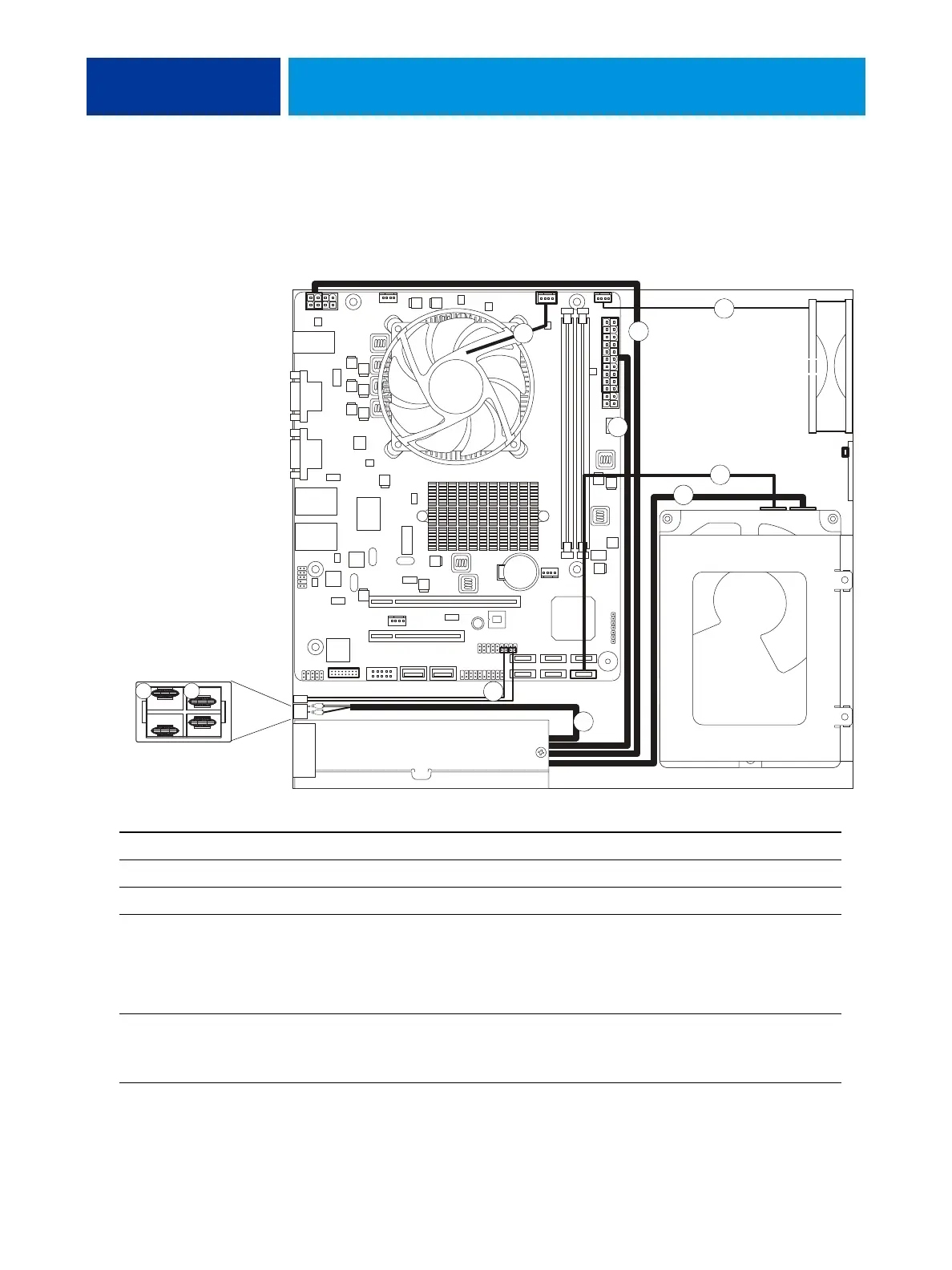
FIGURE 9: Cable diagram
Cable key From To
1. CPU fan cable CPU fan CPUFAN connector on the motherboard
2. Enclosed fan cable Enclosed fan FAN2 connector on the motherboard
3. HDD data cable HDD data connector SATA1 on the motherboard
4. Power supply cables Power supply a. SATA power connector—HDD
b. 8-pin motherboard connector (pins 1–4 are used)
c. 24-pin motherboard connector (pins 1–20 are used)
d. Black and white leads on power switch
5. Power button cables Power button a. SW cable—J14 (pins 6 and 8)
b. SW LED cable—J14 (pins 2 and 4)
(For details, see page 25.)
HDD
4a
5
2
CPU
fan
Power supply
Enclosed fan
4b
4c
3
1
4d
Connect one wire to A
and the other wire to B.
Power switch detail,
inside view
A B



 To Next Page