COMPONENTS 47
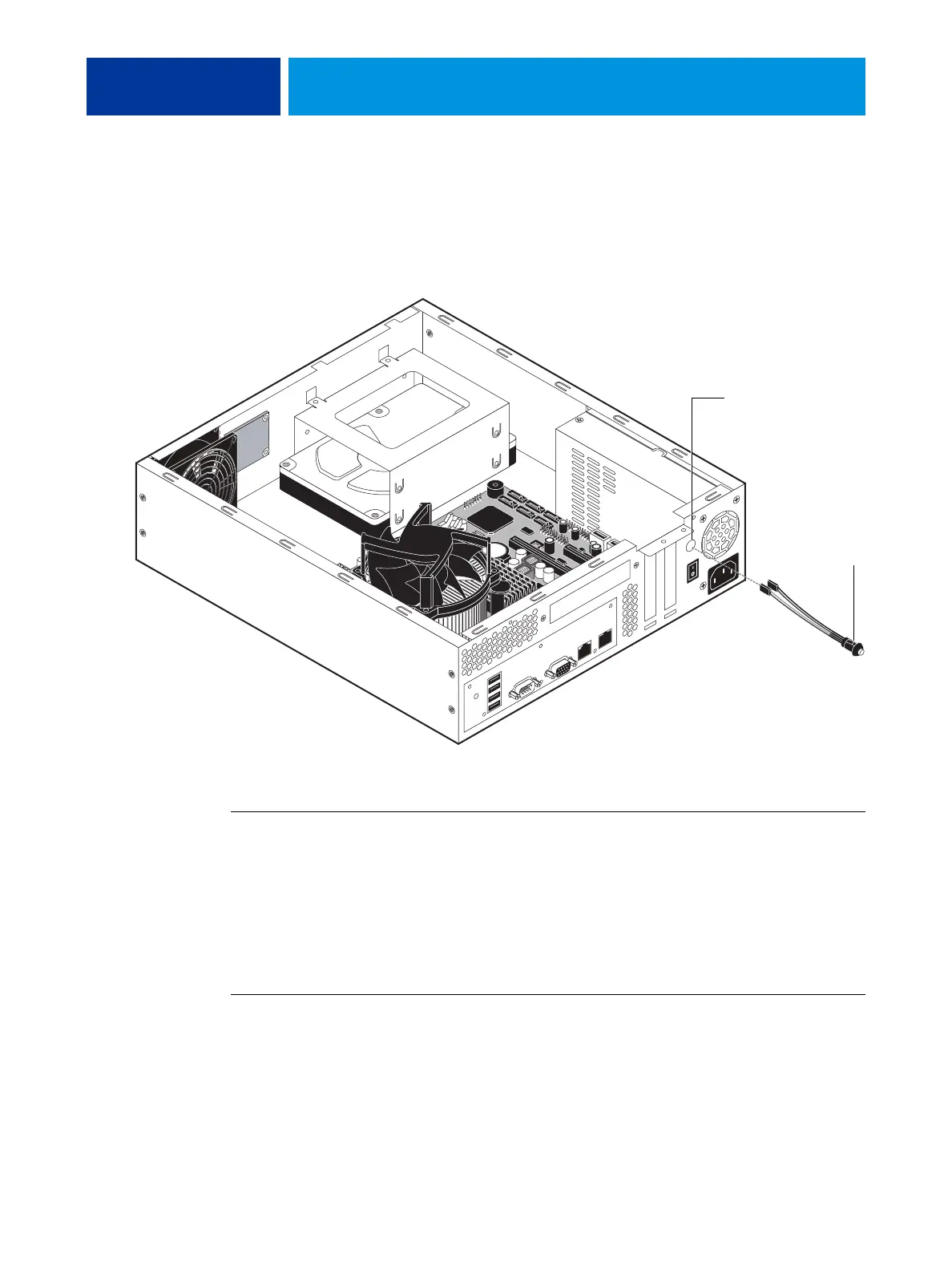
Power button
The power button assembly includes the power button, the SW cable, and the SW LED
cable. For more information about the power button, see page 16. When replacing the power
button assembly, follow “Precautions” on page 9.
FIGURE 24: Location of the power button
TO REMOVE THE POWER BUTTON ASSEMBLY
1. Shut down and open the E100 (see page 14).
2. Remove the power button cables (SW and SW LED) from J14 on the motherboard.
3. Use needlenose pliers to pinch the beveled sides of the button casing, and push the button
assembly out through the cutout in the chassis.
Carefully pull the power button cables, one pair at a time, through the cutout.
TO REPLACE THE POWER BUTTON ASSEMBLY
1. Carefully insert the power button cables through the cutout in the chassis.
Insert the cables, one pair at a time, through the cutout.
2. Push the button assembly firmly into the cutout until the assembly is locked in place.
Make sure that the beveled sides of the button casing are secured to the inside of the chassis.
Cutout
Pinch beveled sides
to unlock button
from chassis.



 To Next Page