18 ECS Series Manual — P/N LS10262-001FK-E:A 3/3/2021
Installation Installing ECS Series Cabinets
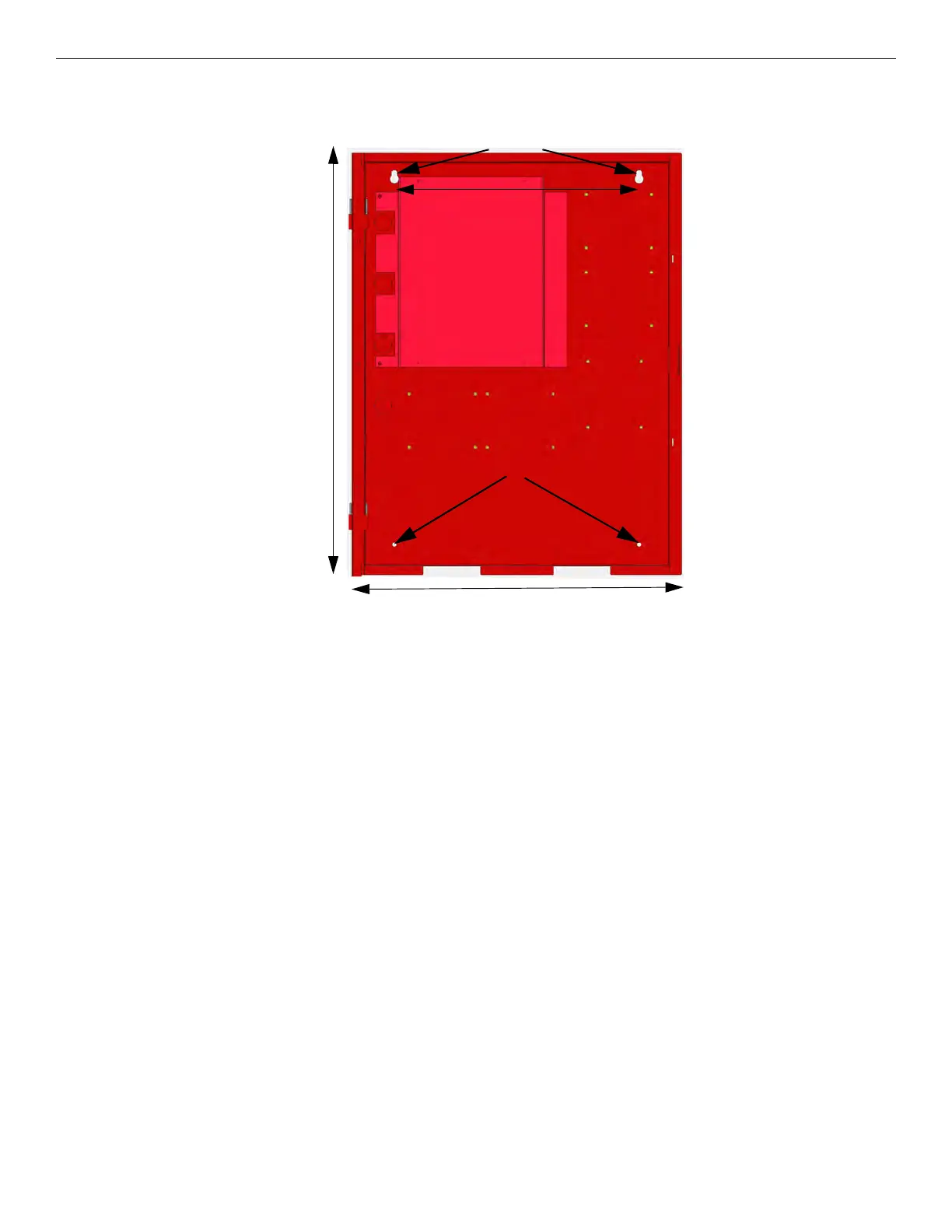
The cabinets can be mounted on the wall surface by using the mounting holes in the back of the cabinet (see Figure 3.6). For more informa-
tion, refer to the Installation manual for the FCP-2100ECS, P/N LS10143-002FK-E. Cabinet backbox dimensions are 26.5"H x 20"W x
4.1"D.
Figure 3.6 FCP-2100ECS or FIK-LOC2100 Cabinet Mounting Holes
3.4.6 Surface Mounting Instructions
The ECS Series cabinets can be mounted on the wall surface by using the mounting holes in the back of the cabinet (see Figure 3.7).
1. Insert two screws level with each other, 16" apart for the top cabinet key shaped holes. See Figure 3.7.
2. Hang the cabinet onto the two screws. Tighten the screws down.
3. Insert two screws into the two bottom mounting holes and tighten them snug to the cabinet.
If you need to remove the cabinet door and the dead front panel, see “Cabinet Door and Dead Front Removal for FCP-300ECS and FCP-
2100ECS” on page 19 for instructions.
26.5"
20"
Key Shaped Holes
Bottom Mounting Holes
16"



 To Next Page