4-6 FT-100/CI and FT-170/CI Operation Guide
Document 40275-0913
4.4 Verifying That the FT-100/CI
Autoshutter Works Correctly
4.4.1 Steps
Only the FT-100/CI includes an autoshutter, which is designed to
open when the conveyor is running to allow the emission of the
inspection beam and to close when the conveyor is stopped to
block all emission. Complete these steps to test the auto shutter.
1. Stop the conveyor.
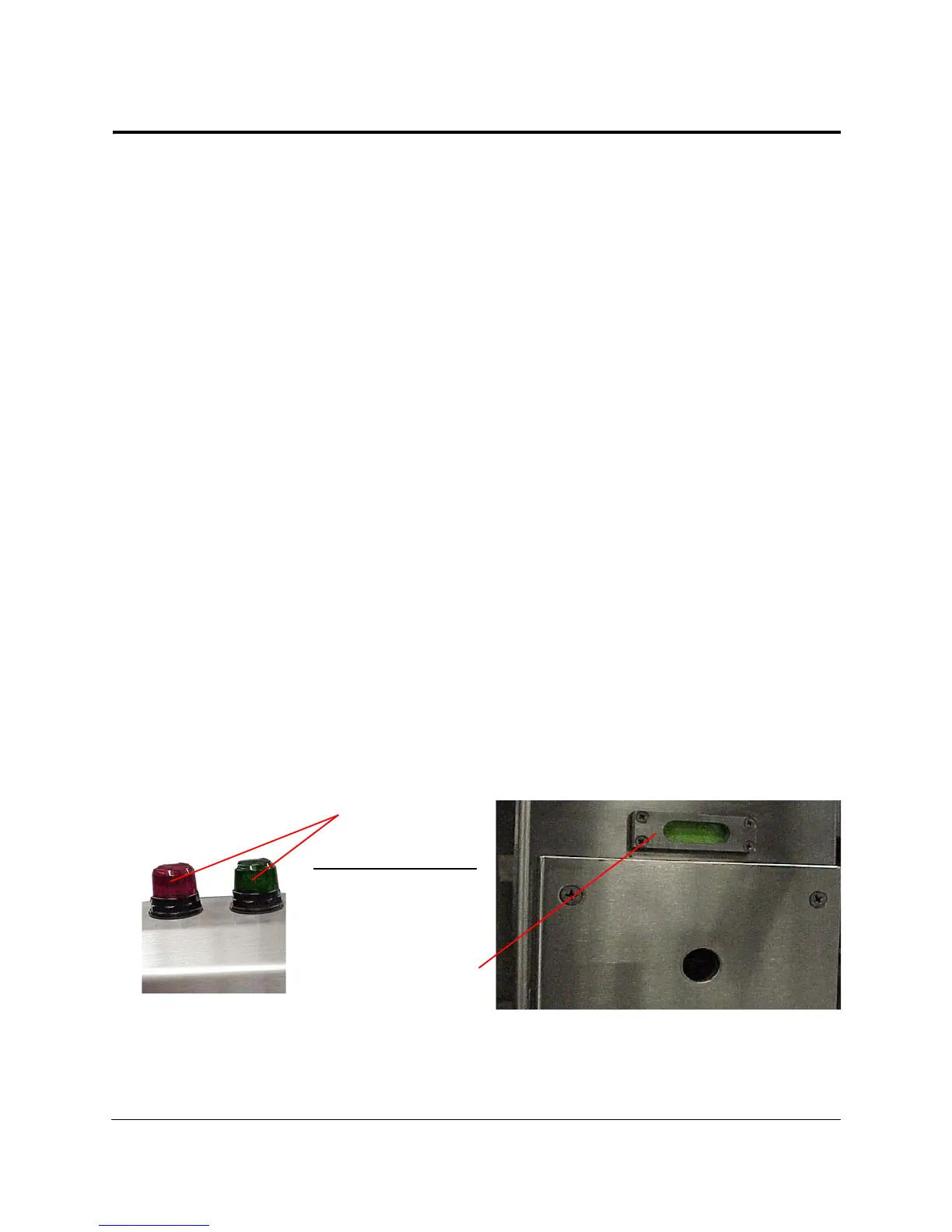
2. Does the green safety light turn on and does the safety
shutter indicator window on the FT-100/CI display green?
If yes, go to the next step, as the autoshutter and safety
light are working correctly.
If no, discontinue using the FT-100/CI and immediately
contact your service department, as the autoshutter is not
working correctly or the safety light bulb is burned out.
3. Start the conveyor.
4. Does the red safety light turn on and does the safety shutter
indicator window on the FT-100/CI display red?
If yes, stop, as the autoshutter and the safety light are
working correctly.
If no, discontinue using the FT-100/CI and immediately
contact your service department, as the autoshutter is not
working correctly or the safety light bulb is burned out.
Figure 4-1. Verifying the FT-100/CI Autoshutter



 To Next Page