9
SYSTEM OPERATION
MENU NAVIGATION
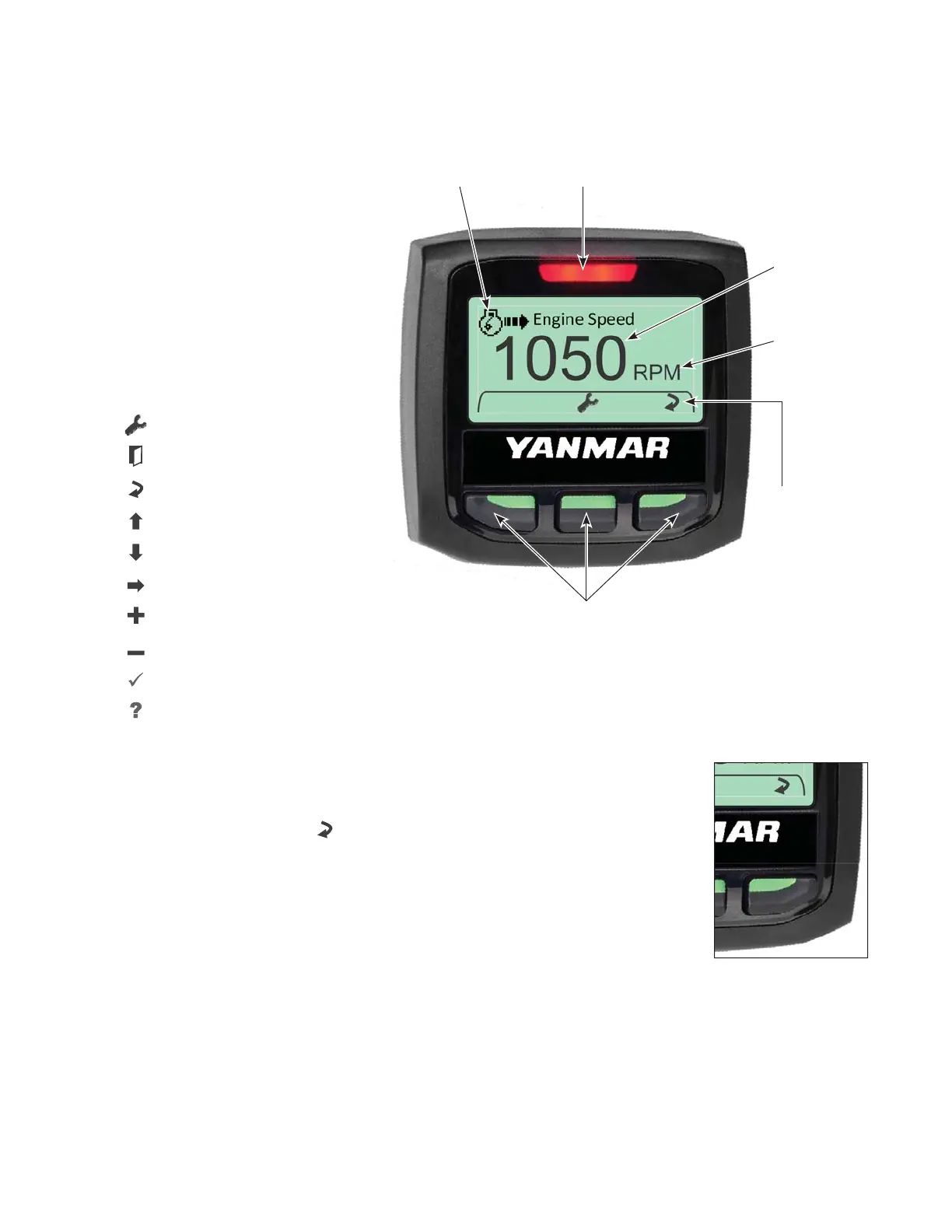
The control unit has three
navigation buttons which are
configured as softkeys. The
system softkeys are used to
navigate between displays,
select menu items and change
data. Pressing any of the
three navigation buttons will
display the softkey menu that is
associated with each button.
Softkeys Displayed
: Main Menu
: Exit
: Change
: Scroll Up
: Scroll Down
: Next
: Increase Vale
: Decrease Value
: Acknowledge
: More Information
CHANGING DATA DISPLAYS
To change the data being displayed, press any key to activate the softkey
menu. Press the Change “
” softkey to access the next data display
available.
See System Display List for complete selection of data displays available.
Softkeys
Displayed
Navigation
Buttons
Data
Units
Engine
Data
Alarm
Indicator
Engine Data
Symbol



 To Next Page