13
RESETTING MAINTENANCE TIMER
The maintenance timer is
operator configurable and
can be accessed through the
engine settings menu. See
“Reset MaintTimer” selection in
engine settings menu. When the
maintenance timer has expired,
a pop-up alert window indicating
that “Engine Maintenance is Due”
will be displayed. The operator
must acknowledge this pop-up to
return the control unit to normal
display operation.
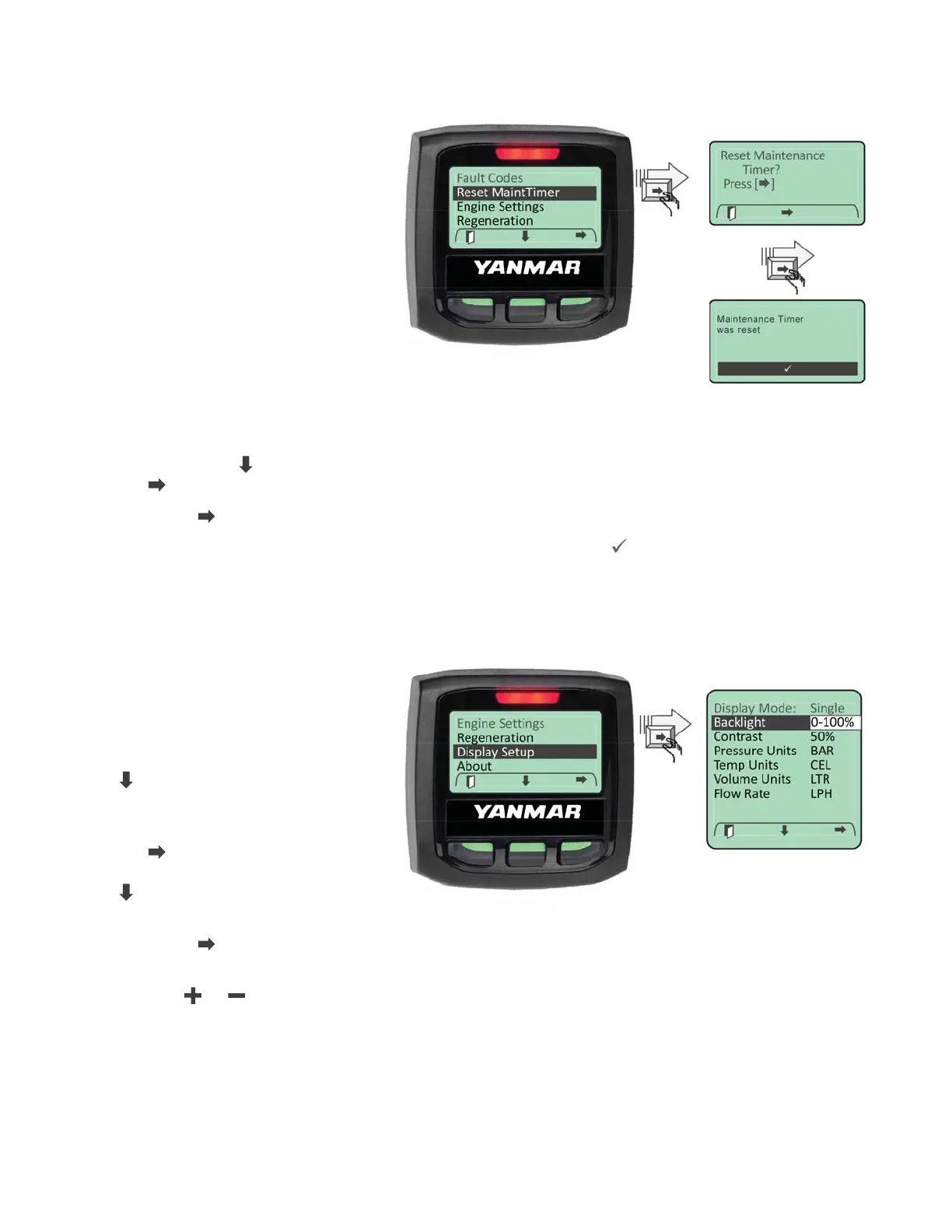
To reset the maintenance timer
enter the Main Menu and then
scroll to the “Reset MaintTimer”
entry using the “
” softkey. Press
the “
” softkey to select the reset maintenance timer menu item.
Press the “
” softkey to reset the timer.
Acknowledge the timer was reset by pressing the Acknowledge “
” softkey.
Note: The maintenance hours data display will indicate 0 hrs when the timer has expired and the
operator has not yet reset the timer.
BACKLIGHT SETTING
The LCD backlight is adjustable
from 0 to 100%. To adjust the
LCD backlight enter the Main
Menu and navigate to the
“Display Setup” menu using the
“
” softkey.
When highlighted enter the
Display Setup menu by selecting
the “ ” softkey. Navigate through
the “Display Setup” menu using
“
” softkey until the “Backlight”
entry is highlighted.
Press the “
” softkey to select
the backlight parameter setting.
Use the “
” / “ ” softkeys to set the backlight value.


 To Next Page