32
Assistant text composition
To simplify the entry of text strings, an assisted procedure
has been included, based on a pre-compiled list of 128
vocabulary words with a maximum of 18 characters. When
one of the numeric keys is pressed to enter a letter, the first
word in the list that begins with that letter will be inserted.
The Up and Down arrows will load the next or the previous
word in the list.
Activate the assisted entry procedure by pressing the Up
key for more than 3 seconds. Deactivate the assisted entry
procedure by pressing the Down key for more than 3
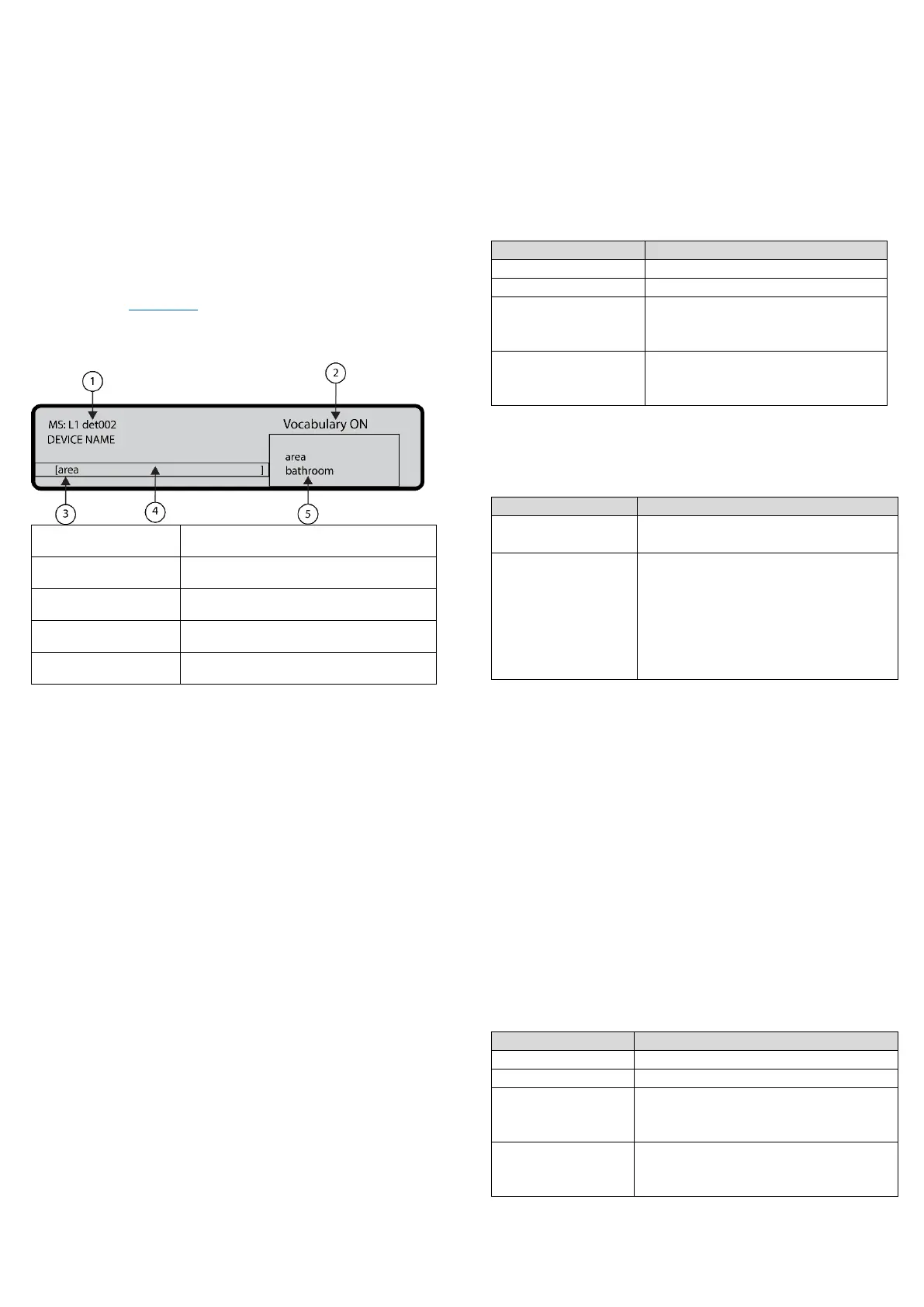
seconds. See Figure 17.
Figure 17: Assisted entry procedure
Assisted procedure active
When the assisted entry procedure is active, the string
Vocabulary ON blinks on the upper right area of the LCD
display. In the Vocabulary area the word currently selected,
in the row aligned with the Entry area, is displayed. The
word that precedes it in the vocabulary is displayed in the
upper row while the next word is displayed in the lower
row. In the Entry area the words used to compose the label
are displayed.
To enter a word, press the numeric key (more than one
time if necessary) related to the first letter of the word that
needs to be entered. If this word is not correct, scroll
through the vocabulary using the Up and Down keys until a
suitable word is found. During the vocabulary scan, the
word in the middle row is entered in the Entry area at the
cursor position. Use the Left and Right keys to move the
cursor to the beginning of each word.
Single selection
Use single selection to select a single value between a set of
possible values. The maximum number of values is 8.
ON off
^
The selected value is displayed in upper case. The
selection of a new value will automatically deselect the
previously selected value.
In this phase the keypad and keys have the following
functions:
Alphanumeric keypad
No function is related to the alphanumeric keypad.
Cursor keys
Table 10: Cursor key functions in single selection
Use to move the cursor to the
next value position and select
the value pointed to.
Use to move the cursor to the
previous value position and
select the value pointed to.
ESC and ENTER keys
Table 11: ESC and ENTER key function in single
selection
Use to cancel the operation and
return to the previous screen
Use to accept the programmed
string. The user interface moves to
the next programming parameter
screen, if any, or returns to the
MAIN screen signaling a local
programming activity followed by a
panel reset.
Multiple selection
Use multiple selection to select more than one value
between a set of possible values. The maximum number
of values is 8.
SUN mon tue wed thu FRI SAT
^
The selected values are displayed in upper case.
In this phase the keypad and keys have the following
functions:
Alphanumeric keypad
No function is related to the alphanumeric keypad.
Cursor keys
Table 12: Cursor key functions in multiple selection
Use to move the cursor to the next
value position and select the value
pointed to
Use to move the cursor to the
previous value position and select
the value pointed to



 To Next Page