42
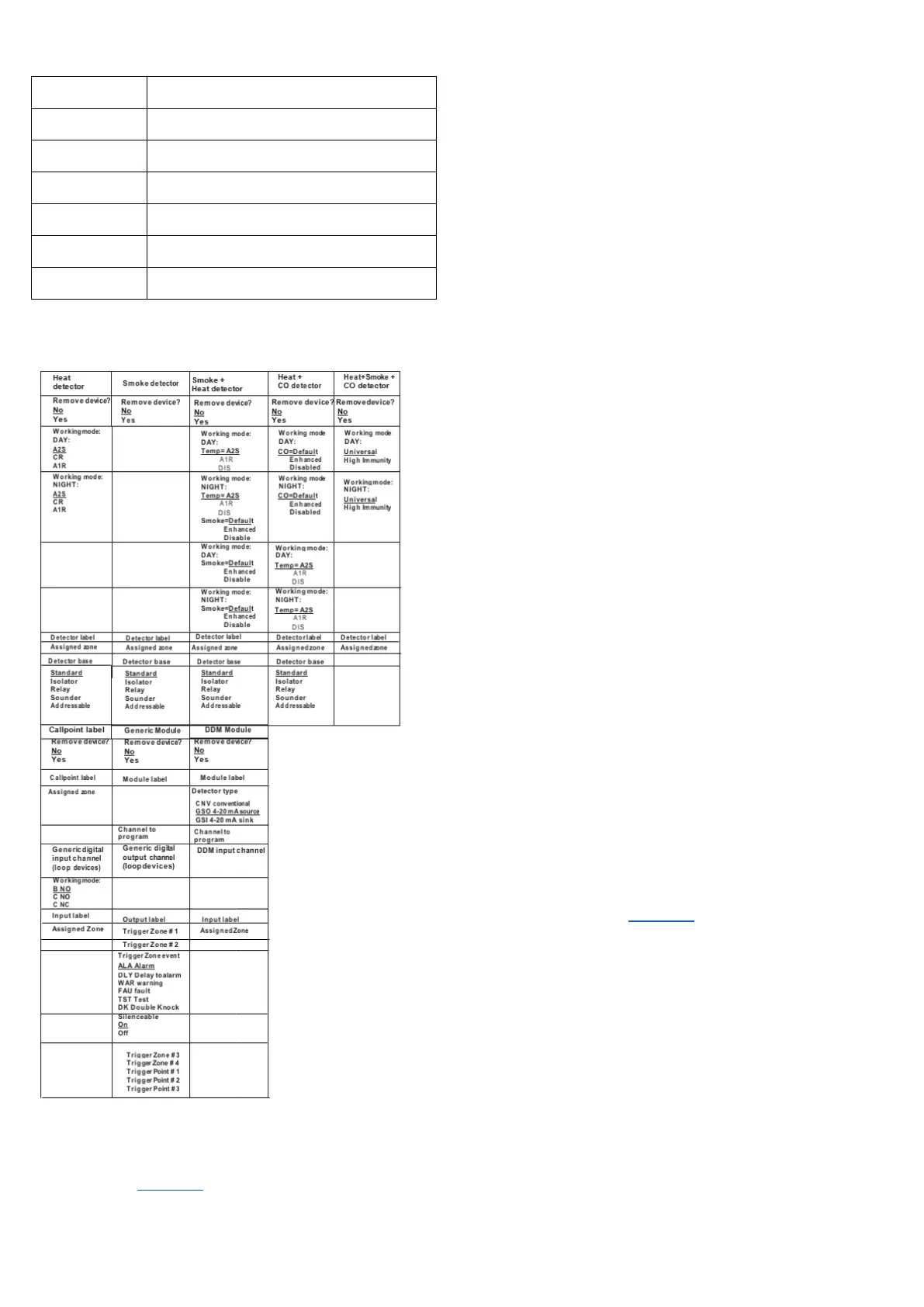
Table 37: Values table of the programming devices
Note: The underlined options are the default options
Loop devices programming screen
After selecting the loop and the device, the option LED is
displayed. See Figure 25. The LED option allows for the
location of the selected device in the site, lighting its LED
when the option ON is selected.
Note: Press the ENTER key to validate the selection. If the
device has no LED, the device sounder or beacon will be
activated. The option OFF removes the device signalling.
The option SKP exits the feature and moves to the normal
device programming sequence.
Remote LED
After programming other parameters, it is possible to
enable the activation of the programmable Remote LED of
a detector.
The detector has an output used to drive the Remote LED.
The output is activated only for the detector alarm to which
it belongs. It is possible to program it to activate for other
events as the activation occurs for other panel outputs and
for the detector alarm to which it belongs.
Note: The Remote LED can also be programmed on the
FireClass FC500 (FC501_FC503_FC506) Console in the
programming screen for the detectors.
Separated programming of the sounder and beacon
Select Separated programming of the sounder and beacon
when any of the following devices are selected:
FC410LPAV (all versions)
FC430LPASB
FC430SAB (with FC430SB)
FC410LPS-R/W (certified EN54-23)
FC410LPBS (certified EN54-23)
FC430LPBSB (certified EN54-23)
In the programming menu choose the channel, sounder or
beacon, to be programmed.
Before the alarm conditions, the user interface will display:
SOUNDER = BEACON
YES NO
If you choose YES, the alarm conditions are selected and
applied to both channels. If you choose NO, the channel
selection will be displayed and the alarm conditions will be
valid for the selected channel.
3 Key - SW zone
The SW zone option in the PROGRAMMING menu
activates the screen used to select and program the
software zone. See Figure 24, 0.
In this phase the keypad and keys have the following
functions:
Alphanumeric keypad
The alphanumeric keypad is used to select the zone
number (ID).



 To Next Page