HF2211 Serial Server Device User Manual
http://www.iotworkshop.com - 46 -
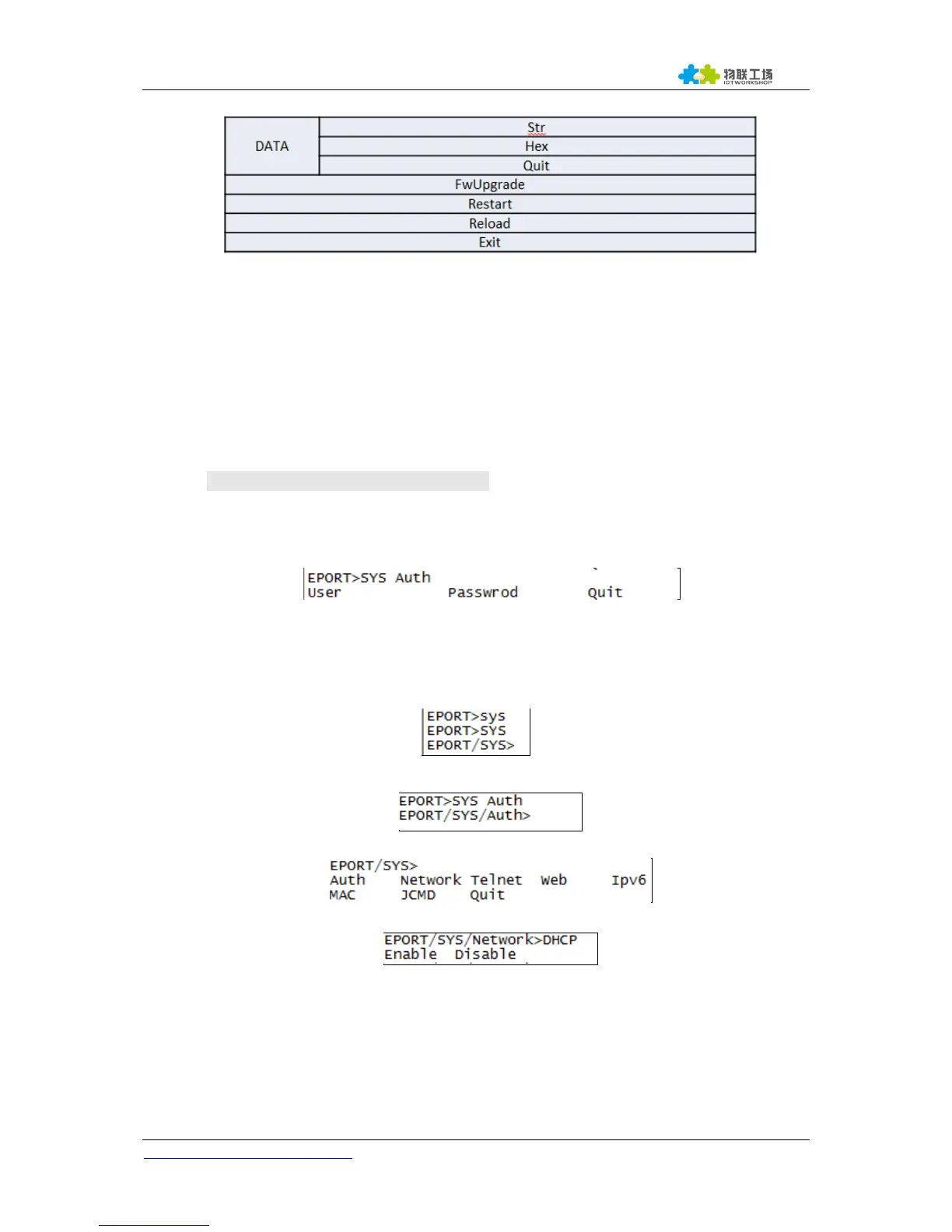
Figure 61. Cli Other Command
4.2.1. Cli Command Format
Cli command is in ASCII format. The usage is similar to Linux terminal. Command format as following:
Format Notes
< >: Cli command name or directory.
[ ]: Cli command parameters.
Command Message
<CMD> [para-2 para-3 para-4…]<CR>
<CMD>: Main directory or command name;
[para-n] : command parameters. If have multiple directory, it can also can be the son
directory. As below example;
<CR>: Command Terminator, “Enter” key, HEX data: 0x0a or 0x0d
<Notes>
If the input command not existed, UART will output again “EPORT>” to allow next command input.
The Cli command is case sensitive.
If need enter into son directory, press “space” key between the directorys.
If need to display all the directory or commands in the current directory, press “Tab” key to query.
If need to display current command parameter, press Tab key to query.
4.2.1.1. Show Command
Function: Show all system information, including the system running status, Network
status, UART status and socket status.
Format:
Query


 To Next Page