Flora Digital Printing System
Model LJ320P
Copyright 2011@ Shenzhen Runtianzhi Image Technology Co.,Ltd. By Victor Xu
~21~
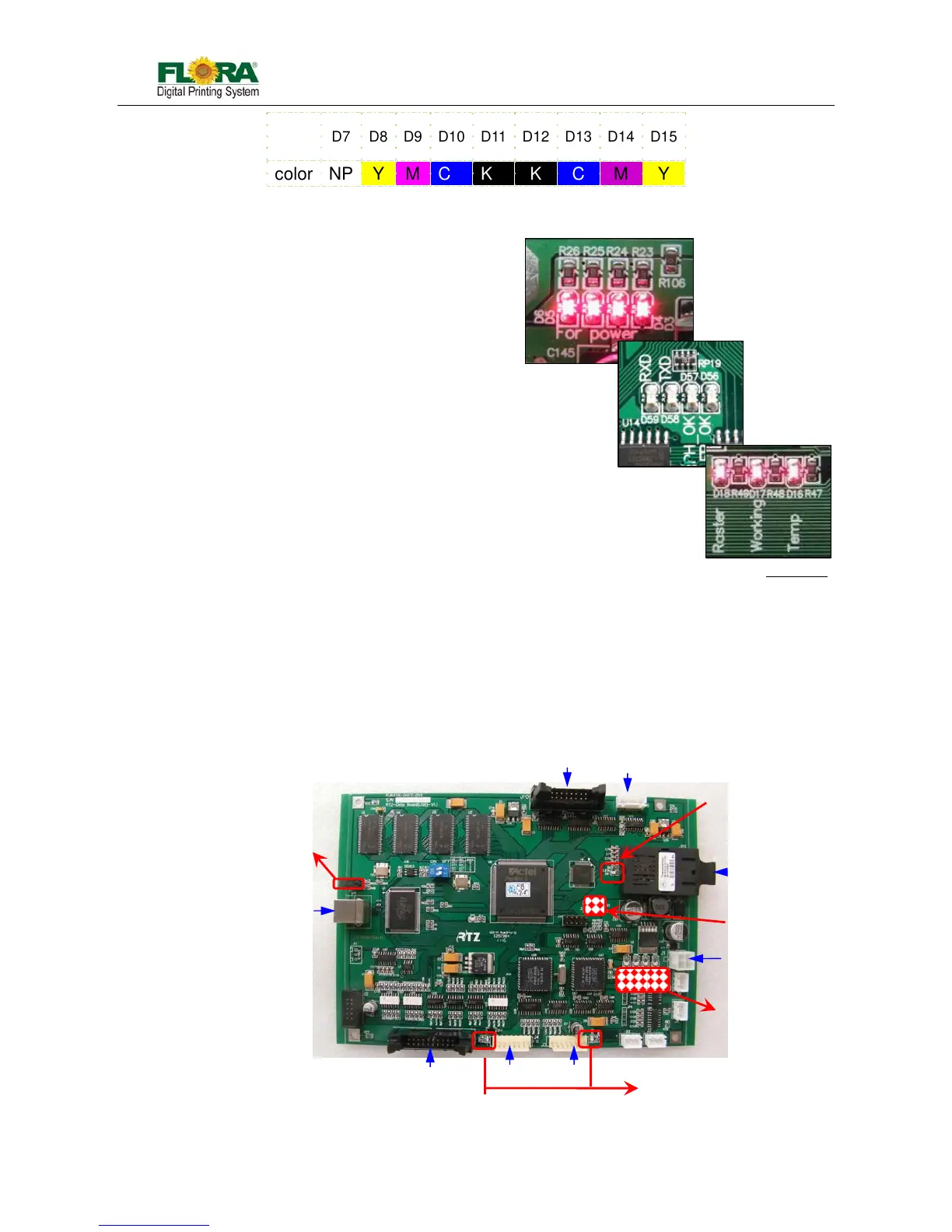
Note: D8~D15 are normal on, while D7 is off. Because the negative pressure tank is always
empty.
Power indicator:
All of these four LEDS will be normal on.
D3: 3.3V
D4: 5V
D5: 24V
D6: 24V
Status indicator:
D56: Fire indicator working normally: on
D57: Configuring indicator working normally: on
D58: TX indicator Transmitting data: on
D59: RX indicator Receiving data: on
Working indicator:
D16: Temperature indicator: heating, on; or it will be off.
D17: Working indicator: shine all the time
D18: Raster reader indicator: Carriage moving, on; carriage stopping, off
4.3.2 USB Board (116-0417-011)
The board is an interface between computer and printer, including functions as follow:
Apply data of image from computer and save it into the buffer, waiting the data request
from the printing control board
Conform the data and the order from computer, convert electric signal into light signal
and transmit it to the Printing control board; receive light signal form Printing control
board, convert them into electric signal and extract after separating them.
Communicate with the other boards, servo driver and computer, to coordinate the
whole printer working.
Take order form computer and control motion of the X axis and Y axis
D7 D8 D9 D10 D11 D12 D13 D14 D15
color NP Y M C K K C M Y
Fig.4.3.1-2 Indicators
Fig.4.3.2-1 USB Board
USB Indicator
Motion Indicator
PHB J1
PC
Communication
indicator
Linking
Indicator
PHB J11
SCB J7
Power
Indicator
5VDC
X-axis SD
Y-axis SD
SCB J5



 To Next Page