Flora Digital Printing System
Model LJ320P
Copyright 2011@ Shenzhen Runtianzhi Image Technology Co.,Ltd. By Victor Xu
~51~
Path for setting Right alignment:
Print Option Tag → Advanced (Test Print Tools Bar → Parameter Setting Icon) →
Offset Tab → Right align Check Box
Print Heads Previous Value Test Results Modified Value
M1 1062 -4 1058
M2 1593 4 1597
3. Align the other print heads as the same procedure.
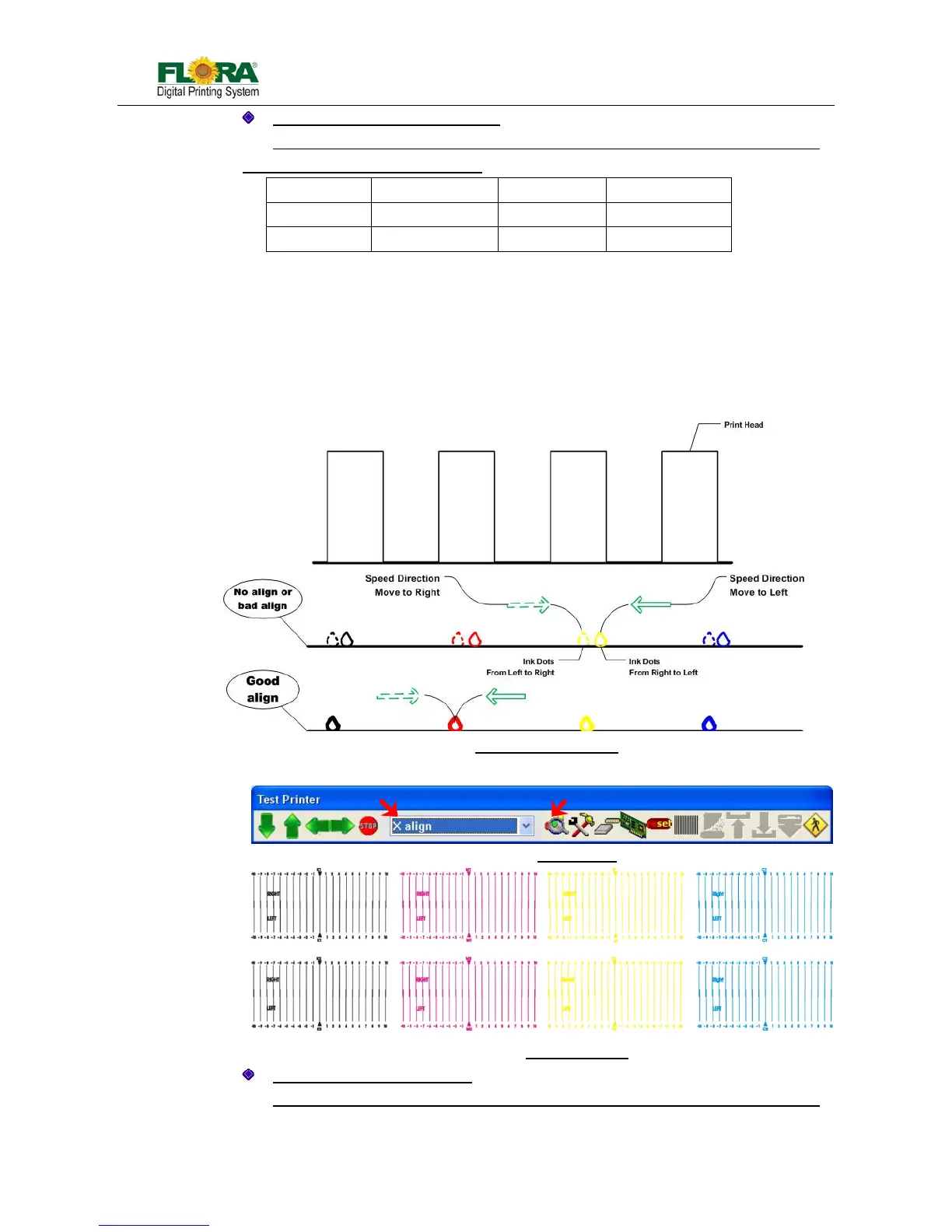
5.5.8 X Alignment
X alignment is very necessary for Bi-direction print mode. If this alignment is not
good, the output image will be rough and fuzzy because of dislocation output coming from
double directions.
X alignment is similar with Right alignment. But every print head will take itself as
reference print head! The way to set the value is the same with right alignment!
1. Highlight X Align from test drop down list, and send print by click align color icon;
Path for setting X alignment:
Print Option Tag → Advanced (Test Print Tools Bar → Parameter Setting Icon) →
Fig.5.5.8-2 Send X Align
Fig.5.5.8-1 Illustration for X Align
Fig.5.5.8-3 X Align Drawing



 To Next Page