Flora Digital Printing System
Model LJ320P
Copyright 2011@ Shenzhen Runtianzhi Image Technology Co.,Ltd. By Victor Xu
~39~
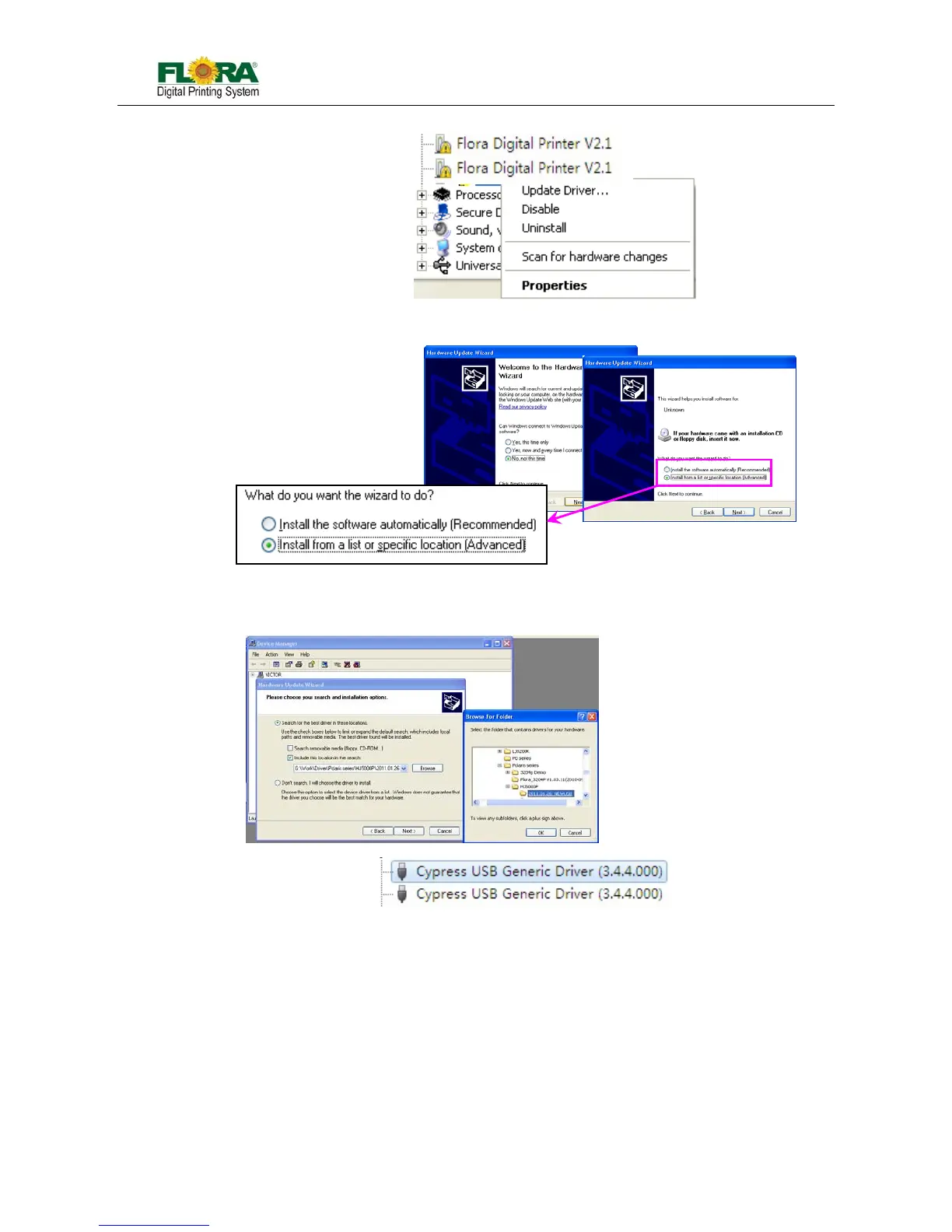
1) Go to Device Manager, you can find that the hardware name Flora Digital Printer V2.1;
2) Right click on this option, choose Update Driver as above. Click it, if will pop Hardware Update
Wizard windows as below;
3) Browse the installation folder, click USB install package. Then you will get the Cypress USB
Generic Driver (3.4.4.000) under Universal Serial Bus Controller;
4) Finished!
5.3.4 Add setup
1) Find the PhotoPRINT Server Flora Edition 6.1v2 on the desktop and double click to open;
2) If it is the first time your install, it will prompt you to add your setup,
If not, you can click “Add Setup…” from “Setup” menu;
Or you can click add setup icon directly



 To Next Page