EasyManua.ls Logo

FLORA LJ3208P - Setting Negative Pressure Sensor

FLORA LJ3208P
74 pages
Print Icon
To Next Page IconTo Next Page
To Previous Page IconTo Previous Page
Loading...
Flora Digital Printing System
Model LJ320P
Copyright 2011@ Shenzhen Runtianzhi Image Technology Co.,Ltd. By Victor Xu
~70~
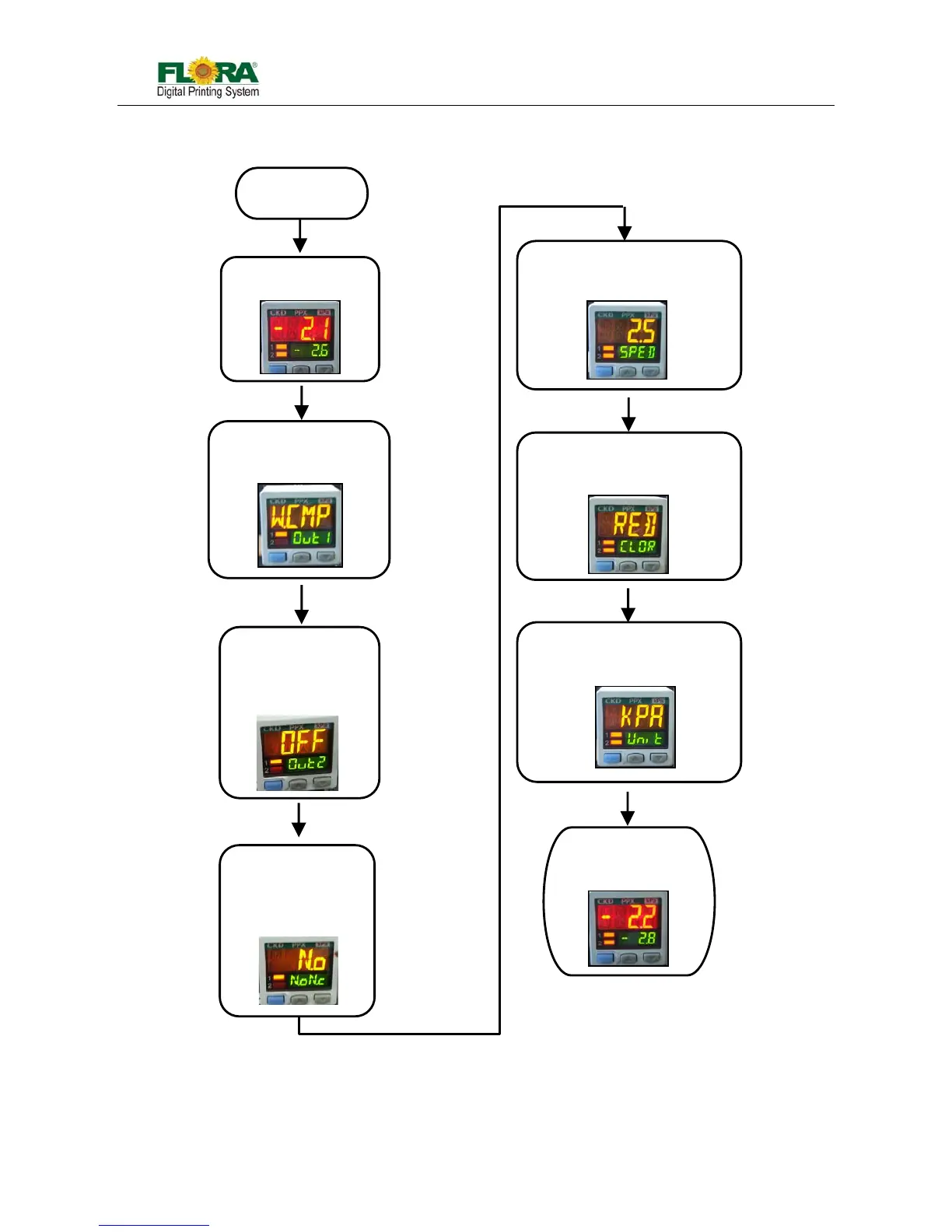
Appendix B HOW TO SET NEGATIVE PRESSURE SENSOR (CKD) DISPLAY
The sensor will
show this display
Press MODE button
and hold for 2
seconds to display
Press MODE
button 1X then
press arrow
UP/DOWN until it
display
Press MODE
button 1X then
press arrow
UP/DOWN until
it display
Press MODE
button 1X
then press arrow
UP/DOWN until it display
Press MODE
button 1X
then press arrow
UP/DOWN until it display
P
ower
up
the
Press MODE
button
1X to exit
Press MODE
button 1X
then press arrow
UP/DOWN until it display

Table of Contents

Related product manuals