Flora Digital Printing System
Model LJ320P
Copyright 2011@ Shenzhen Runtianzhi Image Technology Co.,Ltd. By Victor Xu
~48~
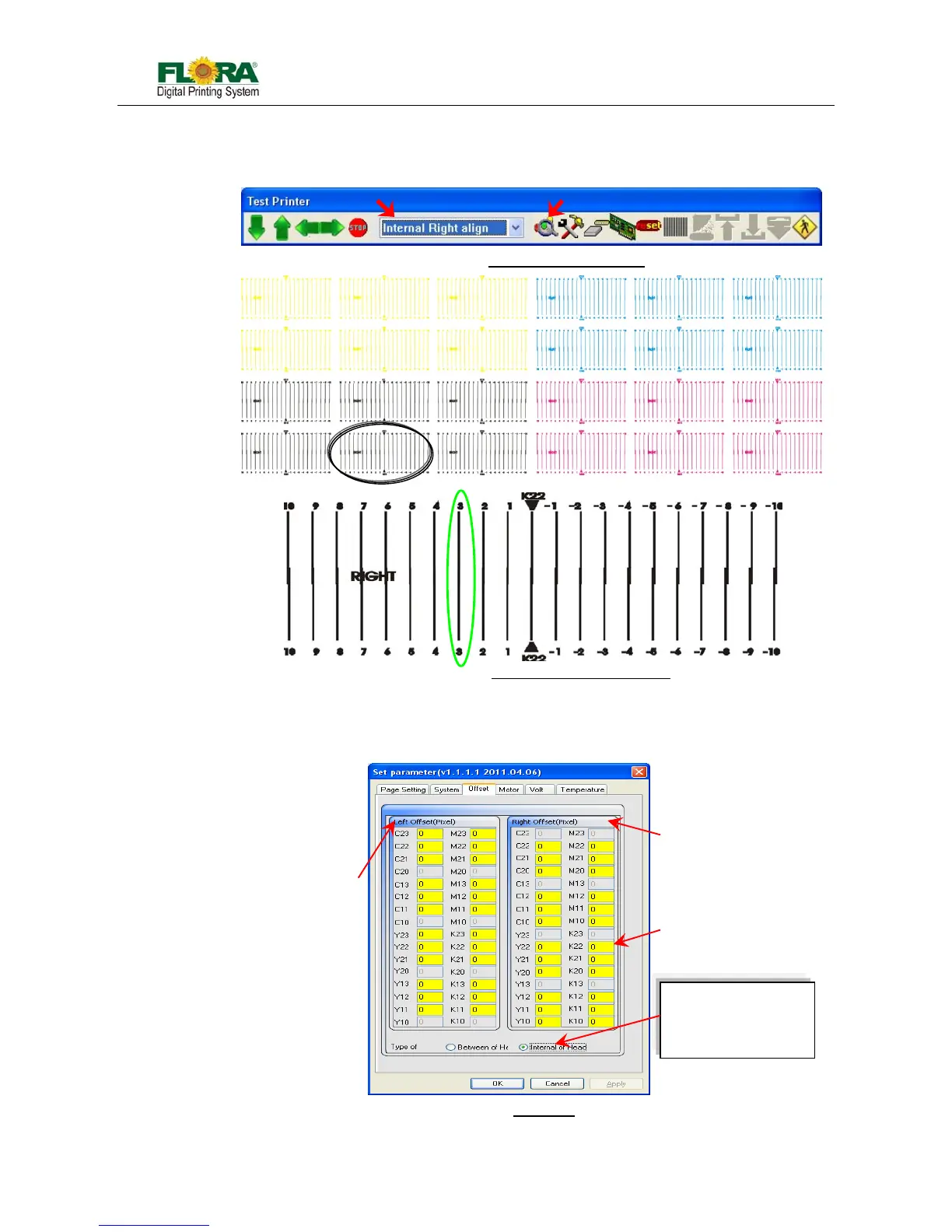
1. Highlight Internal Right Align from test drop list, and send print by click align color
icon; you will get prints as below. Every color will have three units of prints, take K
for example:
2. The “0 position” of the top K22 must be aligned with “0 position” of down K22. In
illustration Fig., K22 meets at “3 position” (in green circle), and the default value of
K22 is 0. So the K22 should be 0+3=3.
Fig.5.5.5-2 Send Internal Right Align
Fig.5.5.5-3 Internal Right Align Drawing
Fig.5.5.5-4 Offset Tag
Internal Left Offset Column
Internal Right Offset Column



 To Next Page