Rue J.H. Cool 19a | B-4840 Welkenraedt | BELGIUM
Tel. : +32 (0)87 899 799 | Fax : +32 (0)87 899 790
E-mail : info@flow-tronic.com | www.flow-tronic.com
- 22 -
4.3 Main screen
When powering on the IFQ Monitor, some information about the device and the firmware is shown: serial number
followed by the firmware version. You will then be directly forwarded to the “Main Screen”.
Lift up the top cover window in order to use the navigation keys. Refer to section 4.2 on page - 21 -.
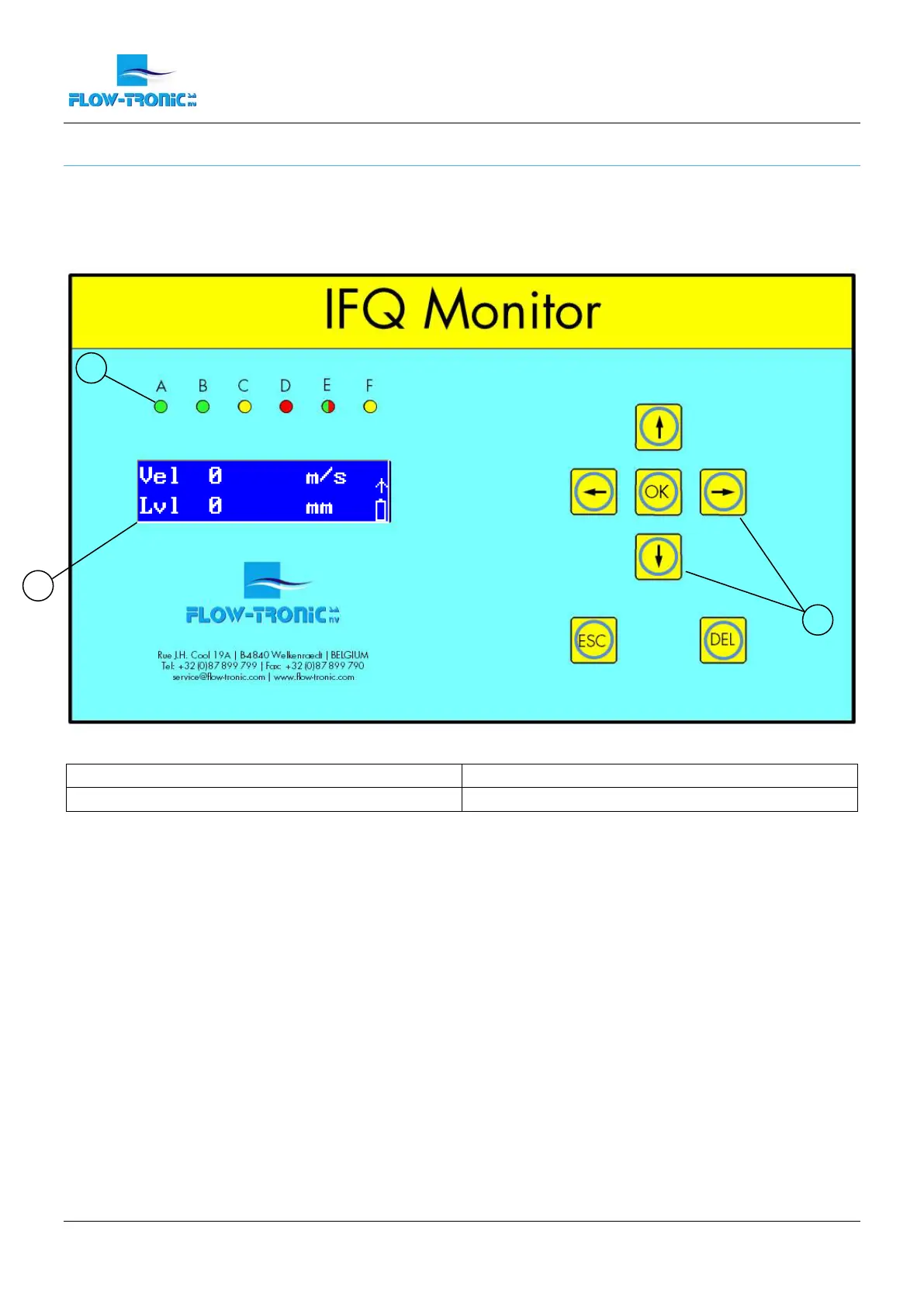
Figure 14: Main screen
1 Status LEDs 3 Navigation keys
2 Result screens
For detailed information about the status LEDs refer to section 4.3.2 on page - 23 -.
For detailed information about the result screens refer to the section 4.3.1 on page - 23 -.
The navigation keys are explained for each kind of menu in the sections 5.2.1 and 5.1.
1
3
2


 To Next Page
 Loading...