7
EN
5.FLYERwithBosch
motor
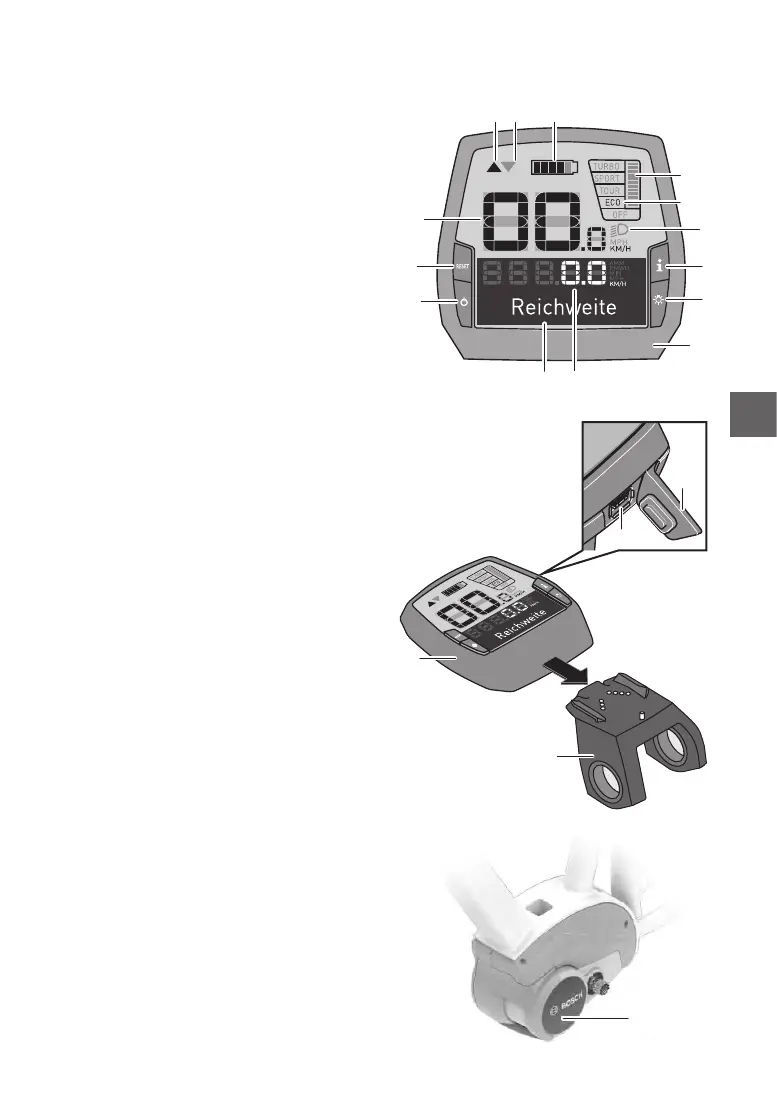
5.1 Operatingthee-bikewiththe
Intuviaon-boardcomputer
1. “i” display function button
2. Lighting button
3. On-board computer
4. On-board computer holder
5. On-obuttonfortheon-boardcomputer
6. “RESET” button
7. USB socket
8. USB protective cover
9. Drive unit
On-boardcomputerdisplayelements
a Motor power indicator
b Support level indicator
c Lighting display
d Textdisplay
e Values display
f Tachometer display
g Gear Recommendation: the higher gear
h Gear Recommendation: the lower gear
i Battery charge status indicator
You have the following options for switchingon
the E-bike system:
• The E-bike system is automatically switched
on if the controls are on and inside their holder.
• Brieypressthecontrols’on/obutton5 once
the controls and the battery have been inserted.
• Press the battery on/o button once the on-
board computer have been inserted.
You have the following options for switchingo
the E-bike system:
• Presstheon-boardcomputeron/obutton5.
• Switch o the battery using its on/o switch
(see operating instructions of the battery).
• Remove the controls from their holder.
Switchingtheon-boardcomputeron/o
Briey press the on/o button 5 to switch on
the on-board computer. The controls can also
be switched on when they have not yet been in
-
serted
intotheholder(ifthebatteryissuciently
charged).
Press the on/o button 5 to switch o the on-
board computer.
For about 10 minutes, neither move the FLYER
nor push any buttons on the on-board computer.
The E-bike system will automatically turn o to
save energy.
6
5
f
g
h
1
a
i
b
d e
c
2
3
7
8
4
3
9



 To Next Page