EasyManua.ls Logo

Flying Voice Technology IP542N - Get Familiar with IP542 N; Front Panel

Default Icon
72 pages
Print Icon
To Next Page IconTo Next Page
To Previous Page IconTo Previous Page
Loading...
FLYINGVOICE Page
11
of
72
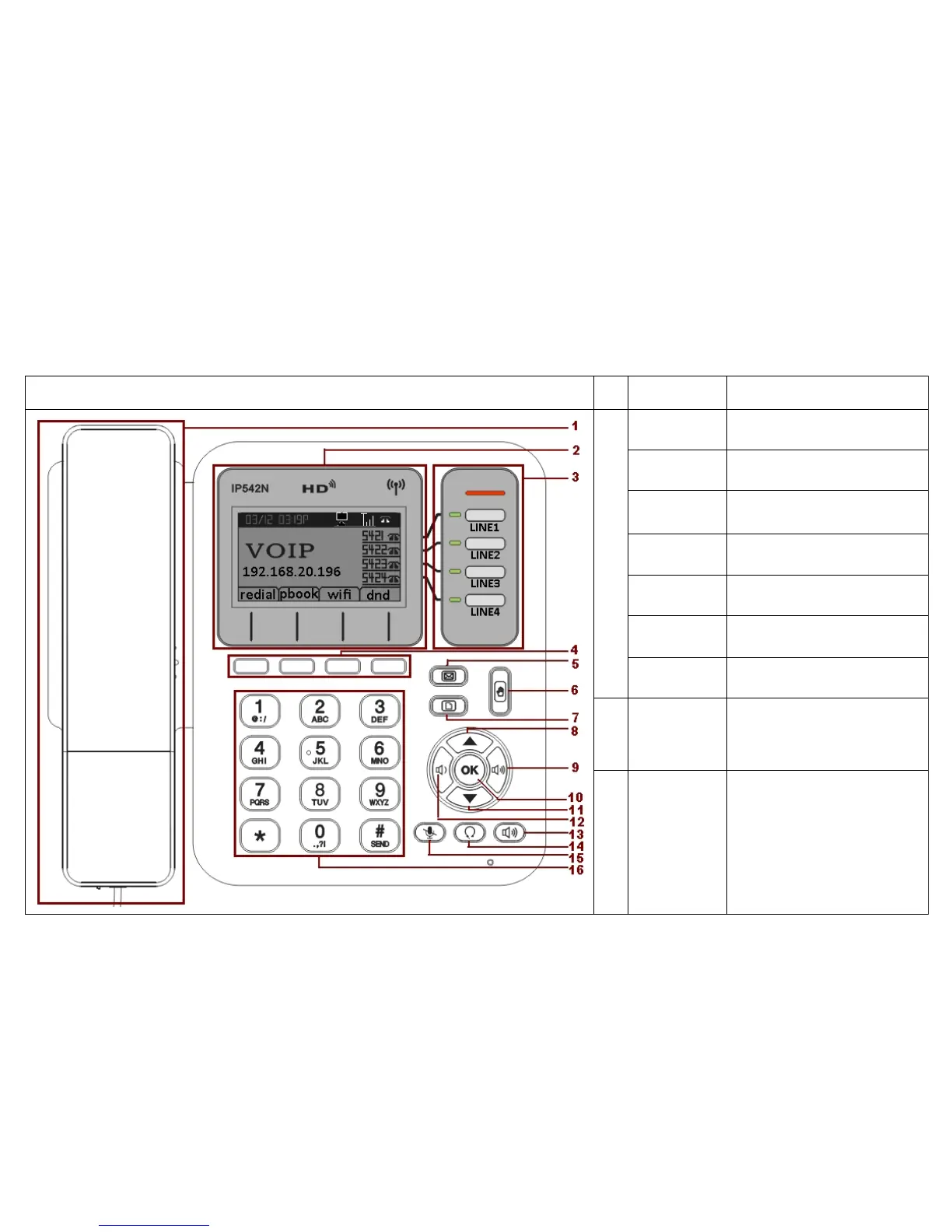
3 Get Familiar with IP542N
3.1 Front Panel
Front Panel
No.
Part Name Description of function
1
cradle
For the placement of handset
(Receiver end)
Hook switch
For hang-up and hang-off of
handset
Cradle latch
To prevent the handset from
dropping when it is
wall-mounted.
Handset
bottom cradle
For the placement of handset
(Transmitter end)
Handset cord
port
RJ-11 jack on the left side of
the IP phone
Headset wire
port
RJ-11 jack on the bottom of the
handset
Headset
To mount mouthpiece and
earpiece on the single handle.
2
LCD screen
The LCD screen is for
displaying your settings, such
as the IP address of you
Internet port, phone number,
and line status and so on.
3
Line Keys
These keys are used as line
keys; you can press the line
button to select the
corresponding line, and then
user can make call or do other
functions.
The LEDs under the keys used
to display the status of each
extension, please refer to 3.4

LCD indicators.

Table of Contents