FLYINGVOICE Page
47
of
72
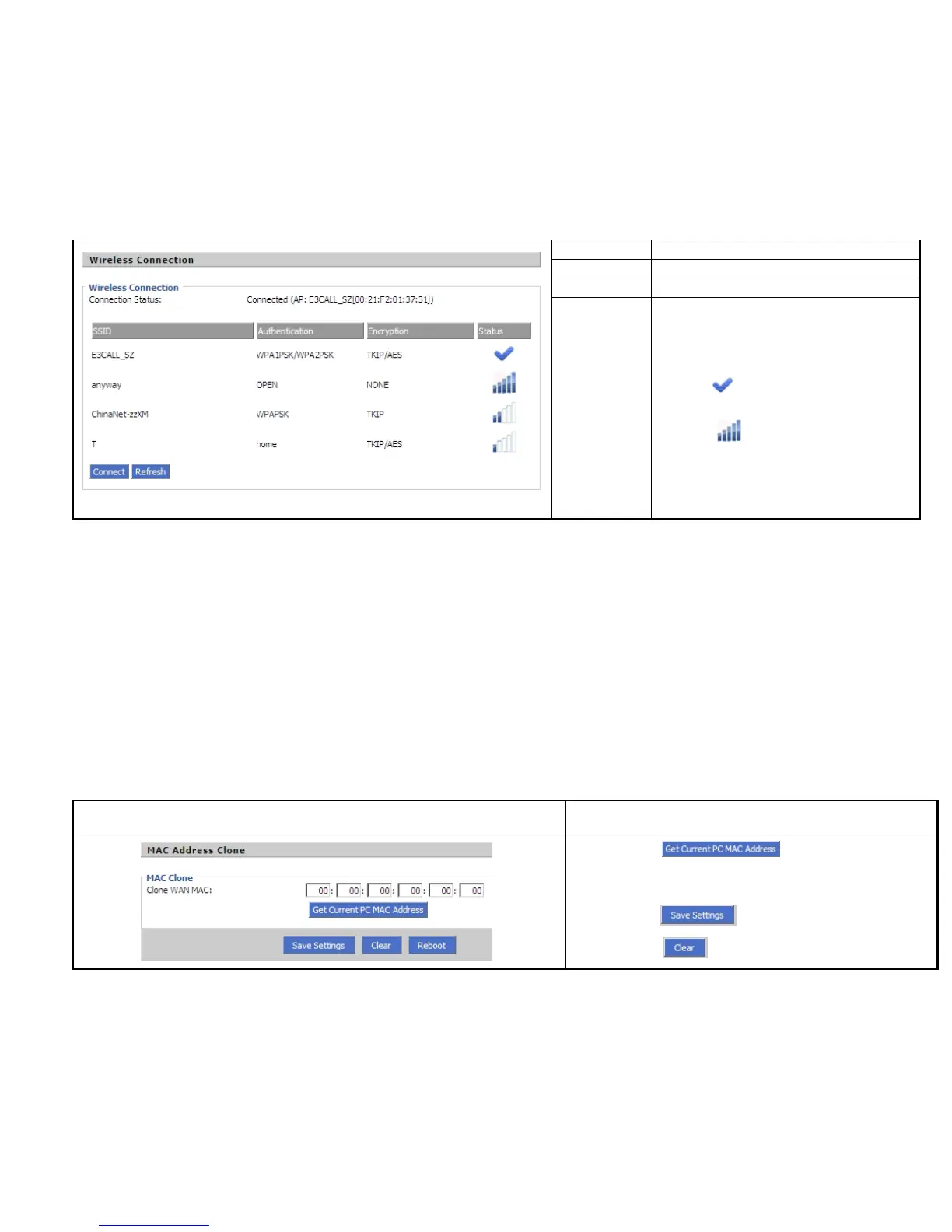
SSID
The SSID name of all searched AP.
Authentication
Display the authentication type of the AP
Encryption
Display the encryption type of the AP
Status
Display the status of the AP.
The icon stands for the IP542N have connected
to the AP.
The icon stands for the signal strength of the
AP.
MAC is the hardware address of network equipment. Sometimes, network providers may bind network account with the network equipment’s
MAC address. So you may not pass the provider’s authentication when you use a new IP542N. In this case, you can use MAC Clone to copy
your PC’s MAC address to IP542N’s Internet port.
MAC is an important parameter for network equipments, so you should make sure that the MAC is right, in order to prevent to make IP542N
unusable.
You can login IP542N’s Web via PC port if you are incautious to make it wrong. And then cloning the right MAC or resume the default settings.
Description
Step 1 Press button to get the PC’s
MAC address
Step 2 Press to save the changes
Step 3. Press to cancel MAC address clone.



 To Next Page