INSTALLATION AND SETUP
Electrical Installation
25
Additional Control Input/Output Wiring
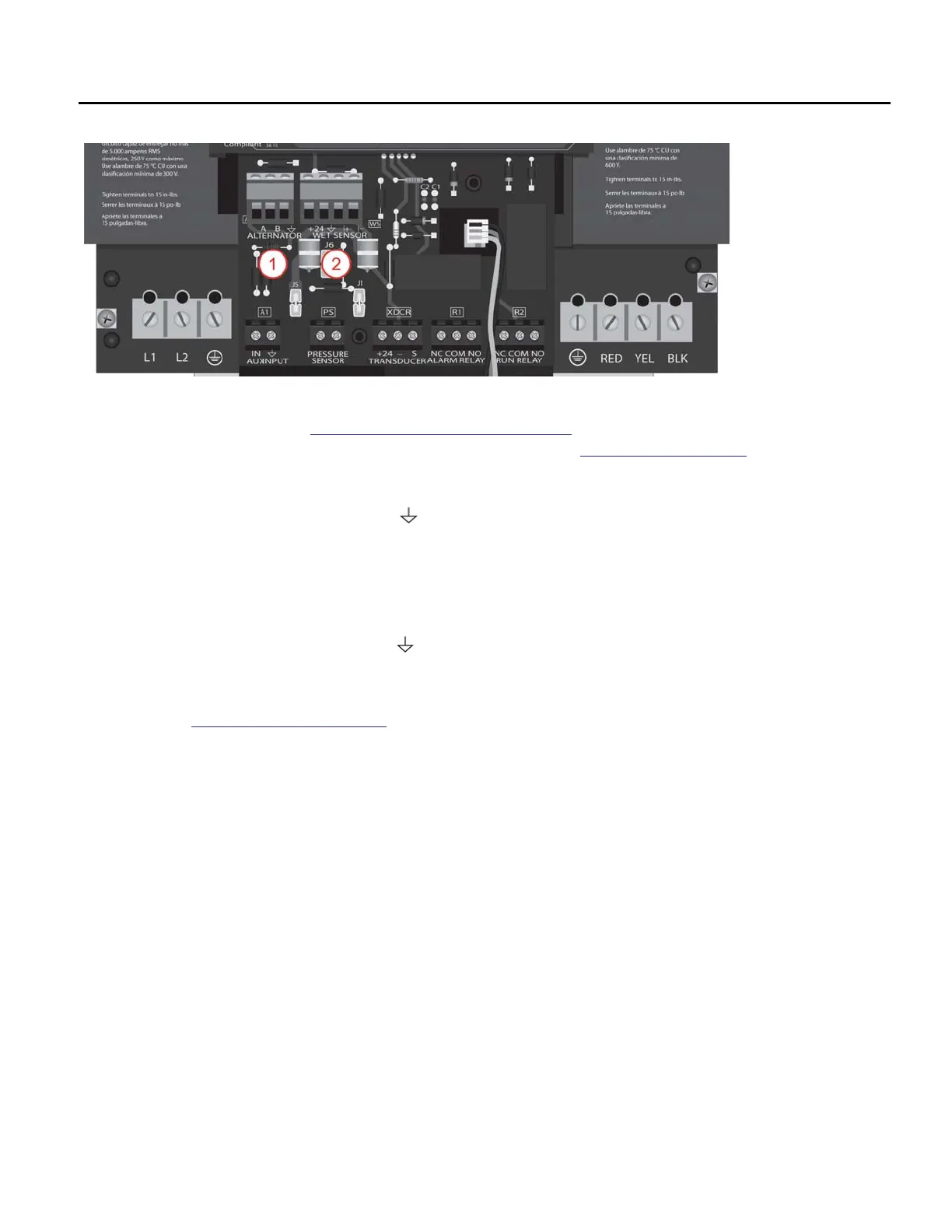
1. Built-In Duplex Alternator – Use the ALTERNATOR terminals to connect two drives in a lead/
lag configuration. Refer to
“Duplex Alternator Feature” on page 42. An appropriate Duplex
Alternator communication cable should for this connection. Refer to “Accessories” on page 54.
• Connect the black cable lead to the A terminal on both drives.
• Connect the red cable lead to the B terminal on both drives.
• Connect the green cable lead to the terminal when applicable.
IMPORTANT: Both drives should be wired from the same panel to ensure proper communica-
tion and operation.
2. Moisture Sensor – The WET SENSOR terminal supports the Franklin Electric Moisture Sensor.
• Connect the red cable lead to the +24 terminal.
• Connect the black cable lead to the terminal.
• Connect the white cable lead to the I+ terminal.
• Connect the green cable lead to the I– terminal.
Refer to “Moisture Sensor” on page 32 for more information about configuring this input.



 To Next Page