•
outside air temperature is low enough to make
the A/C ineffective;
•
engine is running at extremely low rpm;
•
conditions exist that result in the climate con-
trol system going into protection mode.
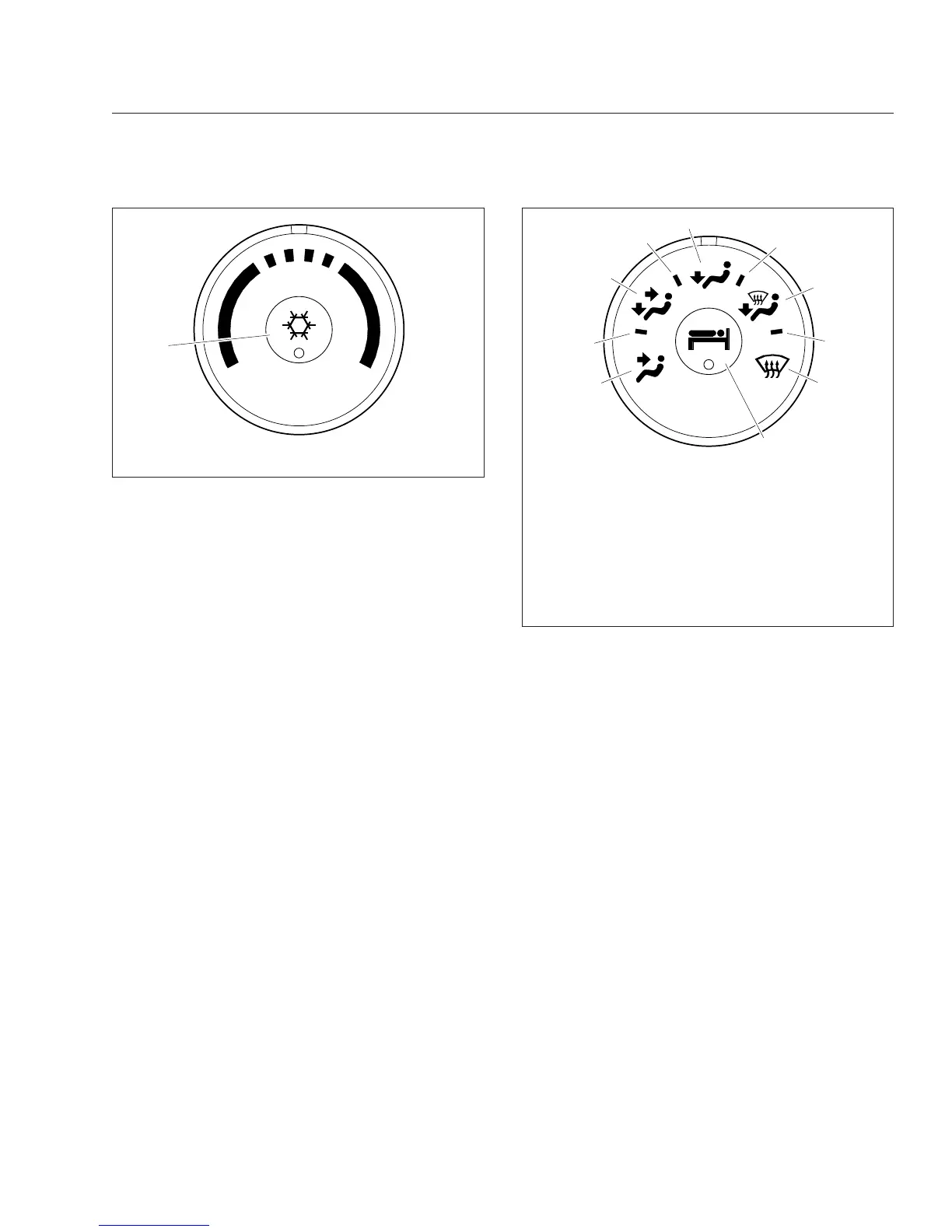
Mode Control Switch
The mode control switch allows the driver to control
the flow of air through the face outlets, the floor out-
lets, the defrost (windshield) outlets, or a combination
of these outlets. See
Fig. 8.4.
•
Face Mode: Directs all airflow through the face
or instrument panel outlets.
•
Bi-Level Mode: Directs the airflow equally to
the face outlets and the floor outlets.
•
Floor Mode: Directs all airflow through the floor
outlets.
•
Floor/Defrost Mode: Directs the airflow equally
to the floor outlets and the defrost outlets.
•
Defrost Mode: Directs all airflow through the
defrost outlets.
Bunk Override Button
The bunk override button, equipped on sleeper cabs
only, allows the driver to control the sleeper heat and
A/C settings from the cab. See
Fig. 8.4.
Press the bunk override button to turn the sleeper
heat or A/C on. An amber indicator will illuminate
when bunk override mode is activated.
Press the bunk override button again to turn bunk
override mode off. Adjusting the sleeper climate con-
trols at any time will also cause the bunk override
mode to cancel.
Sleeper Climate Control Panel
The standard sleeper climate control panel has a fan
switch and a temperature control switch with an A/C
button.
If the bunk override button has been activated, the
override mode can be canceled by changing the
sleeper fan speed or temperature setting. The cli-
mate control system will then operate from the
sleeper controls.
Fan Switch
The fan switch activates the fan, which forces air
through the air outlets. The fan switch has eight fan
speeds and an OFF position. See
Fig. 8.5.
To operate the fan switch, turn the switch clockwise
to increase airflow; turn the fan switch counterclock-
wise to decrease airflow. If the vehicle has Optimized
06/08/2007 f610947
1
1. Air Conditioning Button
Fig. 8.3, Temperature Control Switch
06/08/2007 f610948
1
2
3
4
5
6
7
8
9
10
1. Face Mode
2. Selection Between Face Mode and Bi-Level Mode
3. Bi-Level Mode
4. Selection Between Bi-Level Mode and Floor Mode
5. Floor Mode
6. Selection Between Floor Mode and Defog Mode
7. Defog Mode
8. Selection Between Defog Mode and Defrost Mode
9. Defrost Mode
10. Bunk Override Button (on sleeper-cabs only)
Fig. 8.4, Mode Control Switch With Bunk Override
Button
Climate Control
8.2











 To Next Page