Detroit
™
Automated
Transmissions
Detroit transmissions have twelve forward gears and
up to four reverse gears that can be shifted automati-
cally or manually. Shifting and clutch actuation are
computer controlled, and there is no clutch pedal
needed to operate the vehicle. Automatic shifts are
selected for fuel economy or engine power. Manual
shifts can be requested with the shift control and the
transmission ECU grants them when conditions per-
mit. In all cases, shifts depend on the following fac-
tors: engine speed, accelerator pedal position, ser-
vice brake usage, engine brake operation, vehicle
load status, and road conditions.
NOTE: To avoid potential engine stall risk or un-
expected shifting, use the interaxle differential
lock when the vehicle is operated in slippery
conditions. See
Chapter 16 for information
about the interaxle differential lock.
Detroit
™
Multifunction Control
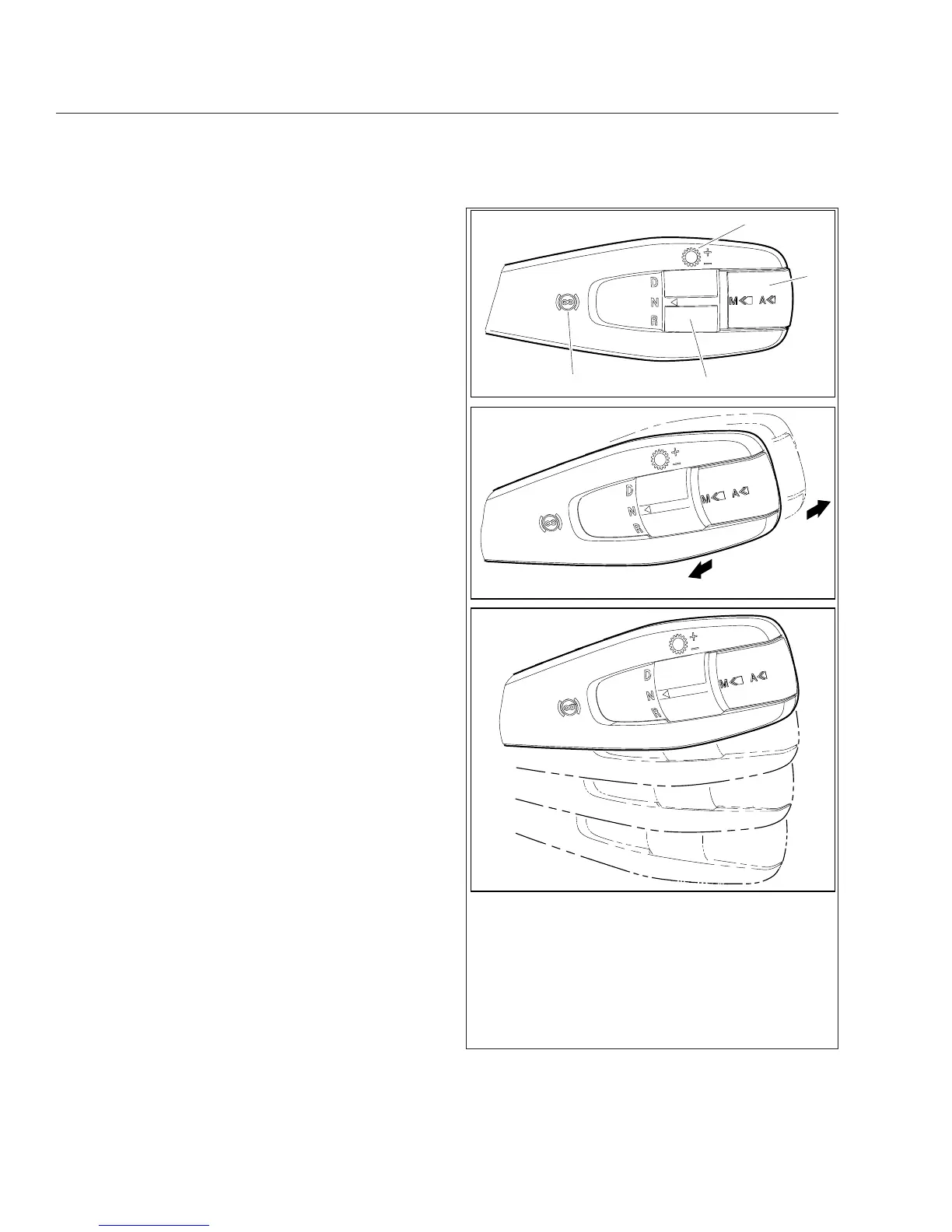
Vehicles with Detroit transmissions use the control
shown in Fig. 15.1. This control can be used to re-
quest manual shifts, change driving mode, and set
engine brake levels. See
Table 15.1 for an overview
of control functionality.
D/N/R Switch
Use the "D/N/R Switch" to request drive (D), neutral
(N), or reverse (R).
Mode Switch
The driving mode can be changed using the Mode
switch on the shift control (see Fig. 15.1). To activate
the manual drive mode, press and hold the switch
briefly. Press the switch quickly to activate the auto-
matic drive mode or change between Automatic
Economy and Automatic Performance modes.
Upshifting and Downshifting
Gear shifts can be requested manually; push the
lever away to request a downshift, or pull the lever
toward you to request an upshift. See
Table 15.1 for
more information about upshift and downshift
requests.
B
2
3
1
( + )
( − )
4
05/30/2012 f270163a
A
C
See Table 15.1 for a description of control functionality.
A. Front View
B. Shift Requests
C. Four positions for engine brake settings
1. Engine Brake Symbol
2. D/N/R Switch
3. Mode Switch
4. Gear Shift Symbol
Fig. 15.1, Detroit Multifunction Control
Automated Transmissions
15.1











 To Next Page