Webasto Heater
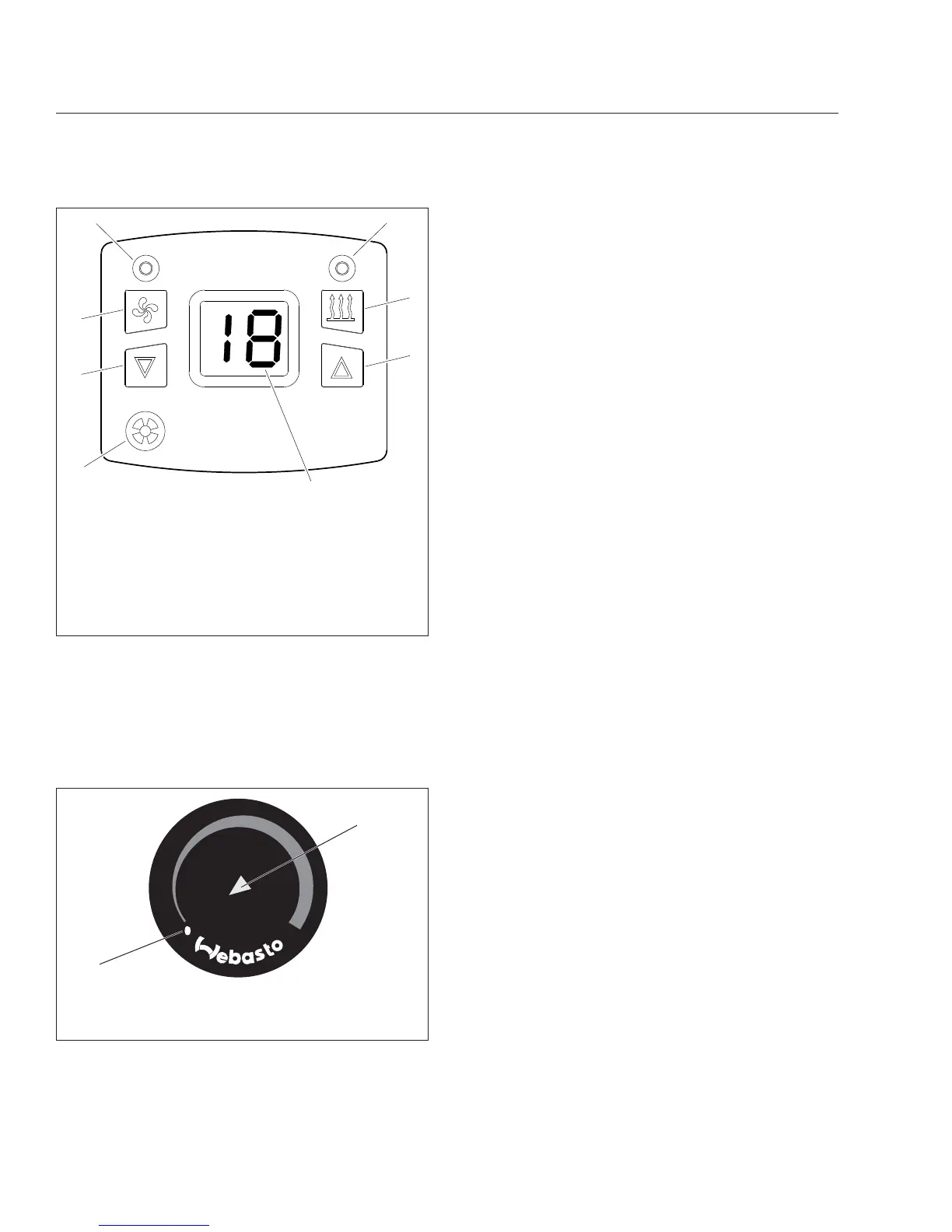
To turn the heater on, rotate the heater control knob
clockwise until the indicator light illuminates. See
Fig. 8.9. The Webasto heater requires one to two
minutes to warm up before warm air is delivered.
To set the desired temperature, rotate the heater
control knob clockwise for warmer air, or counter-
clockwise for cooler air.
To turn the heater off, rotate the heater control coun-
terclockwise until it clicks and the indicator light is
extinguished. The heater will initiate a two-minute
cooling cycle.
Refer to the Webasto website,
techwebasto.com,
for additional information.
02/06/2012 f611160
Espar
8
1
2
3
45
6
7
1. Ambient Temperature Sensor
2. Down Arrow Button
3. Fan Button
4. Fan Indicator (blue)
5. Heat Indicator (green)
6 Heat On/Off Button
7. Up Arrow Button
8. Ambient Temperature Display
Fig. 8.8, Espar Digi-Controller
10/24/2014 f611162
1
2
1. Off Position
2. Heater On Indicator Light
Fig. 8.9, Webasto Heater Control Knob
Climate Control
8.7











 To Next Page