Cruise Control
WARNING
Do not use the cruise control system when driv-
ing conditions do not permit maintaining a con-
stant speed, such as in heavy traffic or on roads
that are winding, icy, snow-covered, slippery, or
roads with a loose driving surface. Failure to fol-
low this precaution could cause a collision or
loss of vehicle control, possibly resulting in per-
sonal injury or property damage.
NOTICE
When the cruise control is engaged, do not at-
tempt to shift gears without using the clutch
pedal. Failure to follow this precaution will result
in a temporarily uncontrolled increase in engine
speed. Transmission damage and gear stripping
could result.
IMPORTANT: On vehicles equipped with
VORAD Collision Warning System with Smart-
Cruise, see
Chapter 6 before operating the
cruise control.
NOTE: If the vehicle is equipped with a Detroit
multifunction control, setting the cruise control
with the engine brake on will activate Descent
Control Mode. Moving the lever to the top posi-
tion will resume the set cruise speed. Moving
the lever down to engage the engine brake after
the cruise control has been set will activate De-
celeration Mode. See "Descent Control and De-
celeration Modes, Detroit
™
Automated Transmis-
sions" in this chapter.
The cruise control is operated by four buttons
mounted in the left-hand button pod of the steering
wheel. See
Fig. 5.7.
•
ON/OFF Button—Press to turn cruise control
on or off. When cruise control is on, a green
telltale illuminates in the ICU. The speed
memory will be retained until the cruise control
is disabled with the ON/OFF button, or the igni-
tion is turned off.
01/24/2003
1
2
3
4
5
6
8
9
10
11
12
f270120
7
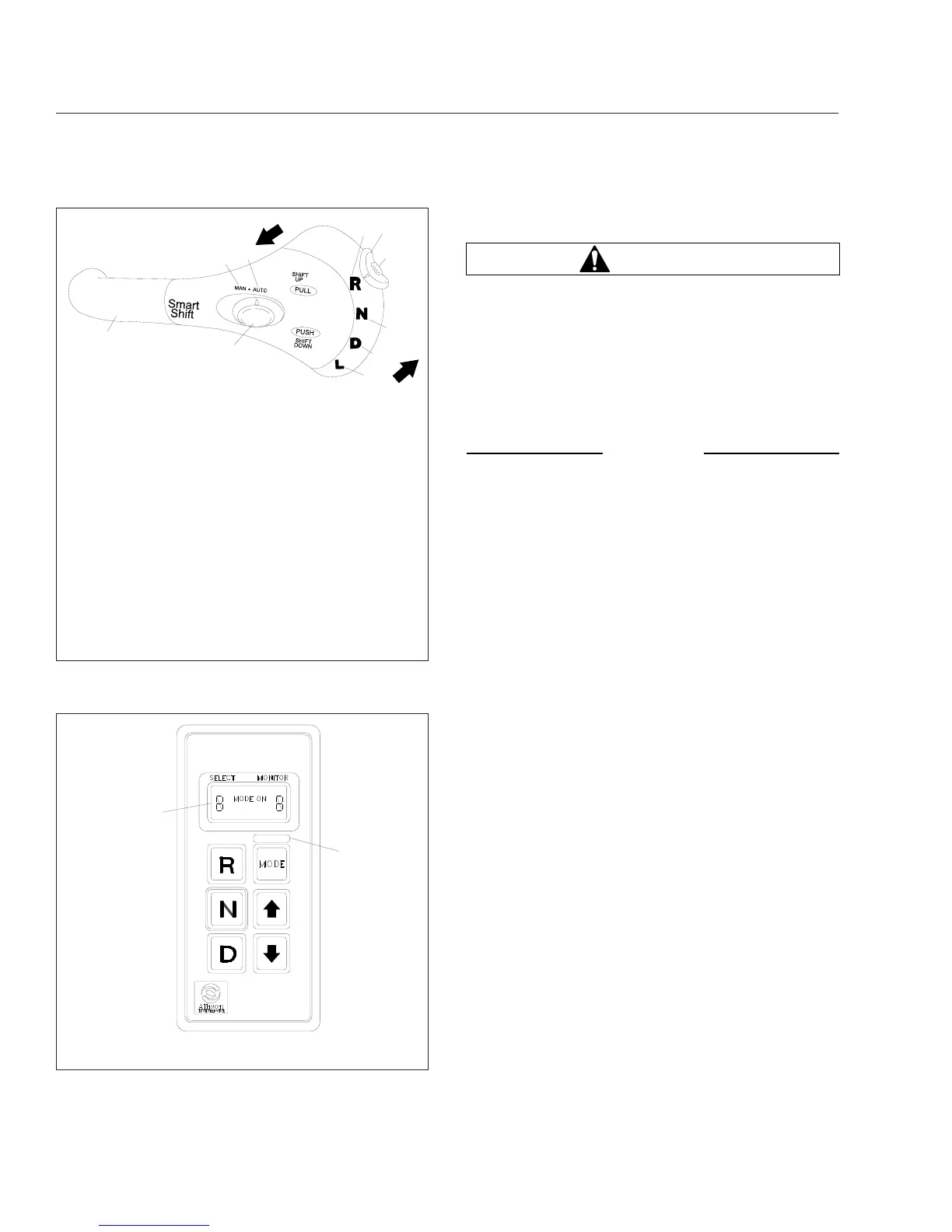
To upshift manually, pull the lever back (towards the
driver). To downshift manually, push the lever forward
(away from the driver).
1. SmartShift Control Lever
2. Slide Switch (forward driving mode switch)
3. MAN Mode (of slide switch)
4. AUTO Mode (of slide switch)
5. Upshift Direction
6. Reverse Position (of selector switch)
7. Selector Switch
8. Neutral Lock Button
9. Neutral Position (of selector switch)
10. Drive Position (of selector switch)
11. Low Position (of selector switch)
12. Downshift Direction
Fig. 5.21, SmartShift Control (Eaton Fuller UltraShift
and AutoShift transmissions)
10/31/94
f600369a
1
2
1. Indicator Panel 2. Mode ID
Fig. 5.22, Allison Push-Button Shift Selector
Driver Controls
5.11











 To Next Page